Optimize Windows Folders and Files - Get Windows Vista Folders to Cooperate
In searching for a file in a folder, I discovered that the folder’s columns reflected music files. There was not a single MP3 or any other music file. I never gave Vista permission to change the columns. That was only the beginning of the long wrestling match with Vista with no end in sight.
Windows Vista Folder Templates
The first thing to do is understand that Vista has five folder types – something not seen in previous Windows operating systems. These include:
- All items
- Documents
- Pictures and videos
- Music details
- Music icons
If you have five documents (mix of .txt and .doc files) and you drop a few photos into the same folder, the folder’s column can change from the Documents template to the Pictures and videos template. The Documents template includes these columns:
- Name
- Date modified
- Type
- Size
- Tags
All items template is the same as documents except it takes away the Tags column.
Music details template shows:
- Name
- Artists
- Album
- Genre
- Rating
Music icons turns all the files into icons similar to thumbnails of images, except the files show the music icons that typically look like a musical note with the file type such as “MP3.”
Change Vista Folder Types
Personally, I consolidate all my music in one place and all my pictures in another. Otherwise, everything else is documents and other files. So I’d rather use the Documents or All items template. To change the folder type template, do the following:
- Open File Explorer (right-click Start > Explore).
- Select a folder.
- Right-click the folder and select Properties.
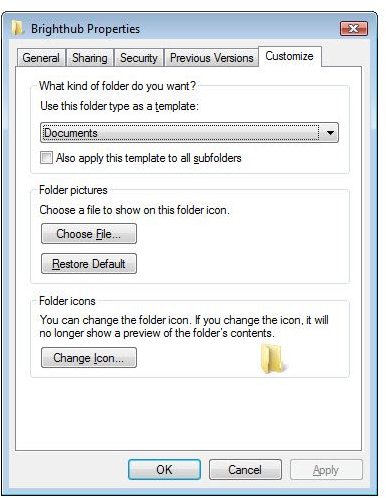
- Select Customize tab.
- Click the down-arrow below “Use this folder as a template:” to choose the folder type.
- Click the box next to “Also apply this template to all sub-folders” if you wish it to do so.
- Click OK.
The follow image shows the Customize tab in folder properties.
Vista Folder Properties
Resetting the Folders to Default
If many folders are not the way you want them, you might need to reset everything back to the default settings through the registry editor. If you’ve never used the editor, best not to try this. Always backup your registry before proceeding with any edits. Here is more details about Windows Registry.
1. Open Registry Editor (Click start button >Start Search, type regedit and press Enter.)
2. Delete these keys:
HKEY_CURRENT_USER\Software\Classes\Local Settings\Software\Microsoft\Windows\Shell\BagMRU
HKEY_CURRENT_USER\Software\Classes\Local Settings\Software\Microsoft\Windows\Shell\Bags
3. Restart computer.
If you want a template to have customized views, then open a folder that will use that template. Right-click the folder and select Properties. Change the template per above instructions and customize the template’s properties. Select the other folders for the other templates as needed.
