If you are creating a Word document that someone else will read (basically any document!), you may want to enlist the help of Word’s Readability Statistics feature, which can help you become a better writer. These steps will show you how.
Make Your Documents Easier to Read
If you are creating a Word document that someone else will read, you may want to enlist the help of Word’s Readability Statistics feature. This option can be used in conjunction with the good old spelling and grammar checks. Following your typical spell check, the Readability Statistics feature will score your document’s readability.
Readability Statistics uses the Flesch Reading Ease score, which rates how easy your document is to comprehend on a scale from 1 to 100, with 100 being the easiest to understand. Word’s Readability Statistics feature also uses the Flesch-Kincaid Grade Level score, which rates your document on a U.S. school grade level. Using the Readability Statistics feature can actually help you become a better writer, as you consistently work on improving your scores. These steps will show you how to enable the feature in Word 2007 as well as earlier versions.
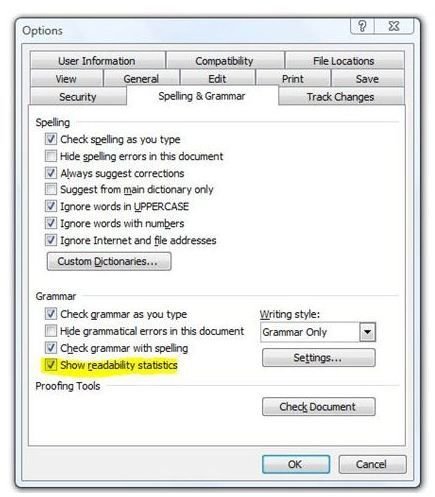
If you are using Word 2003 or an earlier version, start by going to the Tools menu and selecting Options. Go to the Spelling & Grammar tab. Select the Check Grammar with Spelling checkbox, and then select the Show Readability Statistics checkbox. Click OK.
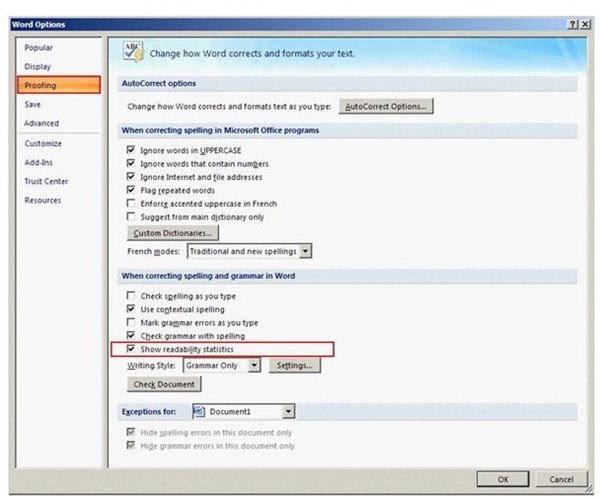
In Word 2007, start at the Office Button and then click on Word Options. In the Word Options window, click Proofing in the task pane on the right. Under When Correcting Grammar in Word, select the Check Grammar with Spelling checkbox and then the Show Readability Statistics checkbox. Click OK and you are all set.
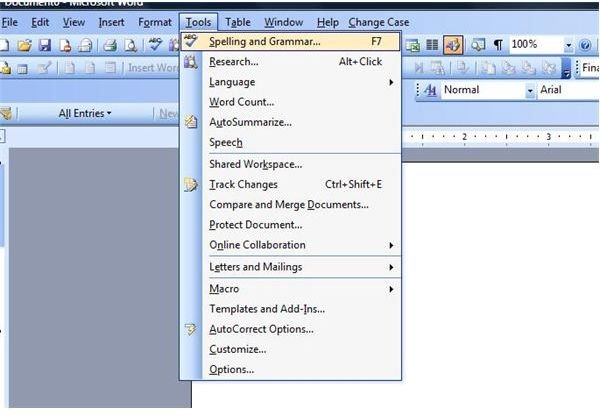
Now that you have Word’s Readability Statistics feature enabled, it is time to see how you score. Open an existing Word document or create a new one. To display Readability Statistics, run a spell check as you normally would. There are several ways to do so, including pressing the F7 key, choosing Spelling & Grammar from the Tools menu in Word 2003 or the Review tab in Word 2007, or pressing the Spelling & Grammar button on the toolbar in Word 2003 or earlier.
Once the spelling and grammar of your Word document have been checked and any necessary corrections made, the Readability Statistics box will appear. The first section will show you several different counts of your document, including the number of words, paragraphs and so on. The next section will list averages, such as the average number of words per sentence. The final section is where you will see your actual readability statistics.
The first line in the Readability Statistics scoring section is the number of passive sentences. The lower this number is, the
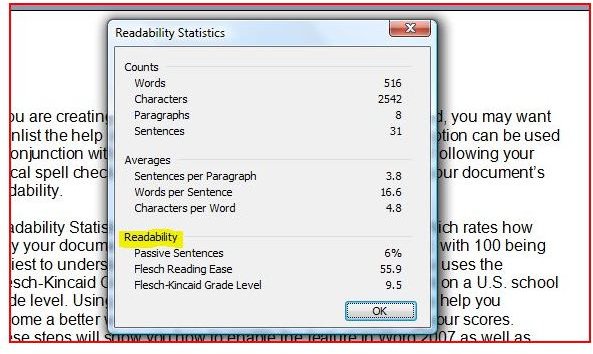
better. Second is the Flesch Reading Ease readability statistic. Aim for a score of 60 to 70 percent here. The final readability statistic is the Flesch-Kincaid Grade Level score. If you are writing a children’s book or something similar, you might aim for a lower number since it corresponds with school grades. However, for most Word documents, a score of 8 to 10 is ideal.
Now that you know how you scored, you can look back over your document and make some changes if necessary. Before you know it, people will be asking you to write all of their documents, too!
Be sure to check out the rest of Bright Hub’s collection of Microsoft Word user guides and tutorials .


