A Complete Guide to MS WORD 2003: File Menu – Save File Formats - by John sinitsky
Introduction
MS Word, developed in the 80s and introduced by Microsoft in the 90s as a part of Microsoft Office, has become an essential and popular text-editing program. MS Office 2007 was released lately, with a new look and features. However, many users are quite happy with their Word 2003. Moreover, most users are not familiar with the many options that are present in Word 2003. This article continues the coverage of the commonly known “Save File” procedures – giving an in-depth analysis of various saving formats.
Save Portion of File Menu
As it has been mentioned, there are several saving options in Microsoft Word 2003 as the “Save” portion of the File Menu in MS Word 2003 consists of:
- Save
- Save as
- Save as Webpage
- File Search
With the meaning of the above possibilities covered in previous articles, we are now going to cover the really important part of Save – file formats.
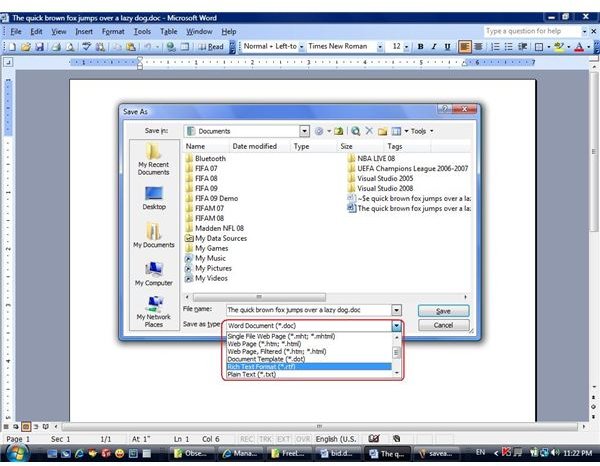
If you save your document (not for the first time) – for instance, using the keyboard shortcut of Ctrl-S, there are no questions presented to you. Your document is saved under its current name and extension, overwriting itself. If you do choose the “Save as” option, however, you have the choice of different save formats.
The Formats
The default is, of course, “doc” – common for MS Word documents. To make the file “readable” for previous Word versions (95, 97, NT) – scroll down and choose the corresponding option. By the way, for Word 2007 users – I really recommend to save in Word 97-2003 format instead of “docx” as many people still have no Office 2007 installed.
Another option is “dot” – a document template which will have certain “variables” written to it, which are accessible by other documents. The template can be “locked” for editing to defend your important designs from accidental or deliberate changes.
The “txt” is a basic text format, which is accessible by virtually every text-editor (such as “Notepad”), but these files can only have very simple formatting. So when saving as “plain text” you are almost sure to lose you design.
A more advanced option is “rtf” (Rich Text) format. It is also recognized by many text-editors (even the linux- and mac-based ones). Moreover, it can keep most of your document design – formatting, styles, and so on. Of course, some of it could be lost in the text-editor conversion, but much is kept.
The last group of save formats is the web-pages formats.
The known “html” and “htm” formats are for saving your document as webpage. It is advisable to use the “web-page, filtered” option, as it removes Office-specific tags that are “attached” to your document by Word. Notice that in this option, your pictures and other “insertions” are saved in separate folder. If you want to save everything as one file, you should choose the “single-page” option, “mht” or “mhtm”. This will create a larger file, but will keep all data in one place, making the publishing easier.
Saving Formats
This post is part of the series: Microsoft Word 2003 guide - are you sure you know all about File Menu?
Microsoft Word is a very strong text-editing tool that has enormous number of options If we examine program menus step-by-step we can get the best of our Word 2003 experience. This series goes “deep” into File Menu and is going to give even advanced user many useful tips about MS Word 2003.
- MS Word 2003 - File Menu Overview and Tips – Create New File, Open File, Close File
- MS Word 2003 - File Menu Overview and Tips – Save File – Part I - Options
- MS Word 2003 - File Menu Overview and Tips – Save File – Part II - Formats
- MS Word 2003 - File Menu Overview and Tips – Restricted access and version management
