Aside from being a great tool for making slide presentations, Microsoft PowerPoint can also be used to create simple basic web sites. Here’s a guide on how to create a basic web site using Microsoft PowerPoint.
PowerPoint Web Sites
Although Microsoft Powerpoint is an excellent application for making all sorts of slide presentations, it can also be used to create simple web sites to feature your product, company profile, and other basic information. With Microsoft PowerPoint’s powerful saving features, you can pretty much turn your Powerpoint slide into a web page by selecting “save as web page”. But then again, not all PowerPoint presentations would look good as a web-rendered home page. So, you must carefully plan out your slides before saving your presentation as a web page. This guide offers you some tips on creating a basic home page from a PowerPoint presentation.
Creating your Home Page from a Blank Slide
Start by creating a blank presentation. Add a text box and type in a name for your home page. You may start adding other text or even graphics on this slide presentation with anything you want to have on your home page, although you can also do this later on. The important thing to do at this stage is to save your slide as an ordinary PowerPoint presentation.
Adding Pages to Your Site
Open your saved Powerpoint document and then select “Insert Slide”. Select a blank slide. Add a text box and type in About Us. Insert another slide, add a text box and type in Our Services. Repeat the same steps to create another slide and type in Contact Us. You now have four slides at this point - Home Page, About Us, Our Services and Contact Us.
Creating Hyperlinks to Connect Your Slides
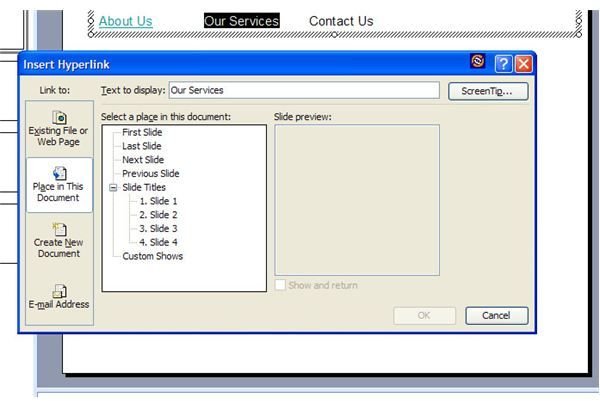
Now, it’s time to create hyperlinks that will connect your slides (which will later be the web pages of your site). Go back to the first slide (Home Page). Add some text to identify the other slides - About Us, Our Services, and Contact Us. Highlight “About Us”, click on the hyperlink icon or select Insert - Hyperlink. The “Insert Hyperlink” window will show up at the left site of the window. Select “Place in this document”. Next, choose the Slide number where you typed in About Us. Click OK to continue. The phrase About Us on your first slide will now be underlined to signify that it is hyperlinked text.
Check whether the hyperlink is working properly by viewing your presentation in slideshow mode. If the hyperlink is working, highlight the next phrase - Our Services - and perform the same steps as you did with About Us. Repeat the steps again with “Contact Us.”
Now, it’s time to link the individual sites to the homepage. Just go to each slide and add the word Home or Homepage, whichever you like. Highlight the text, insert a hyperlink, and then select Slide 1.
Saving and Previewing your PowerPoint Created Web Site
After inserting a hyperlink on each of your slides, choose to save your PowerPoint presentation as a web page. After saving, open the saved file using your IE browser.
That’s pretty much it - simple steps to create a simple web site using Microsoft PowerPoint. You may continue experimenting by adding more stuff into the individual pages. When editing your site, make sure to edit the PowerPoint file and then save it again as a web page.


