Is Microsoft Works Compatible with Word and Excel?
Microsoft Works vs. Microsoft Office
Microsoft Works is an affordable alternative to the Microsoft Office Suite. For around forty dollars, Works offers the capability to perform many tasks you might normally perform with Office applications. You can manage a calendar and create spreadsheets, letters, and even greeting cards, making Works a suitable option for more casual home users.
However, what if you have an Excel spreadsheet at work and need to make modifications from home? Or you wrote a report for your volunteer group and need to email it to all of the participants? Can you work on the Excel file in Works? Will the group be able to open your Works document in Word? Don’t worry. Excel and Word are both compatible with Works. All you really need to know is how to save and open them correctly.
Opening Works Files in Office
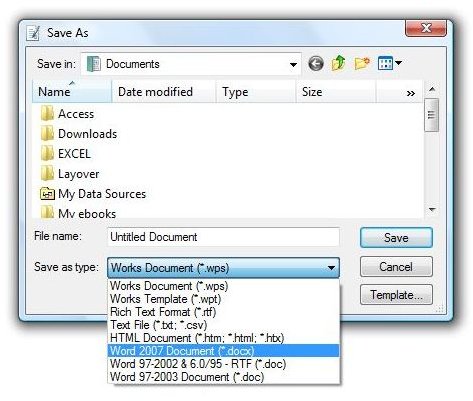
In order to make a Works file readable in Word or earlier, start by opening or creating a document in Works. In the File menu click on Save As. Open the dropdown menu for Save As Type and choose Word 97-2003 Document (*.doc) or Word 2007 Document (*.docx).
Similarly, to make a Works spreadsheet functional in Excel, open or create a spreadsheet in Works. Then go to the File menu, select Save As. Pull down the Save As Type dropdown, and choose the .xls file extension for Excel 2003 or earlier, or the .xlsx extension for Excel 2007.
How to Change the File Association
If you need to open a document or spreadsheet in Works, you can save the file, open Works and navigate to the file. However, if you regularly need to open Word email attachments, you can simplify the process by changing the file association. This simply means that any files ending with .doc will open in Works automatically.
To associate a file type with Works, right click a file with that extension (such as .doc or .xls) and point to Open With. Click on Choose Program and the Open With dialog box will open. Select the checkbox next to Always Use This Program to Open This Kind of File. Click the Browse button and navigate to your Microsoft Works program. Double click Works and click OK. From now on, when you double click any file with that extension, it will open in Microsoft Works.
