Learn how to get to your Word documents faster by building a worklist using this little known Microsoft Word feature. Available in Word 2003 or earlier.
How to Build a Worklist in Microsoft Word
Microsoft Word’s Work Menu is a little-known feature that enables you to get to Word documents much faster. It is a button that you add to your toolbar that allows you to build a “worklist” of up to nine documents. This is a much more functional feature than Word’s “recently used documents” list located on the File Menu because it allows you to decide which documents to add to the list, and the documents remain there until you remove them. So imagine how much time this feature can save you by placing documents that you use daily right at your fingertips, or to organize documents for a project that you’re working on.
To add the Work Menu to your toolbar:
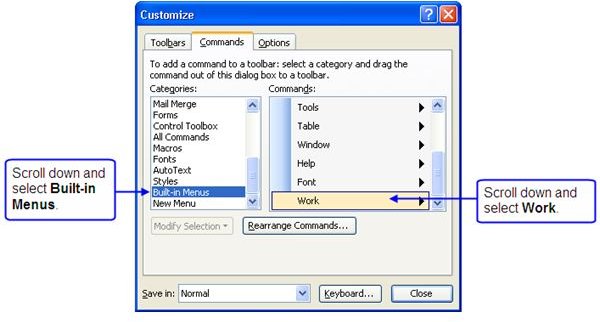
1. Click Tools on the menu bar, then choose Customize.
2. The Customize dialog box opens. Click on the Commands tab.
3. Under the Categories list, scroll down and choose Built-in Menus.
4. Under the Commands list, scroll down and choose Work.
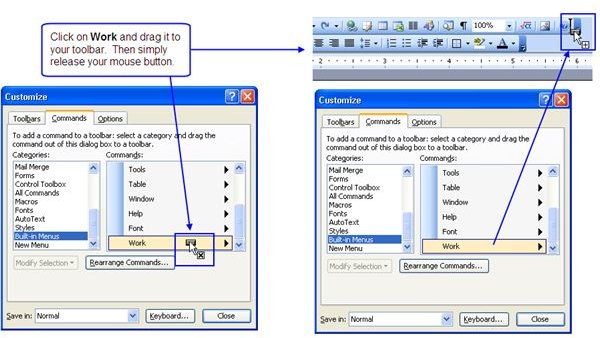
5. Click on Work and drag it to the location on your toolbar where you want to insert the button.
6. When you get to where you want the button to be, just release the mouse button. You should now see a button on the toolbar called “Work”.
How to Add Documents to Your Worklist
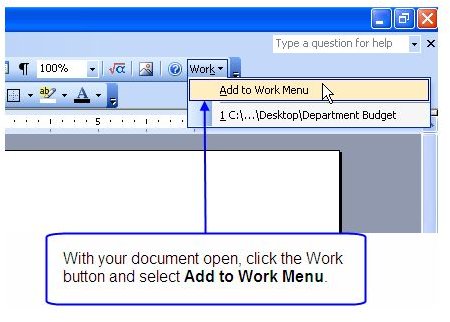
1. Open the document that you want to add to the Work Menu.
2. With the document open, click on the Work button that you created, and choose Add to Work Menu.
The document is now added to the Work Menu list. As you add more documents to the list, the most recently added document is placed at the top of the list.
NOTE: The Work Menu can only hold up to 9 documents. If you try to add a 10th document, the document at the bottom of the list will be removed to make room for the new document.
How to Open Documents in Your Worklist
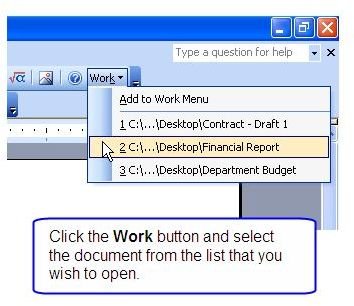
To open documents that you have added to the Work Menu, simply click the Work button on the toolbar, and select the document you wish to open.
IMPORTANT: The Work Menu holds “shortcuts” to your documents. Consequently, if you move, rename or delete a document that is on the Work Menu, the link to the document will no longer work and you will receive an error message when you click on the link.
How to Remove a Document from your Worklist
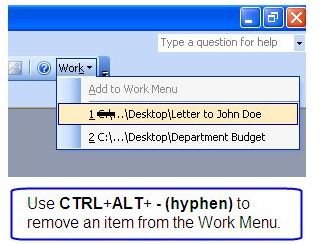
To remove a document from the Work Menu, press CTRL+ALT+ - (hyphen). You will see your cursor turn into a large, black minus sign. Click on the Work button to open the list, and then click on the document that you want to remove from the list.
Your cursor should go back to normal after you’ve clicked on an item to remove, or just press ESC to cancel the “removal” icon.
CAUTION: This command can be used to remove other items from your toolbars or menus. So be very careful that you don’t click on anything that you want to keep!
Conclusion
Now that you have discovered this hidden feature, be nice and share it with the people you work with. They’ll think you’re a genius!


