Did you know that you can get unlimited, all you can eat music on your MP3 player or smart phone for about the same cost as buying one traditionally priced CD per month? This looks specifically at plans that cover using the music on your portable device as well as on your PC.
At Macworld 2008, Steve Jobs reiterated his position that people want to own music rather than rent it. (He apparently doesn’t feel the same way about movies.) Apple’s iTunes is the second largest music retailer in the US.
Amazon Digital and Wal-Mart also sell music, but in MP3 form. Unlike iTunes music, these MP3s can be used on all of your devices. (But you shouldn’t share them as they are still copyrighted.)
A problem with both iTunes and MP3 players is that you can spend a fortune filling your device. 80 gigabytes is 81,920 MB. At an average file size of 6 MB, it would take 13,653 tracks to fill that 80 GB player - at $0.99 or $0.89 per track!
If it’s prohibitively expensive to purchase enough music to fill your iPod or MP3 player, what are the (legal) alternatives?
Well, you could skip the MP3 player and get a portable XM or Sirius radio for a $12.95 monthly subscription. This music is commercial free, there are a lot of channels and content, and the quality of the music itself is sufficient for listening on the go. But it’s still radio. It’s not guaranteed to play music that you like all the time, or to play songs that you haven’t heard 2,000 times before.
The other solution for music on the go is renting the music. For about the same price as buying one traditional CD per month, you can get a veritable smörgåsbord of music for your MP3 player. You can access literally thousands of tracks, truly “all you can eat,” and your music is good as long as you pay your bill.
Napster to Go and Rhapsody are two sources of subscription music.
Rhapsody
Rhapsody describes their portable service as “drag, drop, and roll.” It costs $14.99 per month compared to their $12.95 PC-only plan. To search for music, start to type in the name of an artist or song and the search feature will start filling with suggestions. Once you select an artist, it will show you all the tracks from that artist. Clicking the + sign next to a track adds it to your playlist. Saved playlists can then be synced to your MP3 player. You can use up to three portable devices and three PCs with your subscription. Rhapsody offers a free trial in which you can download the application and listen to up to 25 free plays per month or purchase tracks for $0.99 each.
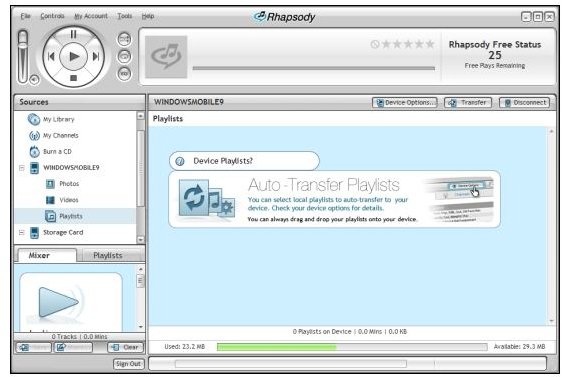
Picture 1 below shows Rhapsody detecting a portable device and offering to transfer local playlists to it. Despite the software offering this, however, the 25 free plays do NOT transfer to the device. They stream rather than transfer, so you can listen to them only on the PC. Since the sync is not enabled for streaming music, you’ll need to trust them when they say it works.
Rhapsody is also trying to build traction by branding devices. Here is a list of Rhapsody-enabled players :
Below is an image of Rhapsody detecting a portable device. (Click to enlarge.)
Image
Napster to Go
Napster to Go costs $14.95 per month. They’re currently running a promotion where they’ll provide a 1 GB Creative Zen V MP3 player if you agree to a year’s contract. The Creative website lists this player for $59.99. A newer model called the Zen V Plus is also available in a variety of capacities starting at the same price for a 1 GB model.
Napster to Go supports a wide range of Janus-enabled devices. Janus is a Microsoft Digital Rights Management scheme that appeared in Windows Media Player 10. Your phone or PDA may already be compatible, and you can check that here :
Napster offers a 7-day trial, but don’t expect to find much information on their website about the portable subscription service. Clicking the “Take it all with you” link takes you directly to the sign-in screen. The next screen offers “free 7-day trial, then only $14.95 per month for Napster plus unlimited portability to a compatible device.”
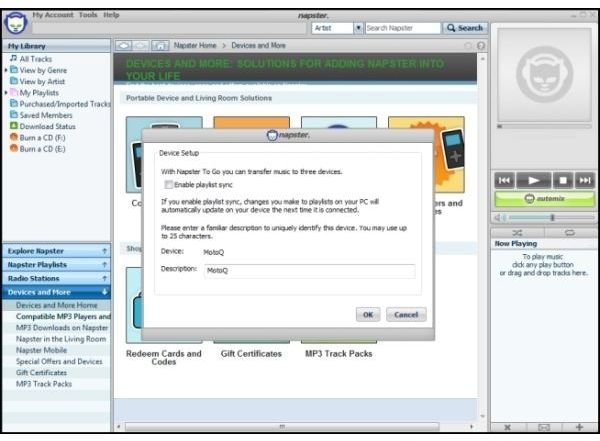
The image below shows the Napster Windows application identifying my Smartphone. It is not compatible with my Treo 755, but the list linked above includes the Palm Centro and Treo 750.
Image
Besides making sure that you have a compatible device, there are other considerations with a subscription music model. Using the subscription with a portable device brings a few requirements. You must sync the device with your PC. Rhapsody makes it simple: each time you sync, your expiration date is extended thirty days. With Napster to Go, you need to sync within seven days of your billing date. This works out to be a grace period. If you don’t sync within this window, your subscribed music is deleted on the device. In both cases, you need to sync with an Internet connected PC (not a Mac, sorry, Microsoft only spoken here).
And, as a usage note, both Napster to Go and Rhapsody provide pre-compiled playlists to get you started.
Which service is better? If you have a Rhapsody-enabled MP3 player, you’ll probably enjoy using Rhapsody with it, as it adds features similar to the PC application. The same players, though, will work with Napster. Both services work on Windows Mobile devices, but they don’t integrate with iTunes. Both services have agreements with the four major music companies, and their back catalogs.
Disclaimer: I use Napster.
Further Reading
How to Test High-Definition Video on Your Vista PC or Notebook - Want to find out what high-definition video looks like on your current Vista or high-end XP PC without spending any money or buying any additional equipment? You’ll find out quickly if your PC can handle 720p or 1080 video. All you need is a fast Net connection and Windows Media Player 9 or 11.
“We’re Not Blocking P2P Traffic” - How Comcast Did It - Every network provider has the right to manage traffic on his own network. However, did Comcast go too far when they decided to interfere with traffic that belonged only to a few specific file-sharing protocols? Here we’ll look at the nuts and bolts of how Comcast actually did it.
Is Using Vista’s Hybrid Sleep Good for My Notebook? - Curious about whether the new power saving modes in Vista are actually better for use on the desktop than on your laptop? Here we look at Vista’s hybrid sleep mode and how hibernation and sleep are different from Windows XP.


