Many computer users try iTunes and decide they prefer it to Windows Media Player. However, transferring music collections can be troublesome. We explain the simplest way to do it and how to cope with digitally protected files.
Moving your files
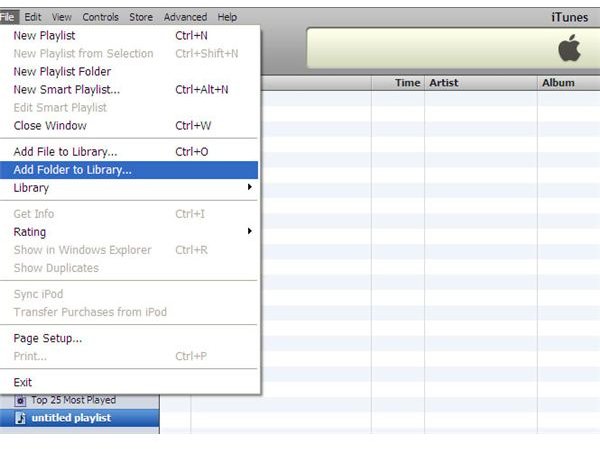
The options available to you depend on where your music is stored. If all your files come from CDs which you have ripped using Windows Media Player, you will usually find all your music is stored in the My Music folder, found within My Documents. In this situation, the quickest option is to simply use iTunes to import the files. You can do this by going to the File Menu, then choosing the Add Folder to Menu option.
iTunes will ask if you want to convert any files that are in the Windows Media Audio format as these will not play in iTunes. Bear in mind that this will take a few seconds per track, which can really add up if you have a large collection. The process is also quite memory-intensive, which can cause problems if you are running over programs at the same time. For these reasons, it’s best to import and convert large libraries of music overnight.
If your music collection is less organized, you can simply choose an entire drive rather than a particular folder to import, though this will naturally take longer to scan through. (Don’t worry, iTunes will only import media files.) If you wind up having to do this, you should consider using the consolidation feature once you’ve finished. It’s located under the Library option in the File menu and will move all of your music files into the iTunes Music folder on your disc. Again, this is a task best performed overnight.
What About Protected Files?
If a file has copyright protection (Digital Rights Management), iTunes will refuse to import it. Whether you think this is fair or acceptable is a personal choice: technically it is illegal to remove the DRM protection, but you may feel that it is justified to do so if you have paid for the music and aren’t sharing it with anyone else.
There are several free programs available online which claim to remove DRM. Given the legal situation, we at Bright Hub can’t recommend any particular program. However, you may be able to find a suitable solution by searching for “DRM removal software” or a similar method.
Another method, which is more longwinded, is to burn an album to a CD, then import the CD into iTunes. You’ll likely find Windows Media Player won’t burn these files, so you’ll have to use another burning program, and even that isn’t guaranteed to work. If you use this technique, consider using a rewriteable disc (unless you want a permanent CD copy), and take care to keep the songs in their original order or iTunes won’t be able to automatically recognise which album it is.


