Have you ever changed your desktop wallpaper, only to find that it makes your icons look bad with weird colors behind the text? It’s a common problem, and there are several different ways to fix it - all of which are covered in this article.
Windows Display Settings
Have you ever found a cool new graphic to use as your Windows XP desktop background, only to find that it makes your icons look awful with weird colors behind them? It’s a pretty common problem with Windows, and it can often be hard to correct since the settings are all over the place for changing the appearance of desktop items. This article will tell you everything you need to check in order to make those icons look good in Windows XP. The same principle also applies to Windows Vista, though the steps to changing these settings in Vista are a little different.
In researching this article, I found a variety of answers to the same question: How do I fix the background color on my icons? What’s funny is that each of the answers is correct depending on what Windows setting is actually influencing that icon background. I swear, buried settings like these are why people switch to Apple computers.
Windows Icon Background Colors
Here’s a list of possible solutions. Once you find one that works, you won’t need to do any of the others:
- The most common fix is to let Windows automatically adjust the colors, and it tends to do a good job when you tell it to. All you have to do is go into the Control Panel, then double click on System. Under the Advanced tab, in the Performance section, click the Settings button. Select the one that says Adjust for Best Appearance. Next, scroll down the list and make sure the box next to ‘Use drop shadows…’ is checked, then click OK and go see what your icons look like.
- If that doesn’t work, the problem could be that you have your desktop set as a web page. I always avoid this setting just for performance reasons, but you may have accidentally turned it on while playing around with the settings. To turn it off, just go into the Display settings under the Control Panel. Under the Desktop tab, click the Customize Desktop button, then click the Web tab and make sure nothing is selected in there. Click OK and now check out your icons.
- Another thing to check in regard to the desktop is to make sure you don’t have Web Items locked. To fix this, right click on the desktop and then go to the ‘Arrange Icons By’ section and make sure ‘Lock Web Items on Desktop’ is not checked, as this is known to cause some problems.
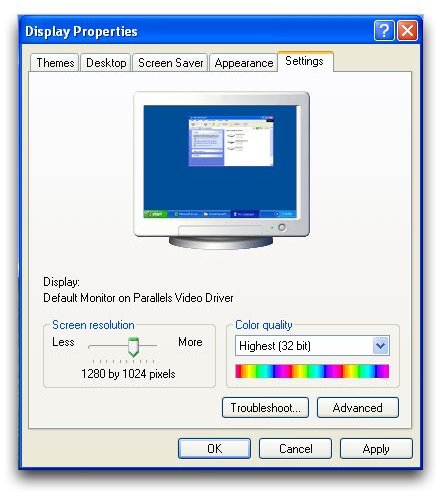
- If turning off web page desktop doesn’t work, it could be that you don’t have your Display settings at the right number of colors. If you have them turned down, this often results in weird shades of colors and you’ll probably notice that some photos don’t look the way they should. To change the Color Quality, go into the Display settings under Control Panel, then click on the Settings tab. Under the Color Quality section, make sure it is set to 32-bit, as this will yield the highest number of colors. If 32-bit is not an option, you may need to update your video card drivers.
I hope this helped you make your icons look better!


