Interested in a new mini-computer like a netbook? Wondering exactly what a netbook is and what you’d gain and have to give up over a notebook? We can help. At Intel Developer Forum 2008, Intel manager Mooly Eden gave us Intel’s perspective on the question.
Future of Mobile Computing
On October 21, 2008 Intel Mobile Platforms Group manager Mooly Eden delivered the second day keynote address at the Intel Developer Forum in Taipei, Republic of China (Taiwan). His address was entitled “Expanding the Frontiers of Mobility.”
One of the many interesting things that Mr. Eden said was that although many industry experts predicted that 2009 will be the year that the crossover happens and more notebooks than desktop PCs are sold, 2008 is the year that Intel will sell more mobile processors than desktop processors. Part of that rapid growth in the mobile field was due to the advent of the Atom-powered mini-computers, the netbooks.
Mooly Eden also offered a look at the netbook vs. notebook question from Intel’s perspective on the past, present, and future of mobile computing.
Design Factors
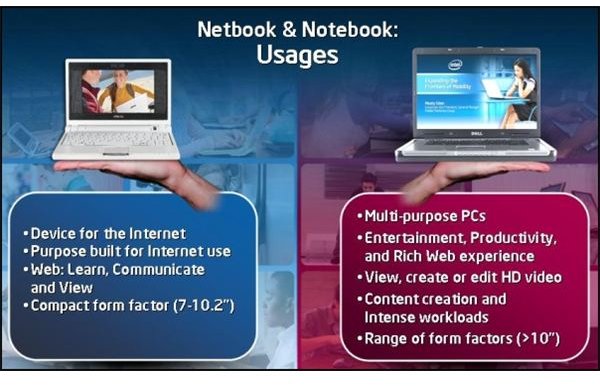
Netbooks are devices designed purposely for the Internet, to communicate, learn, and view information. They have in common a compact form factor of seven to ten inches, are light-weight, feature comparatively longer battery life than notebooks, and are less dependent on a battery charger during the day. They are easily portable and can be easily moved from one place to another place. They may contain more than one wireless method to connect to the Internet. To see some examples of netbooks on the market, read about how 3 of the top netbooks compare with each another.
Notebooks are more multiple-purpose computers in a form factor of about ten inches and up. Notebooks can create content and handle heavy multi-tasking loads with many applications running at once. They can view, create, and edit high-definition video content and run intensive programs like computer aided engineering and mathematical modeling.
Differences in Mobility
Notebooks, like Netbooks, are portable, but some are becoming increasingly less so (the 17-inchers) some more so (the ultra-thins), and users of notebooks tend to pack them away in bags with all sorts of accessories before moving anywhere beyond the office or home. Although a few notebooks are able to connect to the Internet via cellular networks as well as Wi-Fi, being “locked” to a carrier is not widely considered an advantage. Thus notebook users often invest in wireless modems that are external.
Interestingly, we may see netbooks that are sold by the cellular carriers themselves as a bundle of Internet service and the device. Consumers would be likely to consider an inexpensive netbook expendable and simply stop using the wireless connection when the cellular contract was up.
So netbooks are purpose-built for a limited role, while traditional notebooks are multi-purpose general tool. (Click the image from Intel to enlarge the graphicon that explains the uses of each.)
What Applications Will You Run?
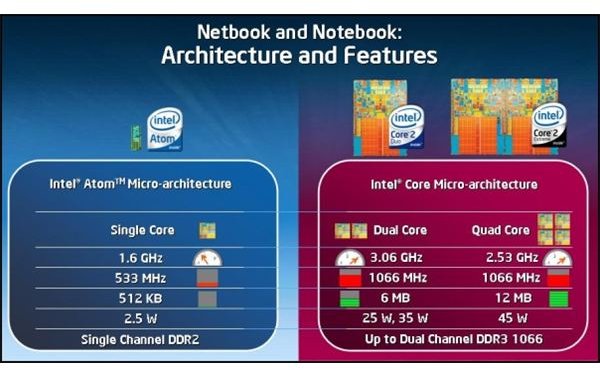
The central question to be asked, Mr. Eden said, was “What applications do you plan to run on it?”
If you want to run basic applications and surf the web on the go, the netbook is a good solution. However, if you want to “open five windows, if you want to run virus protection and do some indexing . . . or high definition video editing ,” said Mr. Eden, then a notebook is better.
Image courtesy of Intel
Mr. Eden said that asking him which is better – the Atom (netbook) or the Core 2 Duo (notebook) processor - is like asking which child he likes best. He says that, although they are different, he likes them both. Then he said he likes all of his kids.
Other Articles About Intel Developer Forum 2008

Intel Promotes Laminar Cooling Tech for Laptops - Finally got that powerful laptop you’ve wanted for so long?
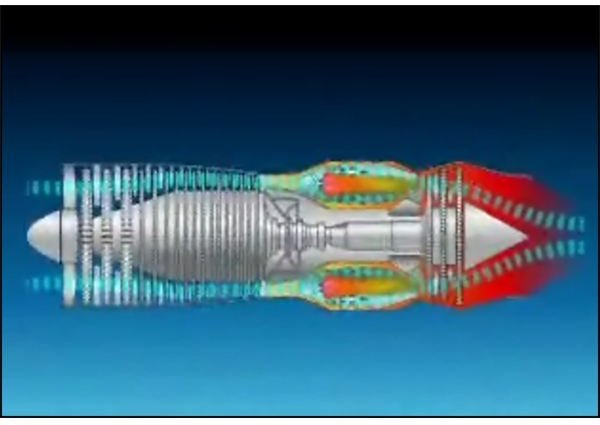
Surprised that the first time you heard the fan fully cut in it sounded like a jet taking off? Well, jet engines were the inspirations for Intel’s new laminar flow cooling technology for laptops. Here we’ll look at what they’ve announced.
Details Emerge about Intel Nehalem 4-Core CPU Architecture - Fresh from the Intel Developer’s Forum 2008 in Taipei, Republic of China come details about the architecture, design, and performance of the forthcoming Nehalem generation of Intel CPUs. In one way, it can be summed up simply as “Quad core comes of age.” Get the essential details here.
Related Reading
Netbooks, Notebooks, Laptops, and Ultra-larges - Netbook, Notebook, Laptop… What’s in a name? By now, we have a pretty good idea about what the difference between a netbook and a notebook is, but is there really a difference between a laptop, a notebook , and an ultralarge? For an answer, let’s look back at the beginnings of portable computing.


