
Facebook has become increasingly chat-oriented over the past few months, and by forging an alliance with Skype things just got a bit interesting with the arrival of Facebook video chat.
Against the background of a takeover by Microsoft during the summer of 2011 came the news that Skype had been successfully working with Facebook over the past few months to integrate video chat into the popular social networking service.
While appearing to have been launched as a way of diverting attention back from the launch of the Google+ social networking service, Facebook had in fact been wooing Skype as far back as early 2010, with an initial announcement made in October of that year. The new service, therefore, is the culmination of several months of development.
Skype on Facebook integrates cleanly with an updated user interface and doesn’t require any additional software. It is free to use, requires only that you have a webcam and the intention is that it will make it ever easier to call on your friends, wherever in the world they might be.
Let’s look at how it works.
Facebook, Messaging and Video Chat
As any Facebook user will know, you can communicate in various ways. To begin with, there is the Facebook email system, known as “Inbox” with which you can send and receive messages to single or groups of friends. This is useful for sending out notices to family contacts but not friends when combined with the Lists function, for instance.
In addition, there is instant messaging or IM, which has become a fixture to the lower right corner of every single page on Facebook since its launch. This enables you to see which of your friends is online and available for chat at any one moment, and this is integrated with the new video chat provision.
Also integrated with Skype is the basic communication of leaving messages on the wall area of a profile of one of your friends. Both of these methods feature contextual buttons that display the option for video chat whenever it is available; that is, both you and the contact you are viewing must have the latest version of Skype installed.
Live Video Chat on Facebook!
So, how do you start a Skype video chat on Facebook?
It is all thanks to a useful browser plugin that can be downloaded to your computer via Facebook. You do not even need to install the most recent version of Skype, version 5.3, as everything is managed via Facebook.
To begin chatting you will need to find the contact you wish to webcam with; they will be listed in the new instant messenger list in Facebook. As of summer 2011, this list is stripped across the entire right-hand side of Facebook, and features a search bar at the bottom to help you to find any contacts that are not visible.
Only contacts that are online and available – ergo, those with green spots to the right of their names – can be chatted with at any

time, and to find out if they also have video chat, click on the contact to open a chat box and look for the small camera icon.
Alternatively, you can open the contact’s profile page and look for the (Start a Video) Call button in the upper-right corner of the page.
What happens next is pretty cool, but first you are required to download a plugin called FacebookVideoCallSetup.exe – first select Save, then Run when the download has completed. The person you are calling will also have to go through a similar process, and once done a window will appear asking you to confirm that you wish to start a video call.
Seconds later, you and your contact should be viewing each other via webcam, and speaking via your computer microphone!
You can end the video call simply by closing the chat window. Meanwhile, if you experience any problems, make sure you are using the most recent version of Internet Explorer, Mozilla Firefox, Google Chrome or the Safari browser.
Two-Way Integration
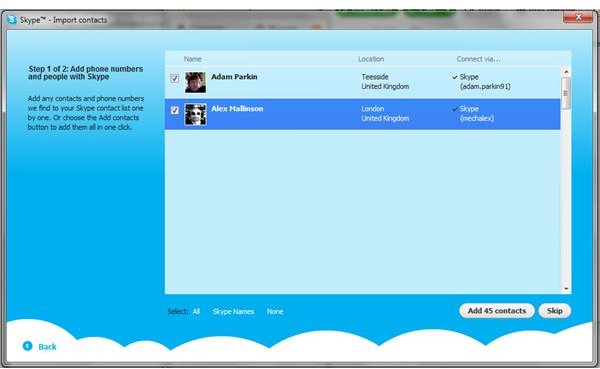
If you already have a Skype account and software installed on your computer, you will find that the integration between the two services works in both directions.
You can now import contacts from Facebook into your Skype client, via the Contacts > Import Contacts… function. Simply enter your Facebook username and password and then check through the contacts list. Any that you don’t wish to add can be excluded from the import by clearing the check box; when you are happy, just click Add contacts and Next to proceed.
Any Facebook contacts that don’t have Skype can also be messaged, informing them of how useful Skype is, but you can Skip this stage if preferred, and start chatting with your Facebook contacts via Skype in the usual manner.
Winning Video Chat!
This new integration between Facebook and Skype looks set to offer users of both networks some additional features and might even see the two companies become quite close bedfellows.
The real winners are the users, however, with a fantastic new way of communicating via Facebook. If you already use Skype, the system is easy enough to adapt to, but if you’re new to it don’t worry, as Skype on Facebook is ridiculously easy to setup and use.
References
Author’s own experience.
Screenshots provided by author.


