There is just something relaxing about a waterfall. What better way is there to relax at your computer than with a beautiful waterfall desktop wallpaper. In this guide, you will find a set of beautiful waterfall backgrounds you can use for your computer that will take your breath away.
In this guide, we will take a look at five really fun and unique waterfall backgrounds. Each of the five I have chosen have a very different look from the others. Most can be clicked on and automatically set as your background, unless you are using certain browsers, like Google Chrome. This guide will provide you with several different wallpapers and also help you set them as your background. To use any of the backgrounds in this guide, please use the links in the Resources box, which can be found at the end of this guide.
White Tiger Waterfall Wallpaper
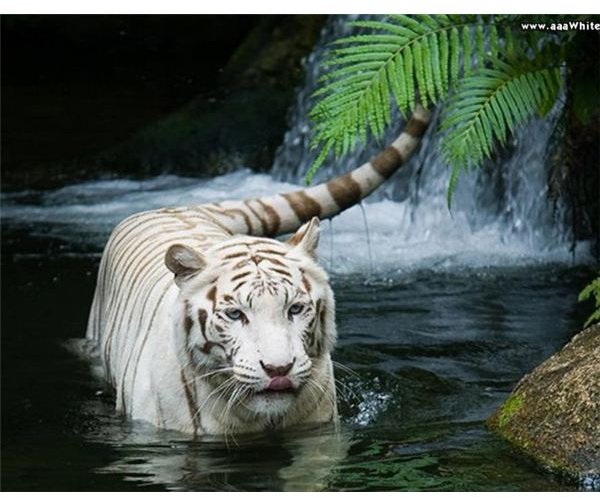
The white tiger waterfall wallpaper is a very beautiful wallpaper. In the background is a beautiful waterfall and walking in the water is a beautiful white tiger. This background would go great with any desktop and it is also very relaxing. It should also fit most desktops. If it doesn’t fit your desktop, you could always center it and change the background color to black. That way the wallpaper will blend in with the wallpaper.
Blue Waterfall Wallpaper

The next waterfall in our list is a blue waterfall. It is a bit hard to explain this one, however, we can explain it in one word, beautiful. This background has multiple waterfalls in one. The water is a lovely blue and the falls are a lighter blue. It appears to have the sun glaring through the waterfalls which makes it really bright and beautiful.
Waterfall with Flowers Wallpaper

This is a beautiful waterfall background. On each side of the waterfall are pretty rocks. There are also splendid flowers adorning the corner of the wallpaper. Not only can this image be used as a wallpaper, but it can also be used as a background for projects, like greeting cards.
Waterfall with Fairies Wallpaper

Our next background is a blue waterfall and fairy background. There is a beautiful waterfall on the left side of the wallpaper, and then there are two fairies with sparkles coming off of each one. There is also a full moon in the back part of the wallpaper. This wallpaper is very busy, but so lovely. However, you may have a hard time seeing your desktop icons with this particular background. If you do, you can change the text color of your icons so that you can better see them. You can change the text color by opening your properties panel and then choosing your appearance section.
Unicorns Waterfall Wallpaper

This is a beautiful waterfall wallpaper, but it is a bit different from the normal wallpapers. This one has three waterfalls and two unicorns. There are also plants and flowing grass in the wallpaper. Over the waterfalls are beautiful rainbows. If you like the fairy type scenes, you will love this wallpaper.
Saving the Wallpaper to Your Desktop
How you save the wallpaper will depend on the browser that you are using to surf the web. If you do not know how to save wallpaper to your desktop, please find the browser you are using below and follow the steps to save your wallpaper.
Internet Explorer
If you are using Internet Explorer, find the wallpaper that you want to use for your desktop. Right click on the wallpaper and wait for the menu to open. In the menu, select the “Set as Background” link in the menu. Give it a second and the wallpaper will be set as your background. You can then minimize everything and see your new wallpaper.
Firefox
If you are using the Firefox browser, follow these steps. Find the wallpaper you want to use. Right click on the wallpaper and wait for the menu to pop up. In the menu, click the “Set as Desktop Background” option. Give it a second to change your desktop and then minimize everything to see your new wallpaper.
Chrome
If you are using Chrome, you will have to take a couple of extra steps to get a new wallpaper. You will first need to locate the wallpaper you want to use. Then right click on the wallpaper and click the “Save Image As” option. A box will open and you will need to save the wallpaper to your desktop. Then go to the desktop and right click on the wallpaper you just saved. When the menu opens, click the “Set As Desktop Background” option. That will apply the new wallpaper to your desktop.
Resources
1. White Tiger Waterfall Wallpaper - https://zangoworld.com/wp-content/uploads/2011/05/white-tiger-waterfall-wallpaper.jpg
2. Blue Waterfall Wallpaper - https://2.bp.blogspot.com/_cWcuJM9QIG4/TDsXkeQrCpI/AAAAAAAABtQ/bzietCRBdEc/s1600/waterfall%2Bwallpaper%2Bdownload%2Bnew+e.jpg
3. Waterfall with Flowers Wallpaper - https://www.layoutsparks.com/1/39795/little-waterfall-stones-clear.html
4. Waterfall with Fairies Wallpaper - https://www.layoutsparks.com/1/191091/mystic-fairies-waterfall-lovely.html
5. Unicorns Waterfall Wallpaper - https://www.wallpaperpimper.com/wallpaper/download-wallpaper-Unicorns_And_Waterfall-size-1024x768-id-139471.htm
All screenshots were taken by the author and are the property of their respective sites.


