A Comprehensive Overview of Handbrake Software for Windows
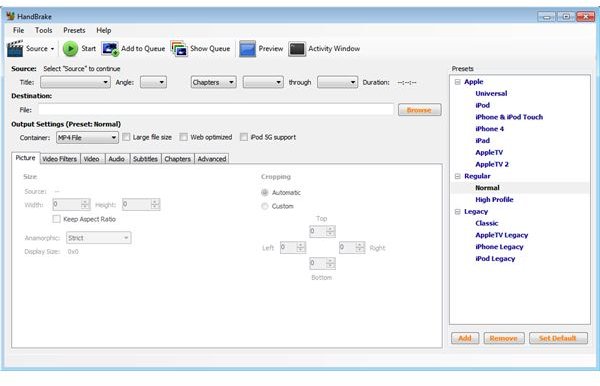
The Best Among Windows Multimedia Converters
Handbrake is an open-source application that is renowned for its video conversion, decoding and encoding capabilities. The software is available for Mac, Windows and Linux. Each version of the application is pretty much the same, and although we are taking a look at the Windows version here, the text more or less applies to each of the other OS versions.
Handbrake is favorite for many, as it offers a wide range of video converting tools that are easy to manage and configure. Built-in presets that are regularly updated help many novice users experience the ease with which video can be converted and prepared for their multimedia devices. To add to this, Handbrake has a vast array of customization options, which makes it the number one converting tool for many advanced users as well.
Why You Want to Use Handbrake: Video Format Support
As with many open-source applications that are enjoying a certain degree of popularity, Handbrake is supported by many developers, which upgrade the software at an impressive rate, bringing it up to date with the latest developments. As of now it supports a considerably large database of video formats, which include the following:
- For input you have the options of DVD and Blu-ray discs and their disc images together with the most commonly associated file types. These include MPEG-TS (and VIDEO_TS folders), VOB, AVI, MKV, MPEG-4, etc. Furthermore it includes support for the most common encoded video files, such as DIVX, XVID, etc.
- What is really important here is what the software can deliver in terms of output. Here is where Handbrake really proves itself to be the Swiss army knife of video conversion applications. In terms of container file types, it can output video in MP4, MKV, M4V, AVI and OGV. Codec-wise, it uses H.264 (or x264), FFmpeg and Theora, whereas audio is produced in AAC, Vorbis and MP3 with AC-3 and DTS pass-through.
Handbrake for Windows has slight disadvantages over other systems, as it does not, under any circumstances, support encrypted DVDs or Blu-ray discs. Both Linux and OS X versions of Handbrake have limited support in those areas with the installation of VLC. Unfortunately, such a workaround does not exist for the Windows version of the program.
Other Important Features of Handbrake
Besides the wide array of video formats the software supports, there are some other perks to using Handbrake. Especially when you are a carrier of mobile multimedia devices such as iPhones, iPads or other phones and media players, Handbrake will quickly become your best friend. For Apple devices, the software is ready to use straight out of the box with many presets already put in place. Even when upgraded, in most cases it will present presets for more classic Apple products such as iPods and older generation iPhone devices.
When you want to use Handbrake for other purposes, it is easy to configure the software to play nice with your preferred media carrier. Configurations are made in the following categories:
- Picture, with options to assign a new aspect ratio and crop the source.
- Video Filters, where you will be able to alter such settings as “Detelecine,” “Decomb,” “Deinterlace,” “Denoise” and “Deblock.”
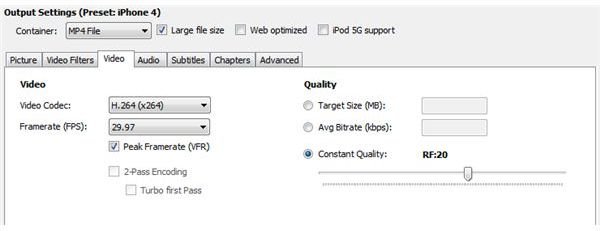
- Video, where you can choose your Video Codec, Framerate or Quality.
- Audio is where you will set your Source, Audio Codec, Mixdown, Samplerate, Bitrate and DRC. You can also select separate audio tracks to be added to the video.
- Subtitles is where you can choose your subtitle file to be added to the video and select whether or not it should be burned in. In general, you will use SRT files for this part.
- Chapters is where you will indicate the chapter markers in your output video result.
- Advanced is the last batch of settings where you will be able to alter aspects in the field of Encoding, Analysis and Psychovisual.
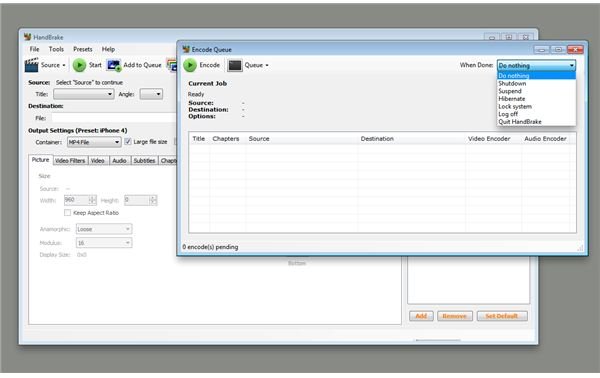
Although it might require you to find out the exact settings for your particular device at first, Handbrake makes it easy for you to save those settings and create custom filters to automate the conversion in future cases. Better still, this process is further enhanced by the built-in option to batch-convert your video projects, although this is done through a queue mechanism.
So whatever your task is in terms of video conversion, there is a good chance that Handbrake will be up to task. It will provide you with an ease of use rarely found in video conversion applications, making the process accessible for those that would normally steer clear from these kinds of applications. Now you can easily take your video content with you on the go and enjoy your movies, as you should!
References
- Handbrake for Windows, https://handbrake.fr/downloads.php
- Author’s own experience
- All screenshots by the author
