Beware of Fake Antivirus - Beware of Malware Masquerading as Genuine Software
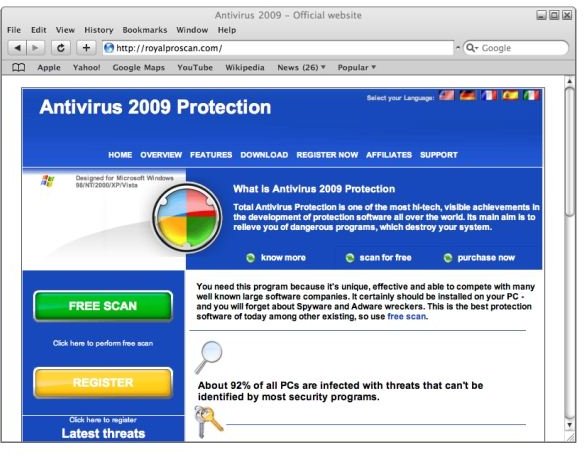
A friend, who shall remain nameless, had been getting a repetitious email that appeared innocuous. There was an unsubscribe link at the bottom of the page. One would think that clicking this link would take one to an unsubscribe page, but that’s not what immediately happened. So my associate clicked the link about three more times . . . and still nothing happened.
A little later a dialog labeled “Antivirus2009” popped up and said the PC had a Trojan virus. This became a frenzy of urgent messages cascading across the screen, and all of this was accompanied by a notice in the system tray area. Internet Explorer opened up with websites where corrective anti-virus software could be downloaded. The names of the websites in browser history were:
scan.antispyware-free-scanner.com
secure2.softpaydirect.com
securityadvizr.com
royalproscan.com
wi-a-v.com
The main dialog had to be closed in Task Manager. However, the notices continued to pop up from time to time and offer to scan the PC to fix the problem.
When this was selected, the scan completed very quickly, and the application said it could not fix the problem. It said to click “Yes” to get more powerful antivirus free antivirus scanning software. Upon looking at the website, pictured below, my friend discovered that while the scan was free, the software to repair the infection was not.
Looking at the purchase link, my friend discovered that the website had neither a lock symbol in the browser frame nor was “https” in the URL.
How the Problem was Fixed
The solution was to stop the program in Task Manager, delete it in Add/Remove Programs, and run a complete computer scan using AVG. AVG reported thirty-five infections, six malware/adware infestations, and over six-hundred warnings that it either removed or healed.
A repeat scan proved the system clean.
How Such Malware is Obtained
PandaLabs, in their bulletin “Profitability of rogue anti-malware,” calls such programs “rogue anti-malware.”
Clicking a link in an email is one way that fake antivirus programs get the user to install them.
Another common “vector” is called “Drive-by download.” In this type, the computer becomes infected by the user visiting the website. The download may be automatic, using flaws in the web browser, or may involve a tempting-looking link to click on. Such sites are often adult in nature.
Yet another vector is web pages that offer downloads of pirated software, but send malware applications instead.
Common Traits
Although there are several variations in the scheme, anti-malware applications tend to have some common traits. PandaLabs mentions
They look and pretend to work like real antivirus applications.
They complete the scanning of the system very quickly.
They report infections that other anti-virus programs can’t find (because the infections do not really exist).
They use popup dialogs and messages in the system tray area of the toolbar to warn about an infection.
They may alter the screen-saver to make it look alarming, modify the desktop theme, and hide the Screen Properties settings so the user cannot change the theme or screen-saver.
The downloaded application appears to be a real, authentic anti-virus program, but it really installs a host of malware.
The Hook
The hook is insidious. They get the user several ways. One is that the user is encouraged to “register” in order to get a higher quality scan. This gives the malware provider the user’s email address, which tells the provider that his spam email message hit a home run. Another is that the purchased program is false. It fixes nothing. Even worse, it installs more malware on the user’s machine.
My friend, by the way, was in an elite group. Of all the malware Panda Security tracked, Adware/Anti-virus2009 was in the smallest group – 3.19%. The most active malware was Adware/AntivirusXP2008 coming in at 39.23%.
What You Can Do to Avoid Fake Antivirus and Other Malware
NEVER click a link in an email unless you totally trust the sender and can reasonably verify the message IS from the sender. Doing this is bad for a couple of reasons. One is that it might download something you certainly don’t want. The other is that it tells the scam artist that he’s got a valid rube.
If a website sounds dubious, or your web browser gives you an alarm about the site, don’t visit it!
If you want to visit such a website anyway, turn your web browser into a battle cruiser. Use FireFox and arm it with No Script. Then if you get into trouble, the onus is all on you.
Use popular, name-brand antivirus software and keep it updated.
If you’re not sure that you can correctly spell the name of a website, try searching for the website in Google before you try typing it in. If you’re reasonably close, Google will ask you, “Did you mean . . . " Much malware is distributed by and many phishing sites rely on misspelled web addresses.
If you run a Windows PC, run Windows Update and then set it to automatically download updates at some time the machine is actually on. (The default in Vista is 3:00 am.)
Be supremely suspicious if you’re using Internet Explorer and a website wants to install an Active-X control or application. Small websites should never need to do this, and I can only think of a few mega-sites that would.
Links
Further Reading
How to Speed Up File Copying in Vista - Growing old waiting for Vista to complete a file copy operation? Although Service Pack 1 improved copy performance, we CAN do better. Here, we’ll look at what else is out there.
Security in Google Chrome - Security in Google Chrome was a design consideration, possibly making it the safest and most stable web browser yet created. How well did they do it? In this article, we look at the individual security features and try to decide what they all add up to.
How to Prevent Windows Live (and Other Applications) from Changing Your Internet Explorer Home Page - Want to keep Windows Live applications and malicious applications (malware) from hijacking your home page location in Internet Explorer? This Quick Tip shows you how to lock (and unlock) your home page location.
How to Change the Order of Startup Applications in Vista - Are so many different applications trying to start at the same time during Vista’s boot up that it’s bogging down your PC so much that it’s minutes before you can use it? This article addresses stopping unneeded services and streamlining the startup process in Windows Vista.
How to Block Third-Party Cookies in Firefox and Internet Explorer - Are you leaving tracks everywhere you go online? If your browser is sharing cookies with a website you’re not even (knowingly) visiting, you’ve got third-party tracking cookies on your PC. This article defines cookies and looks at blocking a certain type.
