Here, this article considers the heading question. Is Windows 7 worth upgrading to from Vista?
Vista vs. Windows 7
Windows 7 was released in 2009, and since then has gradually been replacing Vista on laptops and desktops. For those with Vista the question has been whether or not Windows 7 is worth upgrading to. The answer, well read on…
What’s New in Windows 7?
The biggest question that may be asked is what, and how many, big new additions and features does Windows 7 provide. Any upgrade with little in this respect will lack appeal. The good news is that Windows 7 does have a fair amount of new additions.
The most obvious of these is the newly revamped Windows 7 task-bar. The Windows 7 task-bar now has square windows instead of rectangles. These square windows no longer include software application titles on them, but quite simply their relative desktop icons. As such, more minimized windows can fit on the task-bar. On the right-side of the task-bar, next to the clock, there is also a small desktop short-cut that minimizes all windows when selected.
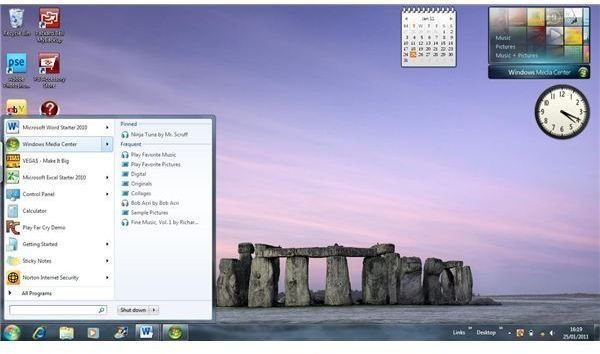
At first glance the start-menu may seem to be much the same as in Vista. Then however, Vista’s recent item short-cuts have all but disappeared! In fact, it has been replaced by Windows 7 jump lists. The jump lists provide a short-cut to any recently opened documents with the recent software short-cuts included above all programs. Aside from these, particular document short-cuts can be pinned to the recent document list so that they remain there.
Windows 7 accessories have been largely revamped. This is particularly the case with WordPad and Paint which almost seem like different applications as a result! WordPad has new ribbon menus with tabs for the main tools, a huge variety of fonts, and options to include date/time and images. Paint has new image tools, a greater number of brushes, and edit color options. In addition to this the calculator has also been more marginally enhanced with the new programmer and statistics modes, plus quick tools for things like mortgage calculations and vehicle
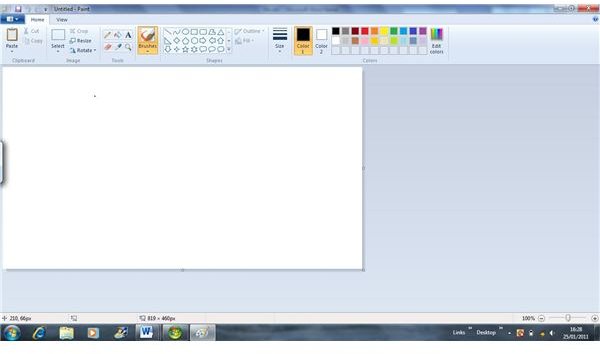
leasing.
Then there is Windows XP mode which is sure to make XP obsolete. This is based on virtual PC software which provides a full virtualised Windows XP system on Windows 7, and so better compatibility with older software. What is the catch? Well, XP mode is not included with Windows 7 Home Premium! Also, a version of Virtual PC 7 will also be required for those editions that do support it.
In terms of Windows themes Vista had hardly any themes of its own. However, Windows 7 has expanded the variety of themes included with themes for landscapes, architecture, and other scenes. As such, there is a greater variety of themes included with Windows 7.
Windows 7 also includes Windows gadgets . However, do not be fooled as this is not really a new addition, but a mere refinement of the Vista sidebar. The sidebar has been abandoned in Windows 7 with Windows gadgets being a more flexible replacement.
Tablet PC
For those with a tablet PC that support touch-screens there can be little question that upgrading to Windows 7 will have advantages. Windows 7 has a multi-touch keyboard for touch-screen typing. Then, in addition with this, Windows 7 handwriting recognition is also much enhanced and can covert untidy input into accurate text.
For more information on tablet PC’s and Windows 7, be sure to read our article on how a tablet PC works and learn some of the benefits of having a tablet PC .
Benchmarking
Various sources have benchmarked Vista with Windows 7. And the good news, for Windows 7 at least, is that it comes out on top. For both boot-up and shut-down Windows 7 shaves a few seconds off Vista. Then, in more general tests Windows 7 has also fared better than Vista. As such, Windows 7 performance is generally superior. In other words, Windows 7 is faster than Windows Vista when using the same hardware.
The Price is Right, or Is It?
Finally, some may question the overall value of Windows 7. This will vary depending on the edition, although the most limited Windows Home Premium is officially $199 on the Windows website. The Ultimate edition can be up to $319. This may seem quite steep for an upgrade, however with store discounts and other offers Windows 7 could still be quite a bit less.
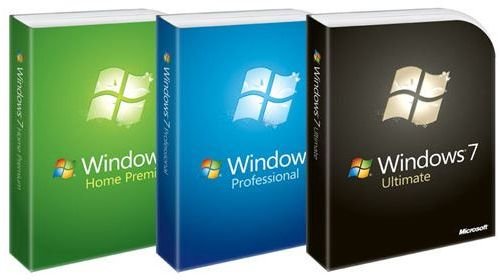
Overall, there are three editions of Windows 7. The main difference between them lies in their networking options and support, and Windows 7 Premium has few of Windows 7 Ultimate edition’s network options. In addition to this, Windows 7 Home Premium also lacks some of the security and back-up options included with the Professional and Ultimate editions. As such, the Ultimate and Professional editions are more geared towards business. Do not upgrade to these two editions unless you require the extra networking and back-up options.
The Bottom Line
As such, the bottom line is that Windows 7 has some good new additions and refinements. Plus, it is just that little bit smoother than Vista performance wise. Given that Windows 7 hardware requirements are not that much greater, it is a good upgrade which may just about merit the expense.


