Are so many different applications trying to start at the same time during Vista’s boot up that it’s bogging down your PC so much that it’s minutes before you can use it? This article addresses stopping unneeded services and streamlining the startup process in Windows Vista.
It Rains on the Just and the Unjust
After you’ve used a Vista PC for a while and have installed several applications that install startup services, the last phase of Windows’ startup, where it loads applications and their “helpers” can become mind-bogglingly slow – so slow that they actually delay you using your computer.
There are two ways to approach this problem, and both can be used together. The first is identifying the startup services and deactivating those that are not needed. Sysinternal’s Autoruns can help here . The second method is to use an application like Studio R2’s Startup Delay to time or “spread out” startup applications. Both programs are Vista-compatible.
The essential difference in these approaches is that Autoruns deals with all services and Startup Delay deals only with add-on applications, not essential services. This also means that incorrect or unknowledgeable use of Autoruns could make your system unbootable. So be careful out there. If you don’t know what a service is or what it does, STOP before you reach into the plumbing. Instead, go to Google and find out what the service IS.
On the Side of Caution: Vista Restore Point
Before we start looking at this, as a precaution, let’s set a Vista Restore Point. This is the fastest way to set a restore point.
1. Press the Windows button and type in “systempropertiesprotection”
2. If User Access Control is active, click “Continue.”
3. Click “Create.”
4. Enter a meaningful name for your restore point.
5. Click “Create” again and watch as it creates the restore point.
6. Click OK to close the System Properties dialog.
Have a Way to Reach a Recovery Environment
Having a Restore Point is great, but if the system is unbootable or unstable because you’ve stopped some essential service, you’ll need a way to reach a Recovery Environment. Technically, Vista should do this all by itself, but if your paranoia dwells at the highest levels, you should have a backup method of starting the PC. If you don’t have a Vista DVD, we recommend that you create a Vista boot disc that will mount a Recovery Environment. Please see “How to Create a Bootable Disc in Vista ” for full step-by-step instructions.
Identifying Startup Services with Autoruns
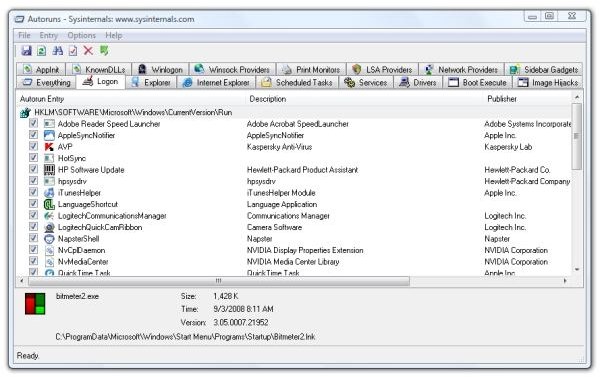
Running Autoruns for the first time can be a bit overwhelming. There are a lot of pipes and junctions in Vista’s plumbing. Fortunately, we’re mainly interested in those services that run under the “Logon” tab.
Image
A second thing to know about Autoruns is that if you stop a service and reboot your PC, the service does not disappear from the list. You can easily reactivate it by running Autoruns again and finding the service’s line in the listing.
Here we suggest that you make a paper and pencil list of the services you’ve stopped just in case you need to find them again and restart them. Include in your entries the name of the service, the tab where the item is located, and maybe a brief note about what in the world you were thinking when you stopped the service.
As an example of Autorun’s use, I see under the Login tab, “RemoteControl” started by “PowerDVD RC Service.” Since I use a media center PC, that’s a good service for me to keep because it makes Power DVD compatible with my existing media center remote control. If I saw that and did not have a remote, it would be an unneeded service that I could safely block.
Not all applications are great about filling out all the columns in Autoruns. If an entry does not include a description and publisher, go to the last field in the list and find out which directory it’s running from. You can then deduce what the service does.
Again, be cautious. The worst thing that could happen is that you’d need to boot Vista from a CD or DVD, mount a Recovery Environment, and go back to your created Restore Point. For less drastic problems, you can go back to your Restore Point with Vista running.
Once you’ve used Autoruns to stop services that you absolutely don’t need and have verified this by rebooting and trying out several applications, going online and browsing Bright Hub , and maybe sending an email, it’s time to look at easing the startup load of applications that do load.
Unclogging the Application Startup Queue with Startup Delay
If Autoruns looks overly complex at first run, Startup Delay looks deceptively simple. It is pretty simple to use, but it provides a powerful utility when managing startup applications. These are things that you probably do need to start on your PC because they provide some needed function. But do you need them all trying to start at once?
Image
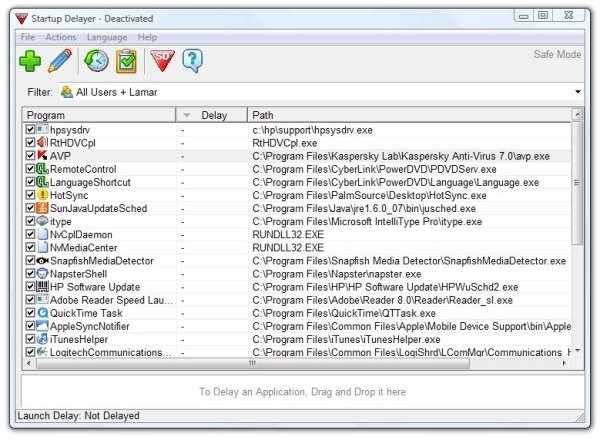
In this discussion, we’ll assume that you’ve clicked Help in Startup Delay and read the directions.
Again, Startup Delay is concerned about applications more than services. Note that Startup Delay itself runs as a startup application, so you must “Activate” it, or set it to start, before it will work. Then you have the choice of running it as a graphical application or running silently in the background. I suggest that you try the graphical application until you get your startup sequence fine-tuned.
A good use of Startup Delay is to allow essential services to “settle in” before running applications that need to “phone home” for updates. Antivirus programs (we know which) can be especially bad about this, but, as applications, they are what we want to start first – or do we?
My fellow contributing editor Brian Nelson, in “Advanced Windows Configuration Questions – Ask the Reader ,” puts forth an example where his antivirus program tries to retrieve updates before his network is fully up and running. Startup Delay may be a solution for this. Perhaps delaying the AV for, say, ten seconds and then spreading out the remaining startup applications over a one or two minute period may allow him to avoid this error – and get his system ready for productive use more quickly.
I suggest this because I still think that AV should start FIRST – before other applications begin trying to obtain their own updates – thus clogging the plumbing.
In a way, this is sacrificing time for s_moothness_. However, if it prevents an annoying error message or an exasperating clot of applications all trying to start at the same time, it’s worth it.
Thank you for reading this.
Further Reading
How to Speed up Vista’s Boot Time – Can you bake bread in the time it takes for your Vista PC to start up? Or does it seem that way? Fortunately, there are some relatively easy steps to take to speed up Vista’s boot time. We describe four of them here.
Turn Your Vista Laptop into a Mobile Hotspot - Need to share your wireless Internet connection with your friends or colleagues? If they’ve got WIFI, the solution is easy and free. This article tells you how.
Broken Down on the Information Superhighway - In the war against terrorism and media piracy the lines have been drawn - or have they? Highly visible is the conflict between the pipe owners and the content pushers, but are secret deals and treaties that affect the global use of the Internet, music, and movies being made out of the public eye? Read this to learn about the secretive “Anti-counterfeiting trade agreement and who’s really behind ACTA.
How to FIX Vista’s Using the Wrong Templates for Your Folders - If Windows Vista is confused and is showing your documents in a multimedia folder and your music in a documents folder, we’ve been there, too. This article will show you how, step-by-step, to tame Vista’s template folder forgetfulness until, we hope, Microsoft finally fixes the problem for good.


