Changing Browser Settings - Set Homepage, JavaScript in IE/Firefox
Internet Explorer Settings
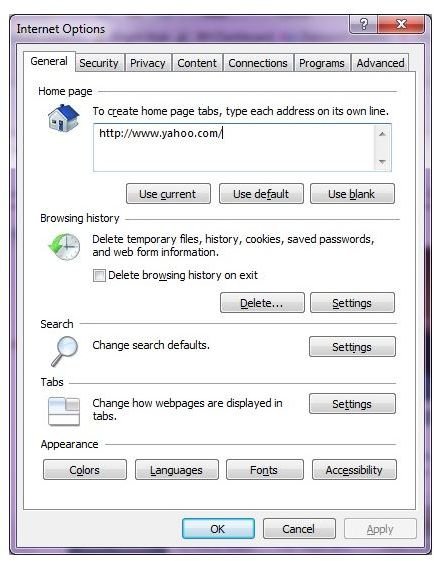
Both IE/Firefox provide you with a wealth of settings to completely customize your browser. All Internet Explorer settings are divided into different tabs to easily find the settings you need. Access Internet Explorer settings by opening a browser window, selecting Tools and choosing Internet Options. These options allow you to set the homepage, JavaScript and other settings
General
The general tab contains the most popular settings. The first section allows you to type in any web page as your homepage. The browsing history section allows you to delete your history and change when history is deleted automatically. You can choose how much space to reserve for history, such as cookies and temporary Internet files by selecting Settings. Edit your default search preferences and how tabs are displayed. Customize the appearance of your browser, such as colors and fonts in the accessibility section.
Security
Customize your browser’s security from the security tab. Use the slider bar to choose the security level for your zone. Select a custom settings by selecting your zone and choosing Custom.
Privacy
Edit how your computer accepts cookies, manage the built in pop-up blocker and choose how the InPrivate browsing works. The privacy tab is all about keeping your system secure from cookies and malicious pages.
Content
With the content tab, you have complete control over which sites can be viewed on your computer. The parental controls and content advisor sections let you visit or block sites based on ratings, site content and even specific websites. If you use certificates, control them through the certificates section. Automatically fill in certain information by using AutoComplete. You can turn the feature on or off through the content tab. Choose when and how to use feeds and web slices as well.
Connections
Set up dial-up, LAN and VPN connections through this tab. You can also edit any existing connections.
Programs
This tab allows you to choose the default programs for certain services, such as email. You can also make Internet Explorer your default browser. Manage add-ons through the Programs tab as well.
Advanced
The advanced tab is typically avoided by most users, but there are many settings available to help make your browser work better. For instance, many websites require scripting and JavaScript in order to work correctly. However, some computers may not be able to support scripting. Depending on your situation, you can turn on scripting and JavaScript and configure when and how to use these advanced settings. You can also restore Internet Explorer’s default settings.
Firefox
Firefox, like Internet Explorer, can be customized. Firefox is often called the more secure browser out of the two; however, you can choose the level of security that’s right for you. From within Firefox, you can set your homepage, JavaScript and various other settings.
General
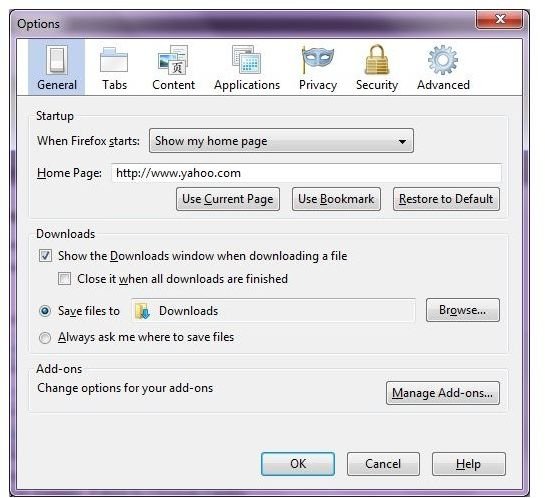
The general tab allows you to manage your homepage, downloads and add-ons. Choose your homepage, select where downloads are saved and completely manage all aspects of installed add-ons through this tab.
Tabs
Use the tabs section to manage how tabs are displayed in Firefox. You can also choose whether or not to use tabs at all. If you have a slow connection, Firefox can be set to you warn you when you have too many tabs open.
Content
Block pop-ups, choose how images load and enable JavaScript through the content tab. Customize the look for Firefox through the fonts and colors section. You can also choose your preferred language for using Firefox.
Applications
Select your default application for various types of content in the applications tab. Simply choose a content type and select an application from the drop down list. Applications can include programs and plug-ins.
Privacy
Choose how and when to delete your browsing history, including cookies, through the privacy tab. You can also choose how the location bar works.
Security
Keep your browser safe by setting security options in the security tab. You can block malicious sites, choose how add-ons are installed and even set passwords to visit specific sites. You can also choose warning messages when a potentially dangerous site is visited.
Advanced
The advanced tab of Firefox allows you to select how scrolling works, search options, network settings, when Firefox updates and the type of encryption used. You can also select what happens when Firefox crashes unexpectedly.
