Get Rid of Spam Using MalWasher Anti-Spam Protection
About MailWasher Pro 2010
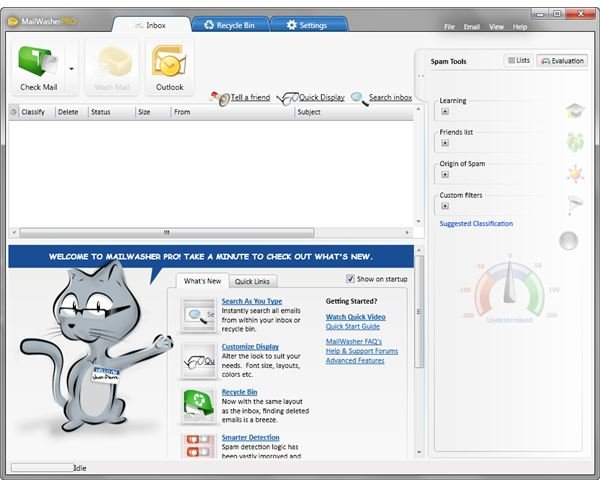
Firetrust has developed another version of its popular anti-spam program, MailWasher Pro 2010. The new version comes with a new look, options and features. Using MailWasher to take care of your e-mails is quite easy. You can’t lose important e-mails and never download spam message anymore. Find out more about MailWasher anti-spam protection in this MailWasher Pro 2010 review.
Installation and System Requirements (5 out of 5)
Computers running Windows 7, Vista, XP can install MailWasher Pro. Microsoft .NET Framework 3.5 SP1 is also one of the system
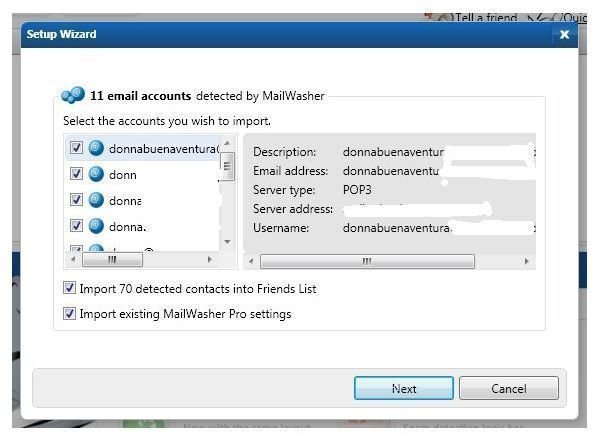
requirement to install. A system reboot is not required after the install, which means you can start using the program right away.
The new version has been re-written by Firetrust developers, which means the old version of MailWasher will not be removed from your computer. You can use both versions and allow the new MailWasher to import existing settings. The license for the old version will not work with the new version, but the installation of the new program will recognize it so you can take advantage of the small upgrade fee, $9.95.
MailWasher Pro 2010 will only use 17.2MB of hard-disk space.
Available Options and Features of MailWasher Pro (5 out of 5)
MailWasher is different from other anti-spam protection for it has the following great features:
- Avoid viruses and malicious e-mails - MailWasher will only preview your e-mails from the server instead of downloading it to your hard-drive using your preferred or default e-mail client. You will never get e-mail viruses or any messages in your computer if you will delete them from the server before retrieving good messages.
- Search as you type - Even though you’re only previewing your e-mails using the program, you can find any e-mails that MailWasher has retrieved from the inbox or recycle bin.
- Recycle Bin - This feature lets you keep deleted e-mails for later restore, if needed.
- Wash Mail - After the messages have been evaluated, you can configure MailWasher to immediately delete spam messages or manually click on the Wash Mail button to delete unwanted or malicious e-mails.
- FirstAlert - This is Firetrust’s own external database of actual known spam messages.
- Spam Tools - Plenty of tools to use to classify the good and bad e-mails. You can use your own filters (blacklist or friends list), just enable FirstAlert or use a third-party real-time black hole list.
- Customization - Not only can you customize the look, display and columns of the program, you may also customize the score to be used by spam tools in detecting or flagging a message.
Performance of MailWasher Pro 2010 (4 out of 5)
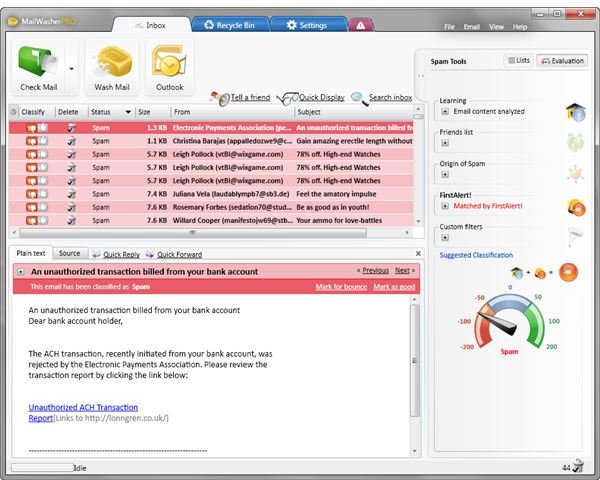
The default settings are good enough to start using the anti-spam and e-mail filtering of MailWasher. The program uses minimal memory usage. It does not cause the application or the system to lag while retrieving e-mails from the server or evaluating the messages for content. When MailWasher Pro classifies an e-mail as spam, the program will display the message with a red background. Any good e-mails are marked with a green background, while undetermined as good or bad e-mails are displayed without any background color.
Any messages from senders in your address book are never classified as spam, which is cool. You won’t lose important messages if you allow MailWasher to import your contacts to your friends list.
The program will display which spam tool has detected an unsafe or unwanted message. The only issue that I noticed with the new version is it will not load soon after it was closed. You have to wait few seconds or after you’ve refreshed the desktop. The issue is because both processes, mailwasherpro.exe and mailwasherproapp.exe continue to run after you’ve closed the program and will only end only after some seconds.
Price and Support (5 out of 5)
Firetrust lets you try MailWasher anti-spam protection for 30 days. Existing customers will only have to pay $9.95 to upgrade to new version or to renew the subscription for another year. New customers may purchase the program for $29.95.
Support is offered by submitting a ticket in https://support.firetrust.com or by visiting the discussion and support forums for MailWasher.
Conclusion
<strong>MailWasher Pro 2010</strong> is highly recommended to anyone who wants to control e-mails, in addition to preventing spam, viruses and malicious e-mails.
