SLOW-PCfighter is one of the best. It is straight-forward software that can clean your system of anything affecting its speed.
Overview And Installation of SLOW-PCfighter (5 out of 5)
SLOW-PCfighter is a $20 product created by SPAMfighter to rectify the problem of having a slow personal computer. If a computer system is running slowly, it is usually die to having old entries in the registry, or lots of files in the temporary files folder.
Having one type of software that can automatically remove all of these without having to individually open each application is one of the best reasons for using SLOW-PCfighter.
Installation of the software was quite straightforward, and SLOW-PCfighter can be installed on any system with at least the Windows 98 operating system from https://www.spamfighter.com/SLOW-PCfighter/ . It is about 1.5 MB to download, and it requires at least 100 MB of space for installation. After installation, it carries out its first scan to detect the condition of your computer. After the scan, the software will then give its opinion of any invalid entries detected. SLOW-PCfighter will also allow the user to customize the scan to their specifications. It is also possible before scanning, to uncheck any areas that do not need scanning, and let the software concentrate on those areas that have more effect on slowing down the speed of the computer.
Images of SLOW-PCfighter

How It Operates (4 out of 5)
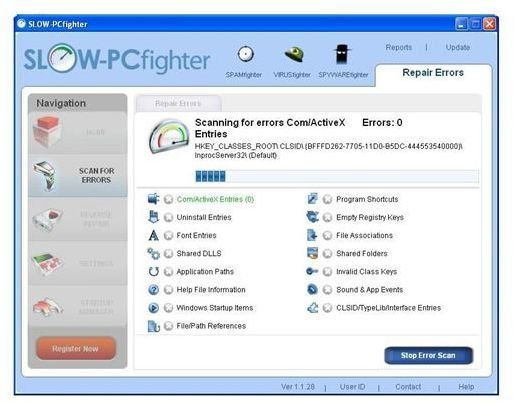
How this software works is that it scans a computer for all leftover components. It will scan for things such as invalid com/Active-X entries, empty registry keys of deleted programs, old file associations, invalid class keys, invalid application paths, and file/path references.
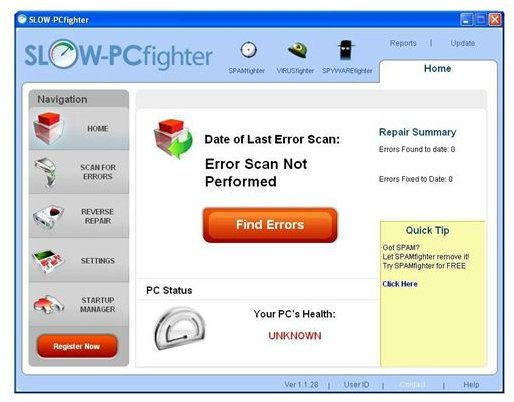
When the software opens after installation the user is presented with a list of items that they can scan for. At the start, the main user interface is called the “”Home” page. It provides a detailed review of how good or how bad a computer system might be. This overview is completed after scanning the computer. The software will scan for all the potential areas that cause problems in the speed of a system.
Other than the home page, the user interface includes a tab to “scan for errors,” “reverse repair,” “settings,” and the “startup manager.” Reverse repair page allows the user to undo any changes they previously made that negatively affected the computer. This is done by reinstalling a backup copy of the system registry. The application will naturally create a backup of the registry before it makes any changes.
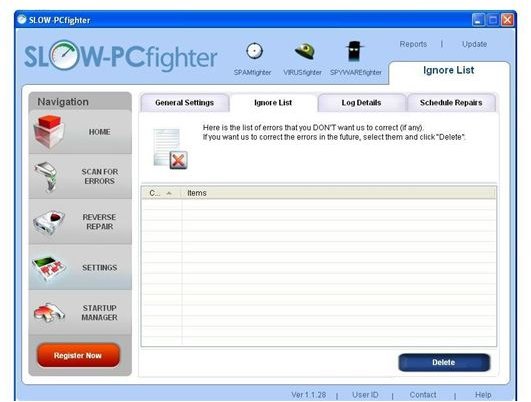
The “Settings” page allows the user to change just the general settings for the scan, but also setup an “ignore list,” view the scan details, or schedule repairs based on your specifications. These areas are a big advantage of SLOW-PCfighter as it keeps a log in case something goes wrong, The ability to create an ignore list is an added bonus, especially in the case of repeated “false positives.”
Conclusion and Recommendation (5 out of 5)
However, the trial will only allow 25 problems to be removed before having to purchase license. Another disadvantage of using this application is seen when a startup scan is scheduled. This will slow down the time it takes the system to boot, if a startup scan is enabled. Yet overall the program is a good one to install because it allows the user to scan for more items than other types of software of this kind. The invalid entries are removed with just a simple click!


