SpyDLLRemover is a scanning utility developed by RootkitAnalytics that scans for hidden dlls inside the processes. It is an advanced scanner designed to detect all hidden dll files that might corrupt your system or might be spying on your computer system.
Introduction
SpyDLLRemover is an advanced spyware scanner designed by RootkitAnalytics. Scanning the system takes only a few seconds after which a detailed report containing all the information about a dll is shown. The report also contains the threat level of each dll along with other information like company, description, process id (if running in the system), file size, file data, etc.
Features (4 out of 5)
- Advanced DLL or Spyware scanner
- Detects hidden dlls running in the system
- Automatic analysis of the scanned dlls
- Threat level indicator
- DLL tracer
- Process Viewer
- Detailed report that contains critical data about the DLL
Installation (5 out of 5)
The best part of the application is that you don’t require any sort of installation. Just download the application, unzip the file and directly execute the SpyDLLRemover.exe file to run the application.
User Interface (5 out of 5)
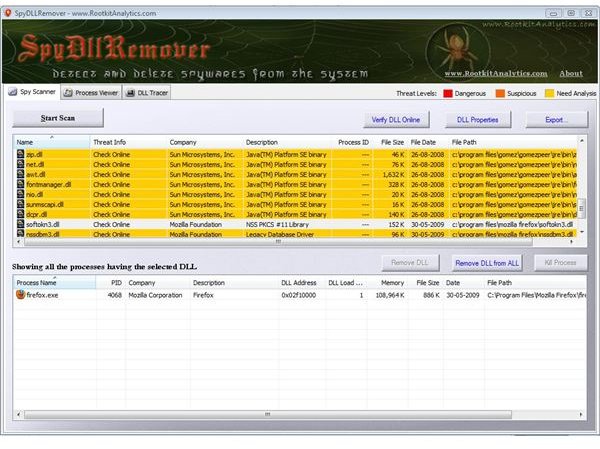
User interface of the application is very nice, filled with rich graphics and information. The application is very easy to use and every option is available at your finger tips. When you launch the application, you will be taken to the scanning section where you can scan your system for hidden dlls that might damage your computer system.
Click the Start Scan button and within few seconds a detailed report containing all the dlls running on your system and their threat level will be displayed on the screen. I ran it for the first time and had no dlls that were a threat to my computer system.
Double click on any of the dll to view more information about it. You can also remove all or a selected dll from your system by clicking the remove dll or remove dll from all button.
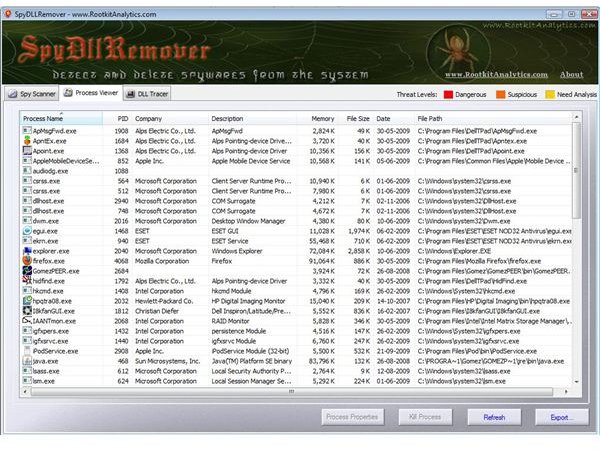
On the top, you can also notice a Process Viewer tab. Click on it to view the processes currently running on your system along with complete details like description, process id, company, memory occupied, file size, etc.
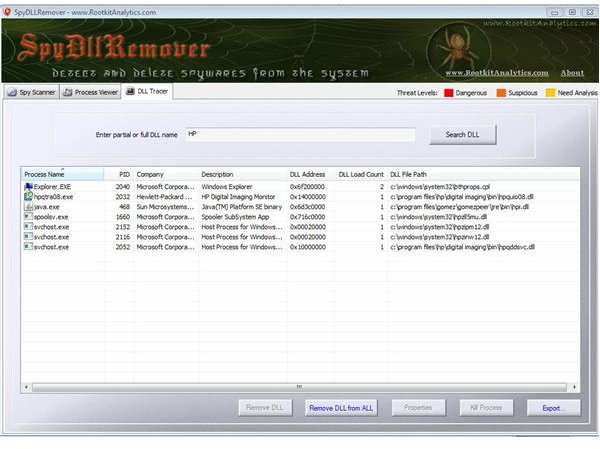
Last tab is the DLL Tracer that allows you to trace a dll based on the keyword supplied by the user.
Pricing (5 out of 5)
The application is available for FREE.
Conclusion (4 out of 5)
After considering the features, pricing and the user interface part, I rate this application 4 out of 5. If the application had more number of features, I would have definitely rated it 5 out of 5.
Note: Users should be cautious before removing a dll, otherwise you might end up with corrupted window or application malfunctioning.
images Credit
SpyDLLRemover application screenshots by rootkitAnalytics


