TrustWatch is a Firefox add-on that alerts you to the status of a website – whether it’s “safe” or harmful by placing alert icons or checkboxes in-line with your search results. This type of web protection is a useful feature, so why wouldn’t I recommend using TrustWatch? Read on to find out.
Overview and Features
The TrustWatch Search plugin for Firefox adds information in-line with a search result to let you know if a web site is deemed safe, harmful or unknown. TrustWatch has the following features:
- Support for Google, Yahoo and MSN search engines
- Sites are designated safe, harmful or unknown using graphical cues
- End user can report sites as harmful
Installation and Usage
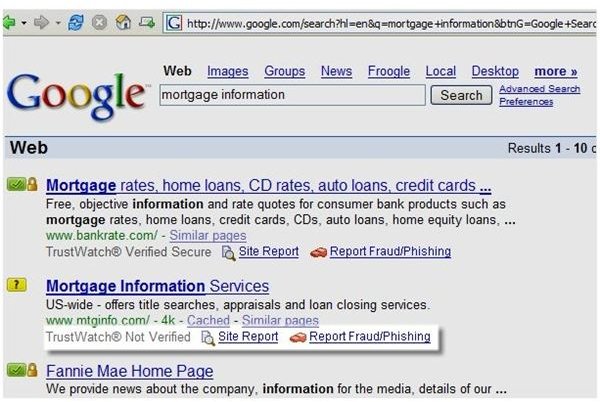
The first thing I noticed when I went to download the plugin (available here ) was that it only supports Firefox versions 1.0 through 2.0b1. Seeing as Firefox 3.x has been out a good while as of this writing, I needed to get creative in finding Firefox 2.0b. Luckily a great site exists for hosting older versions of popular software – OldVersion.com .
After installing Firefox 2.0 beta 1, I go to the plugin site and install the plugin – just like any other Firefox plugin. So far so good. Firefox requests that I restart the browser for the new plugin to take effect.
From what little I can gather from the plugin page description, when I go to Google, Yahoo or MSN to perform a search, I should see a new line of text telling me whether or not the site is deemed safe by TrustWatch. I mention “should see” since when I go to any of the above mentioned sites and perform a search, I see nothing different.
I figured the plugin must not be on so I go into the Firefox Plugins manager and the plugin is installed and enabled. The only configuration options that are present are to designate which of the three search engines TrustWatch should use – Google, Yahoo or MSN.
A lot has changed in the search landscape since the plugin was last updated in 2006 - MSN search now uses Bing for its engine, Yahoo now uses Google and I’m sure Google has made more than a few changes since 2006.
Pricing, and Overall Score (1 out of 5)
As is typical with Firefox plugins, TrustWatch is free. It’s a good idea, but unfortunately, there is little hope of someone resurrecting this plugin as it appears TrustWatch was acquired by GeoTrust and is no longer supported. Luckily for us, many antivirus vendors offer such a feature in their “Total Care” or “Internet Security” products (see Trend Micro Internet Security for an example). Due to the lack of support and failure to get TrustWatch to work on any of my test systems, I’ve got to give TrustWatch one out of five.


