Urgent Backup Review - Fastest Backup Software Available
Urgent Backup is easy to use backup software designed to work on several operating systems like Windows 98, Windows XP, Windows 2000 & 2003, Windows NT, Windows ME and Windows Vista. As you know, data security is the most important concern today, whether it is an individual or a large business enterprise. A sudden failure of computer system can lead to huge amount of losses both in terms of money and personal assets like important documents, reports, assignments, photographs, personal videos, etc.
With the increasing cost of storage drives, it has become almost impossible to store large amounts of data, and you need a better solution for it. Urgent Backup is the answer to all your queries. It allows you to backup your data in CD, DVD, USB drives and even on remote servers. The software allows you to mirror your data as it is, i.e. creating an exact copy of your data. You also have the option to archive the data and copy using an advanced compression algorithm.
Installation and setup (5 out of 5)
Urgent Backup is very easy to install and setup. It took me less than 5 seconds to install the software. Even a beginner can install the software, and you just need to press the Next button and everything is done under 5 seconds.
User Interface (5 out of 5)
As far as user interface is concerned, the software looks pretty cool. You can find all the buttons you need to perform a backup like, Add Task, Edit Task, Delete Task, Run Task and Abort Task. You can also change default settings, by clicking the Preferences button located at the top. To create backup, you just need to hit the Add Task button and a wizard will guide you through the entire process like adding files / folders, setting the compression level, selection of backup storage device, encryption, etc.
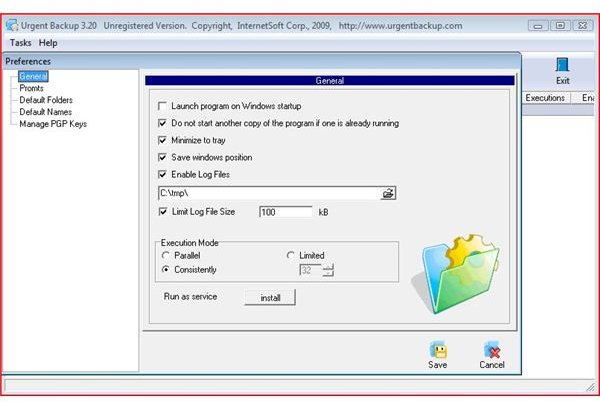
Features (4 out of 5)
Being simple and elegant, the software does not have a huge list of features. As far as backup software is concerned, Urgent Backup provides all the basic functions you find in a windows backup utility with an added feature of compression and selection of backup storage device. You can also choose to encrypt your data and even assign a password to the compressed archive file. Some of the important features are listed below.
· Automatic Backups
· Create backup on CD, DVD, USB drives, Remote ftp server, etc.
· Compressed backup
· It creates exact / mirror copy of data.
· Automatic logging
· Data encryption
Performance (4 out of 5)
After running a test task, Urgent Backup seems to be effective backup software with an easy to use interface. I made 2 tests. In the first test, I created backup of music files with compression feature enabled and compression level set to maximum. It took around 4 minutes to complete the backup process with almost zero compression, as the music files were mainly mp3’s and they can’t be compressed further.
In test 2, I created backup of same music files but this time without the compression feature and the results were really surprising. It took around 41 seconds to complete the backup.
Note: The backup was created on a local drive and as such results may vary for other storage types depending on their speed and performance. I used a SATA 5400 rpm hard drive. There are other factors that might affect the performance timing across different platforms.
Price (4 out of 5)
Urgent Backup is available at a nominal price of 39.95$ and as such is very cheap in comparison to the performance and features it provides.
Conclusion (4 out of 5)
Urgent Backup is really the fastest backup software available. If you don’t believe my results, try it out yourself. You can download the trial version here before purchasing the full version.
