Task Catcher Review: A Startup Manager for Windows
Introduction
Task Catcher is a must-have application if you want to monitor running processes or important programs in your computer. It can also block programs that you do not want to run if you are not on your PC or while you are using the computer.
System Requirements and Installation (4 out of 5)
Task Catcher is compatible with Vista and earlier version of Windows. Installing Task Catcher is a straight-forward process and requires no reboot to start guarding your favorite applications or blocking unwanted programs. Note that it is required to run Task Catcher as administrator in Vista, if UAC is enabled so the preferences in using the program is applied.
64-bit edition of Windows is supported but you have to download a different installer. There is no difference with the normal installer other than it is much larger than the normal installer.
Features and Options of Task Catcher (5 out of 5)
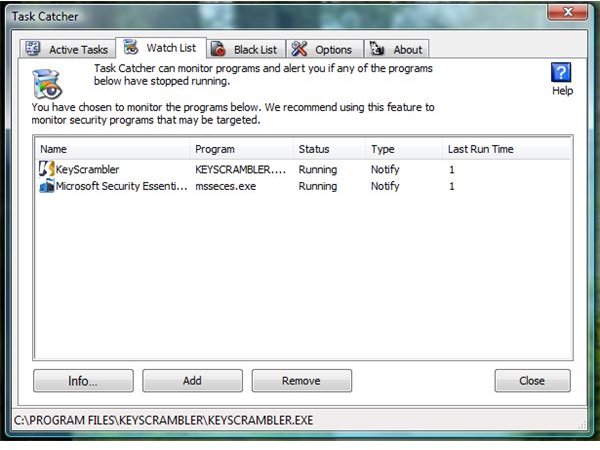
Ensuring the program you need is always running: We never like unwanted shutdown of an application especially if the program is essential. Example: Anti-virus, anti-malware or firewall applications are essential programs that Task Catcher will monitor. If the watched programs are not running or failed to run, Task Catcher will automatically start it.
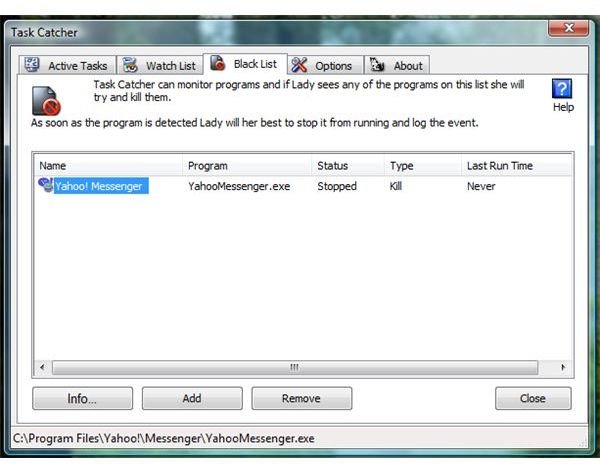
Preventing unwanted programs from running: If you are parent or computer admin, this feature in Task Catcher is definitely a great help. You can add installed programs in the “Black List” tab in Task Catcher so your kids or other people in your office cannot run the blocked programs.
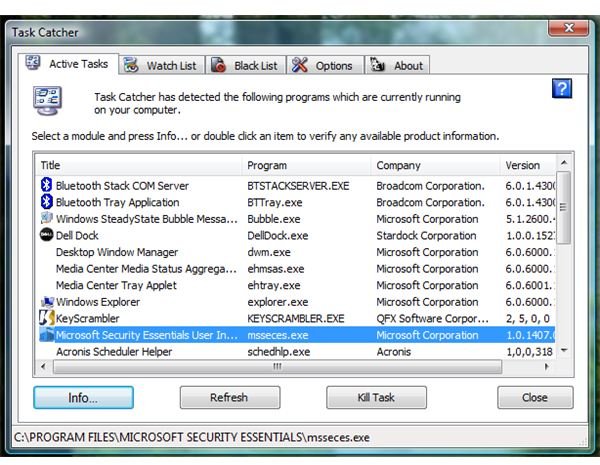
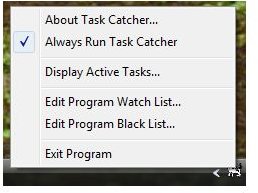
Options in using Task Catcher: Task Cather lets you kill a task manually or view the properties of the process. It can also delete a file on reboot and provide much detailed information of the file via WinPatrol Plus Knowledge Base. Other option in using Task Catcher is the history view where you can view the activity of Task Catcher (e.g. programs that it automatically killed from running or programs that it restarted).
Images
Price to Value (5 out of 5)
$12.95 on any computers that you personally use! That is a great deal if you have more than 1 PC at home as long as it is your PC.
Conclusion
I like every option and feature in Task Catcher and I highly recommend it in addition to WinPatrol and StartUpLite!
