Web Filtering is in use not only in family home PCs but also in business PCs. Administrators of networked computers have less work in protecting PCs, if they will filtering service or software to prevent infection or malicious URLs. This article will discuss K9 Web Protection and its features.
Introduction
Blue Coat’s K9 Web Protection is a parental control and internet filtering service but it is not like OpenDNS where you will change the DNS servers of your network connection to enjoy the filtering service. You can protect your entire networked or single PC by simply downloading and installing K9 Web Protection at no charge.
System Requirements and Installation (5 out of 5)
Installing K9 is simply done as how you install any software. After installation, a reboot is required. It can be installed in 32-bit editions of Windows 2000, XP and Vista. People with Mac OS X 10.4.7 and higher can also use K9 Web Protection. If you downloaded K9 from alternative download sites, you can easily get a free license for K9 Web Protection by going to their website.
Ease of Use of K9 Web Protection (5 out of 5)
You don’t need to configure your browser or any application to start using K9 Web Protection. After successful installation, your network is protected from visiting or communicating with websites that is flagged by K9 users as dangerous, spyware, malware and many more.
Options in using K9 (5 out of 5)
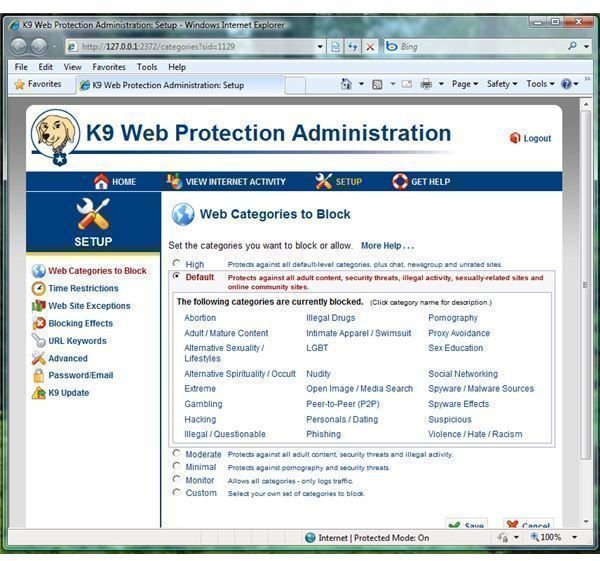
K9 Web Protection allows you to open the admin panel by opening the K9 icon or just go to https://127.0.0.1:2372/
In the screenshot at the left shows the default website categories that K9 will block and as you can see, you have the option to customized or just log the network traffic.
Other features of K9 are similar to Parental Control in Windows Vista where you can restrict the time that the computer with K9 will be able to connect to the internet: Unrestricted, NightGuard or Customized time restrictions.
You can manually allow or block a site in the website exceptions option that K9 will block so you can continue visiting a site you find safe to use or block it if it’s a new site that is malicious. Blocking by keyword is another option in using K9 Web Protection. K9 can be configured to make a bark sound when it blocks a site or just show the K9 admin panel page.
If many websites are currently being blocked, K9 can be configured to quickly disable internet access for 5 minutes. This works like a firewall software blocking unwanted intrusions, port scan or internet attacks.
In K9 Admin Panel, you also have the option to view the internet activity or clear the log.
Search Engine, HTTPS and Updating K9Some search engine has option to display only the search results that is considered safe to visit. K9 takes advantage of this option by popular search engines so you do not need to manually configure your settings to any supported search providers, for example, Live/Bing, Google, and Yahoo. By allowing K9 to use Safe Search, you do not need to keep a cookie of the search provider.
If you do not want anyone in your home or office to buy anything online or become a victim of fraud sites that is using secure protocol (https://), you can configure K9 block access to this protocol.
Updating K9 Web Protection is easily done via K9 admin panel too. It will let you download the new version of K9 software if one is available.
Sites Blocked by K9
If a website is blocked by K9 Web Protection, your or the people in your home or networked computers can allow the connection for a given time as long as you know the admin password. If you find the site as safe and should not be blocked, you can submit the URL for review. If you rather allow the site, you will add in the website exemption list or disable blocking for particular category.
Price to Value (5 out of 5)
K9 Web Protection offers free license – a free protection for your network. What else could you ask for?
Conclusion
K9 Web Protection is undoubtedly one of the best parental control and webfiltering programs on the market. There really is nothing not to like about this program. It’s easy to use, effective and completely free. Highly recommended!
More Reviews!
Would you like to read more reviews? Look around Bright Hub and you’ll find reviews of numerous other leading security solutions including Kaspersky Internet Security , ESET Smart Security , McAfee Total Protection and ZoneAlarm Internet Security Suite .


