Privacy Protector is supposed to clean each and every trace of your computer activities, but that isn’t quite the case.
Downloading and Installing the Privacy Protector (3 out of 5)
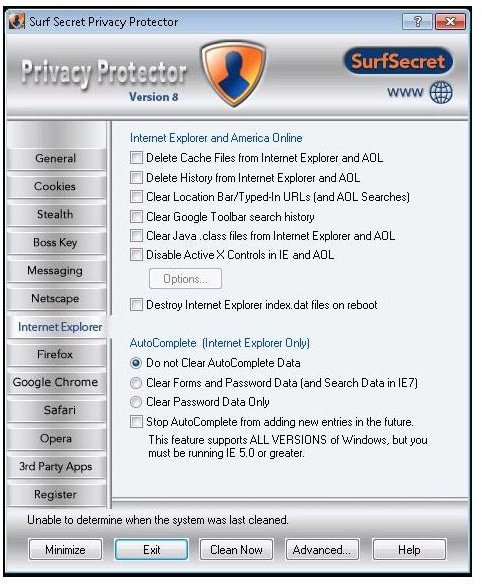
The system requirements mentioned for the Privacy Protector are only 1 MB of RAM and less than 1 MB of HDD space on a system running MS Windows 95 or above.
Computer Used to Test the Privacy Protector: The system I used had 512MB of RAM and 80 GB HDD space. The operating system used was MS Windows XP, Service Pack 3.
Download and Installation: Installation of the program was easy. It hardly took two full minutes to install the software. There are two options: The first one was to install the software for everyone and the second one was to make it available only for the current user. As it was only for testing purposes, I selected the “current user” option. There were no other clicks apart from this and the usual destination folder confirmation and EULA agreement. The rest of the process was automated.
Download Accelerators not Allowed? It seemed that the webpage from where I tried to download the demo was not allowing any Download Accelerators. I had Free Download Manager (FDM) installed on the machine. Whenever I tried to download the SurfSecret Privacy Protector using the accelerator, I found that the FDM could download only the PHP page (the webpage containing link).
Assuming that FDM was not functioning well with the webpage, I tried to use my other laptop that had Internet Download Manager. The IDM could only download the PHP file instead of the actual page, same as FDM. Coming back to the previous laptop, I disabled the FDM before I could download the software to the local HDD using a normal Internet Explorer’s download feature.
Note: I am not sure if it happened only to me but it seemed that the webpage for download of SurfSecret Privacy Protector was not accepting any Download Accelerators, not IDM or FDM at least. You may try using other download managers and if you also encounter the problem, you can simply turn off the download manager to use your browser’s download feature. However, the problem with using a browser’s download feature is that if something goes wrong, you often have to re-start the download.
Do You Need the Stealth Mode? (3 out of 5)
One of the features to consider before buying SurfSecret Privacy Protector is the Stealth Mode feature. As you can always clean your computer when you finish the tasks you want remove history of, I do not think that the feature is actually required. It performs some real-time cleaning, but the cookies and temp files are stay on the computer as long as you are on the webpage or application. If someone is bent upon checking your usage by interrupting you, he will still find the temporary files that reveal information about what you were doing.
Under such circumstances, Stealth Mode isn’t as stealthy as one would hope. It is useful only for those who may forget to clean the computer after using it. A perfect analogy would be the Incognito mode offered in the Internet Explorer 8 that is not used by the majority of people using the browser.
Boss Key Works Great
The Boss Key works very quickly. I tested it on three open windows of Internet Explorer. As soon as I used the key combination, all three windows were gone instantly, as if they were never there. However, it is also possible to minimize all the open windows with the key combination of Windows Key plus “D” even if you are not using the program. Unlike the Boss Key though, showing the Desktop will leave the active applications’ buttons listed in the Windows taskbar. The Boss Key will hide programs on the taskbar as well, giving it an edge.
What Was Cleaned
By default it cleans all IM files from the custom directories. Otherwise, SurfSecret Privacy Protector cleans what it is instructed to clean, using the options under its many Tabs. All the cookies were gone. Even the index.dat files were removed. The Run Menu was clean and so was the Google Toolbar’s Search box. After the scan, I could not find any data file related to my Yahoo IM.
However, I found some important files left behind. The program does not give you some important options that are necessary for full computer cleaning.
Drawbacks of SurfSecret Privacy Protector (3 out of 5)
After running Privacy Protector, I ran another program to clean the computer again. To my surprise, I found that the data pertaining to MSOFFICE and OE was still there. Initially, I thought that I might have not selected the options related to MSOFFICE. However, when I checked the Third Party Software Tab, I found that MSOFFICE was not listed there. This means that SurfSecret Privacy Protector does not give you the option to clean up traces of your Outlook and MSOFFICE use.
Another drawback of privacy cleaner is that the program does not give you a preview of the files to be deleted when you click on the Clean Now button. This may cause deletion of an important file if you are not very careful while selecting the options before you run the program.
Close, but Not Quite
We found that though Privacy Protector cleans up many traces of computing activities, it needs to be improved to allow files related to MSOFFICE and Outlook Express that are generally used on a computer.
I highly recommend that you check out the extent of privacy you want before you spend your money on this software. If you too think that the Stealth Mode, Boss Key, and offering a number of tabs to increase the number of mouse clicks for selecting the cleaning options are not necessary, I would recommend that you go for free clean up software instead of SurfSecret Privacy Protector.
Update on 4-11-2011
It looks that SurfSecret Privacy Protector is no longer available in the market. The official website is off the Internet and third party download sites redirect you to a 404 page.
You may want to consider the following instead:
A Guide to Mac Computer Privacy Options
A Guide to Comodo System Cleaner (Recommended by Author)
If you have used any other software that you think is good, please share it with us.
References
Based on author’s own experience of the software
Screenshot by Author from Surfsecret Privacy Protector
Surfsecret’s website: https://www.surfsecret.com/home-products/privacy-protector.shtml


