ParetoLogic Anti-Virus PLUS Review: Antivirus Software for Windows
Introduction
ParetoLogic is certainly not as well-known as Symantec, McAfee, Trend Micro or even ESET. So, how does their antivirus solution, ParetoLogic Anti-Virus PLUS, stack up against the big name competition? The answer is surprisingly well.
Ease Of Use (5 out of 5)
ParetoLo
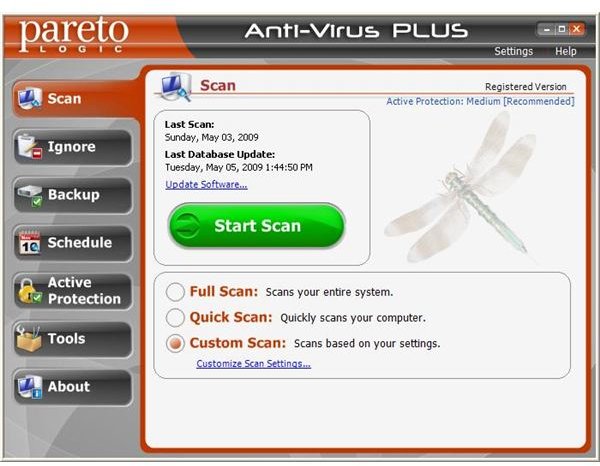
gic Anti-Virus PLUS has an aesthetically pleasing and streamlined interface.
The menu buttons make navigation easy and even the most inexperienced of users will have no difficulty working out how to access the program’s various options and features.
In short, ParetoLogic Anti-Virus PLUS is lean, clean and easy to use.
Ease Of Installation (5 out of 5)
Installation was a quick, easy and entirely painless process.
Features (5 out of 5)
ParetoLogic Anti-Virus PLUS certainly packs in plenty of features in addition to basic virus blocking and removal.
One of the more interesting features is what ParetoLogic refers to as cyclic detection. ParetoLogic explain this as follows, “Malware is blocked automatically depending on your Protection level or when you chose to block it after a popup alert appears. In certain instances the detected item is blocked but, due to its malicious design, it is still able to write a new entry to the registry causing another popup alert to be displayed. This pattern will repeat until a Cyclic Detection alert appears. Cyclic Detection is unique to ParetoLogic Anti-Virus PLUS. With Cyclic Detection the Block option is disabled in order to stop the detection re-occurrence. The Cyclic Detection alert warns you that your system may be infected with malware and you should run a scan to remove it.”
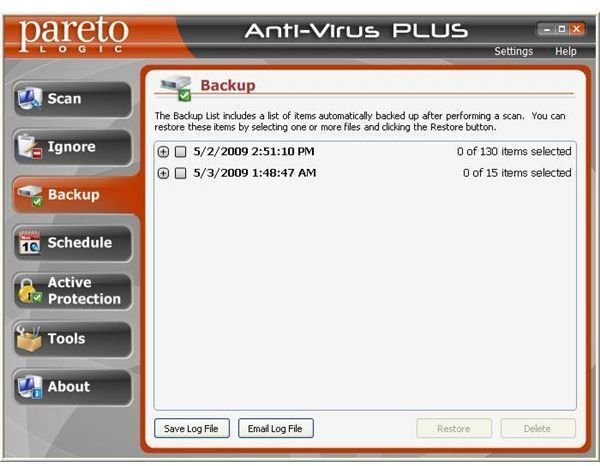
The software’s backup feature enables you to restore files that couldn’t be cleaned and were deleted after being detected as potentially dangerous.
The scheduling
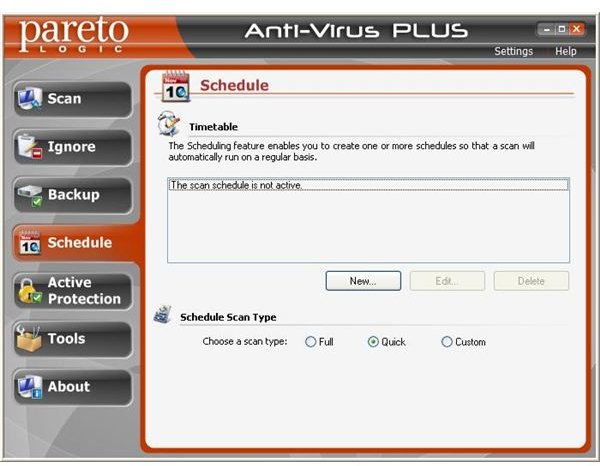
feature lets you to program a scan to run at a particular time and date. You can also choose whether to perform a quick, full or customized scan.
ParetoLogic goes an extra mile b
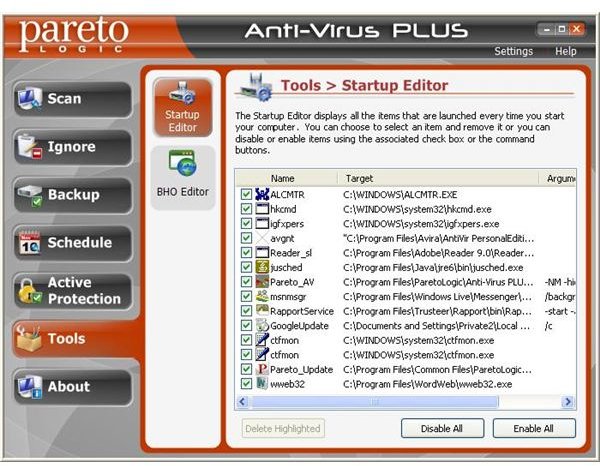
y providing you with an option of managing the Windows startup programs. In the Tools section of the program, you can easily disable or delete a startup programs by unchecking the box beside the program name and pressing the Delete Highlighted button, respectively.
The Active Protection screen allows you to configure many settings of the program. For example, you could set three levels of protection. You can also enable monitoring of Windows startup programs and set the monitor level to medium or high. If there is a particular website you want block access
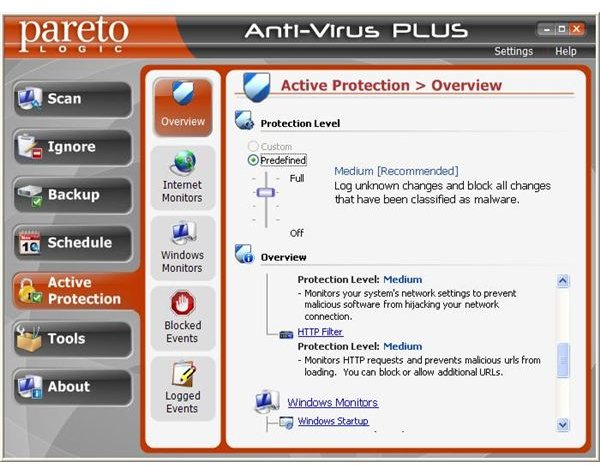
to, this can also be done. The logged events can also be read and deleted if desired.
Effectiveness (5 out of 5)
ParetoLogic Anti-Virus PLUS has great detection and removal capabilities. The product has been certified by West Coast Labs and was able to block everything I threw at it during testing. Impressive!
Help And Support (5 out of 5)
ParetoLogic Anti-Virus PLUS ships with an extensive Help File and other support options are available via ParetoLogic’s website.
System Requirements (5 out of 5)
The program’s minimum system requirements are as follows:
Hardware requirement:
- Intel Pentium 3 or compatible CPU.
- At least 256 MB of memory (RAM).
- 100 MB of hard disk space.
- Internet Connection (required for registering the product key).
- Microsoft Internet Explorer 6.0 or higher version.
Operating system requirement:
- Microsoft Windows 2000 SP4.
- Microsoft Windows XP SP2.
- Microsoft Windows Vista.
Price to Value (2 out of 5)
At $49.95 for a single computer license, ParetoLogic Anti-Virus PLUS is rather expensive. By way of comparison, ESET NOD32 Antivirus costs $39.99 and BitDefender antivirus $24.95. At the time of writing, ParetoLogic were offering the product at a special discount rate of $39.95 but, even at that, the pricing is still on the steep side.
The Bottom Line (3 out of 5)
I’d like to see ParetoLogic adjust their pricing. The product is well designed and undoubtedly a great virus stopper, but it’s steep pricing makes it difficult to recommend. To put it simply, there are less expensive products on the market which are just as effective as ParetoLogic Anti-Virus PLUS.
More Reviews!
Be sure to check out our reviews of other antivirus and security solutions including Norman Antivirus and Antispyware, ESET Smart Security, BitDefender Antivirus and TrustPort Antivirus.
