Yet another player in the anti-virus product is AVG Free and it is under our merciless review. Hop right in to find out more.
Introduction
There are a number of anti-malware products in the market and all of them provide a subset of their features in the free versions. AVG offers anti-virus and anti-spyware protection and a proactive real-time protection against the infected websites and popular search engine results. The webshield (download and instant messaging scanning module), anti-rootkit, identity protection, firewall, anti-spam modules and free support only comes with the premium versions, namely AVG Anti-virus Pro and AVG Internet Security.
Installation (3 out of 5)
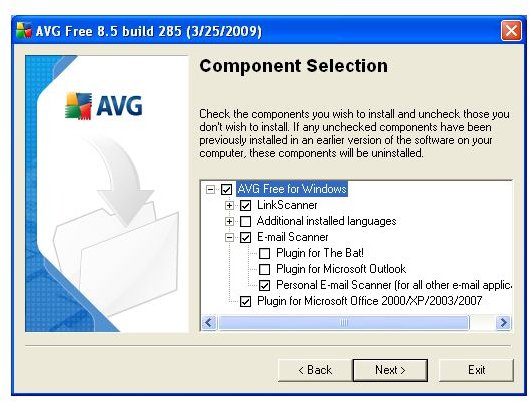
The download for release 8.5 build 285 is 60.1 Megabytes. The installer took a while to start on my computer, especially to decompress the contents. In the first window it asks you to select your language. The next two screens are about the license agreement. After you see some processed files, you will be asked if you want to go with a standard or custom installation. I chose custom and clicked Next. In the next screen presented there was a name input box plus an automatically generated licence number. Carrying on, AVG asked me which components to install. I have removed additional languages (I do not know Spanish) and I added the Plugin for Microsoft Office, as you see in the screenshot. Clicking next, AVG asked me if I wanted to install the AVG toolbar to access the program’s features. Personally I do not use any toolbars, therefore I removed the tick and continued. In the next screen I clicked “Finish” and the program was installed. You can expect a slower installation with the program. The computer I used to install is a Pentium Core Duo E2200 running at 2.2 Gigahertz with 1 Megabyte of RAM and personally I did not expect a slow installation.
After the program is installed, there is a first-run wizard. In the wizard you schedule scan times, choose to send the detected threats to AVG Labs, check and install the program updates and register your product. Do not expect anything from registration, it is only for joining the product’s forums.
Although the program does not require a reboot, I suggest you to go for it.
Features (2 out of 5)
After the installation, with the first boot, I noticed a slightly longer boot time, something around 2-3 seconds. After Windows started up with all the programs and the desktop becomes usable, I have looked at the processes and saw a memory footprint of 19.532 Megabytes. This is acceptable for today’s computers.
In the main window, I have clicked on the “Update now” tab and the program connected to the AVG server and found an update of 121.6 Kilobyte. It was surprising for me because I had already downloaded 1.1 Megabytes of updates during the installation. I can not comment on this because I really don’t know if an update is already uploaded to the server or the update was one which was not downloaded during the first-run wizard.
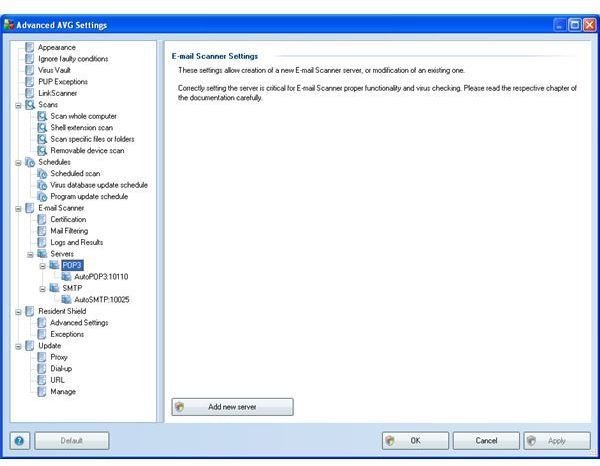
The main window can be considered as a status-window because clicking on the icons just shows the explanations of the modules in the bottom pane. Normally I would expect them to take me to the configuration screen for that module. Just for your information, the settings can be reached by going through the Tools → Advanced Settings. The nice thing that I noticed in the settings is to define POP3/SMTP servers to be scanned and the option to remove e-mail attachments for all executables, documents or defined file extensions. Many of the settings such as e-mail, resident shield are not present in the competing products therefore I can heartily give a big plus to AVG for the configuration options.
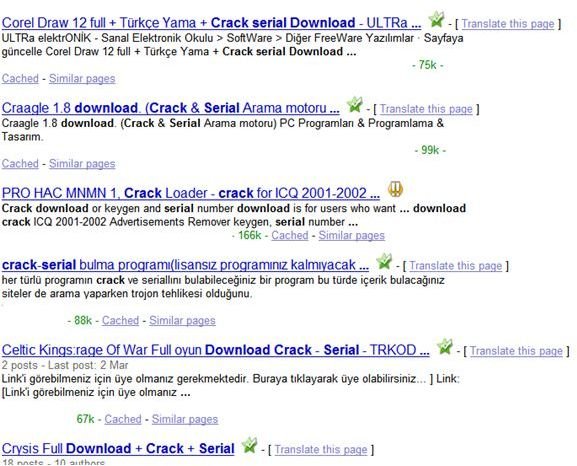
For the test run, I took a trip to the dark side of the Internet, to the places where Indiana Jones-types go. The websites I know are infected and I wanted to see how AVG would behave. Then I have searched these websites on popular search engines and tried to see how AVG did with the search results. I was shocked to see that many of the popular infected sites were marked as “safe.” I wasn’t expecting any better, but my “download crack serial” search results were all marked as “safe” also. You can check the screenshot on the right. I do not expect all illegal forum sites to be unsafe, but if Internet Explorer can warn me against the malware threat where AVG tells me the opposite, and if the Internet Explorer is right, there has to be something going wrong.
Then I went on with the anti-virus and anti-spyware features. In my tests the on-demand scanning was slow, detection rate was average and script malware detection was a little bit more than 40%. There were many false positives as well. I wanted to push the program a little bit further, but the picture so far was demoralizing for an antivirus program, claiming to have 80 million users. Note that my testing was by no means comprehensive or extensive, but it nonetheless enough to convince me that AVG’s detection/protection is not as good as it could be. The results of much more detailed testing can be found at AV Comparatives .
Overall (1 out of 5)
I do not like to knock products - and especially free products - but in this case it’s deserved. I cannot give a good rating for AVG Free Antivirus. Wherever I tried to took the program for a ride, the results were disappointing.
If you want a free solution for your anti-malware purposes, I can recommend you AntiVir or Avast! . Avast! is a more complete solution than AntiVir as it offers peer-to-peer controls and various other useful modules.
More Reviews!
Be sure to check out our reviews of other free antivirus solutions including Comodo Internet Security , PC Tools AntiVirus , AVG , Avast! and Rising Antivirus .


