Using ZonedOut to Manage Internet Explorer Security Zones
Internet Explorer Security Zone and ZonedOut
One of the features in using Internet Explorer is to add or remove IP address and domains in the local intranet, trusted and restricted sites security zone. This feature is to control the security used on each site you plan to browse or prevent in loading contents. The default Internet Explorer’s security zone manager is so lacking features that I decided to ask my friend Todd if he could develop a standalone IE security zone manager. He did it by creating and providing a free utility called ZonedOut.
Installation and Features (5 out of 5)
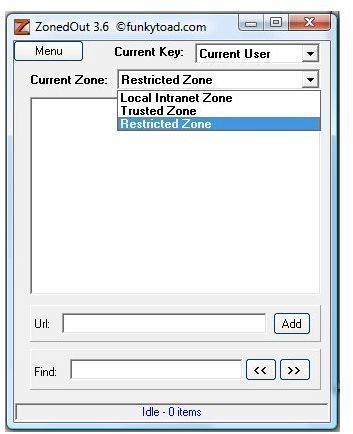
ZonedOut requires no installation and it includes a small help file to help ZonedOut user understand the commands in using the application.
You can use ZonedOut to add bad domains or IP address in the restricted zone of Internet Explorer. As we already know any domain or IP address in the Restricted Site zones is prevented in loading scripts and ActiveX components. And if you have a list of trusted sites, you can add those sites to the trusted zone.
ZonedOut has more features than the default security zone manager in Internet Explorer including:
- Export and Import the list of sites from or to a text file in IE’s trusted, local intranet and restricted zones
- Remove either a single entry or all entries from a security zone in Internet Explorer
- Whitelist a site or move a whitelisted site in restricted zone
- Manually add a single domain or IP address to trust or restrict
- Search function: Find any domain or IP address that is listed in particular security zone in IE.
ZonedOut is also capable of managing the zone for “all users” or “current user” only. This is useful if you are planning to control only your user account in Windows or by managing also the security zones in all users in Windows.
Usage of ZonedOut (5 out of 5)
Eric L. Howes is now offering IE-SPYAD for ZonedOut. IE-SPYAD will add thousands of known spyware and advertising sites in the security zone of Internet Explorer. It does not prevent you in loading the known spyads sites but will prevent those sites in running or loading their content that can cause infection or browser hijacks.
If you are using the immunization features of Spybot Search & Destroy (SS&D) or SpywareBlaster, you can also use ZonedOut to manage the sites that those tools have added in the restricted zone in Internet Explorer (after you immunized IE using SS&D or SpywareBlaster)
Even if a user is not using SS&D, SpywareBlaster and/or IE-SPYAD, users can still find ZonedOut handy when managing the security zone in Internet Explorer.
Not a frequent user of IE? We know that IE is integrated in Windows which means you are securing not only IE but any applications that is using Internet Explorer settings that will try to load malicious script and spyware via ActiveX components in IE. If you are managing the security zone in IE, you might need ZonedOut to remove or add what you should trust or restrict.
Favorites Helper and Whitelist Editor (5 out of 5)
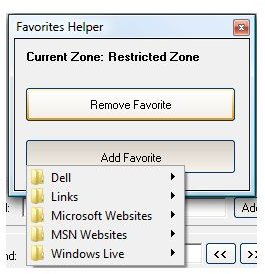
ZonedOut also include Favorite Helper which allows you remove or add a site from and to your favorites.
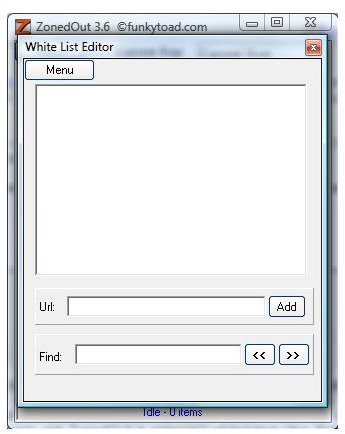
in ZonedOut - Any items in Whitelist is automatically stored by ZonedOut in its folder as zwhite.txt so whenever you add a list of sites, you can easily ask ZonedOut in removing whitelisted sites during the import process or after importing the list of sites from a text file. You can use the Whitelist editor within ZonedOut or simply open the zwhite.txt using a notepad.
Conclusion
Since ZonedOut application handles what Internet Explorer’s security zone manager cannot and is available as free utility, I recommend to all users of Windows and Internet Explorer to have this handy program. Removing any domains or IP address added by any of your user can be easily managed by using this application.
More Reviews!
Would you like to read more reviews? Look around Bright Hub and you’ll find reviews of numerous other leading security solutions including Norton Internet Security, Kaspersky Internet Security, ESET Smart Security, McAfee Total Protection, Blink Professional and ZoneAlarm Internet Security Suite.
Web Security Tips
For more information about web security and how you can surf more safely, see our articles How to Control Cookies in Internet Explorer, How to Block Third Party Cookies in Internet Explorer 7, How To Check If a Website Is Safe, Securing Your Web Browser’s Homepage and Using ZonedOut to Manage Internet Explorer Security Zones.
