Avast! Home Edition Review: Excellent Free AntiVirus Software
Introduction
Avast! claims to offer a total protection for your computer with anti-virus, anti-spyware, resident protection, instant messaging (IM), peer-to-peer (P2P), network and web shields. As you figured out, the firewall feature is broken into IM, P2P, network and web shield modules.
Installation (4 out of 5)
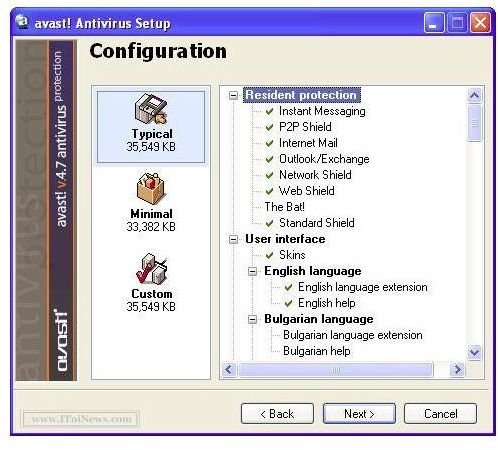
Avast! is a 29.8 MB download and easy to install with the usual Next – Next – Finish routine. During the installation, you will see a “Configuration” window, which will ask you if you will go with the Typical, Custom or Minimum installation. The default is “Typical” and I recommend you to go with this one; basically leave it as it is and carry out with the “Next.”
The good thing I noticed is that the program, if your computer is connected to the Internet, connects to its website and checks if there is anything new, such as new malware definitions. If it finds one, it downloads and installs automatically. Finally it asks you to reboot.
After you reboot, the program asks you for registration. I recommend you to go with the registration process, where you will enter a few details including your e-mail and the activation code (license key) will be sent to your e-mail box. Double click the program icon on your desktop and enter the license key to unlock the program. If you do not go through this process, the program will function as 59-day evaluation copy.
I was happy to see that during the start-up the program checks the memory to see if any malware has placed itself there and running. You will notice this as a slower start-up but this is something you can safely ignore.
I can safely say that the installation of Avast! was easy, clutter-free and not confusing for the end users.
Features (5 out of 5)
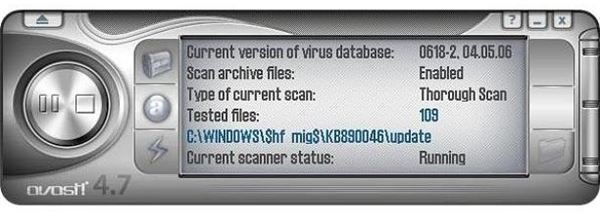
When you open up Avast!’s main window, you will hardly tell if it is an anti-malware or a multimedia program. I do not know if you liked the interface but the first thing I did was to switch the skin. Then I pushed the program for an update although the default update mode was automatic. It found updates of about 2.4 Megabyte, downloaded and installed without a problem. Good one, but I shouldn’t force the program to update.
Avast! has the anti-virus and anti-malware engines running at “resident” mode. Resident mode is where the computer is protected real-time, meaning that you do not need to scan your computer manually for malware. The contrary is “on demand” mode, which is the default mode for the most free antivirus programs. Congratulations to Avast! to include resident protection in their free release.
In terms of both network security, which includes IM, P2P, network and Web protection and the resident protection, Avast! scans your incoming and outgoing mail. It does not work together with your e-mail program, but works on the lower, protocol level with POP3, SMTP, IMAP4 and NNTP, which means that you are also protected from the malware that can arrive with your newsgroup subscriptions. The program ensures protection by going one level deeper in the user space and works with the instant messaging, peer-to-peer, e-mail and newsgroup protocols.
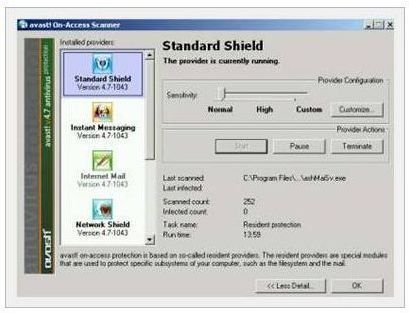
The users may think that the instant messaging is safe. It is, to some degree, correct. It is not likely that you will be infected by a virus just by sending text messages. However, today’s instant messaging programs offer far more features than sending messages, including file sharing. In addition to instant messaging, there are also the peer-to-peer programs that Internet users are sending/receiving files to/from eachother, which also needs protection.
Network and Web Shields together form the online protection. Network shield takes care of the Virii and Trojans in the wild (the ones that are not identified and spreading) and protects the computer as a lightweight firewall program against intrusion. Web shield, on the other hand monitors all the HTTP traffic and provides a countermeasures against adware, spyware, dialers etc.
The program’s nice part with the web and network scanning is that, it checks out the traffic real-time. In other programs, the incoming traffic is first cached (saved on the computer), analyzed and sent back to the system. Avast! does this on the fly and does not cache the traffic. You can expect a little memory usage here. In my tests, I have noticed the memory use between 5% and 18% when idle. You can safely assume this as 8% - 10%, which is good for an all-in-one program.
Overall (4 out of 5)
As a bottomline, I find the program to be a good protection for my computer (but still under heavy testing.) Having the anti-malware and firewall applications in one place relieves me from updating every program individually and keeping track of them. Plus, the resident protection is missing in many of the free programs.
I can not say that the program is excellent. It is geared towards inexperienced users and does not offer detailed configuration options. The resident protection by default is set to “Medium”, but I have increased it to “High.” In any case, I would prefer to have detailed explanations on security levels.
And finally, the interface: please work on this a little. Avast! is not a media player.
More Reviews!
Be sure to check out our review of other free antivirus solutions including PC Tools AntiVirus, Comodo Internet Security, AVG and Rising Antivirus.
