After looking at ZoneAlarm Free Firewall, we shall now look at CheckPoint’s integrated security suite, ZoneAlarm Internet Security Suite 2009. Could Zone Alarm carry its experience in firewalls to malware protection area?
Introduction
As we have told in our article , ZoneAlarm Firewall Free version is the best free firewall solution for your computer. Now we are looking at ZoneAlarm’s security solution, named Internet Security 2009 which is a commercial product. Do not think that “Internet Security” is simply about online protection, the suite offers total protection for your computer, on and offline.
Ease of Installation (5 out of 5)
As we are living in Internet age, there is a download option for the users instead of the retail, boxed-version. The download is a 260 Kilobyte installer, which, after installation connects to the ZoneAlarm servers to download installation files. With 1 Megabit connection, this takes about 15 minutes and I am sure it is a fair duration.
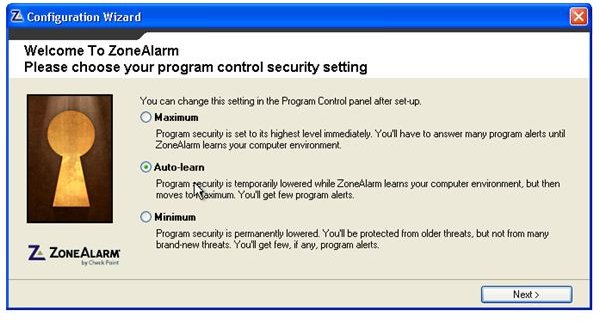
After the download, the installation is guided by the wizard. You can continue with the default settings and you will be fine. I suggest you to give a second thought to the security settings, where you are prompted for “Maximum”, “Auto-learn” and “Minimum” options. Although the default “Auto-learn” is fine, if you want a total control on your computer and will not be distracted by the program’s “Do I allow this?”, “Do I allow that?” questions, you can go with the “Maximum” option. This is not a one-time selection; you can change the settings any time from the program’s control panel.
The next question is about joining the DefenseNet, where you choose whether or not to participate in information share between the ZoneAlarm users anonymously. The default is yes and I chose to go with that.
Then the program asks you about enabling or disabling antivirus component. This is very important, since having two antivirus programs on your system is worse than having one -in this case 1 + 1 < 1- so if you have an antivirus program on your system, disable the antivirus component. Never work with more than one antivirus program.
When the installation is complete, ZoneAlarm Internet Security goes for a scan of all the executable files (exe files) in your system, assess their security risks and apply the necessary protection. Then it asks you to reboot.
Before carrying on, I would like to remind you that the first boot after the installation will take longer than other boots. This is perfectly normal because the software checks your entire computer’s startup process and ensures that there is no malware is present. This is for your safety and you will not experience this with the subsequent boots.
So far there is no technical question to confuse the user, the installation is very simple.
Ease of Configuration (4 out of 5)
After booting, you will notice a slowdown in your computer. Again this is normal because we have set the program to learning state, which means that it is now processing all your programs and your computer usage to secure your programs, which is similar to Novell’s AppArmor in Linux. This is not to be paranoid (but it is good to be a little paranoid in terms of security) but to establish a secure base for your system. These all do not mean that your computer will be slower. The slowdown process will diminish in a couple of days and your computer will return back to the normal operation speed.
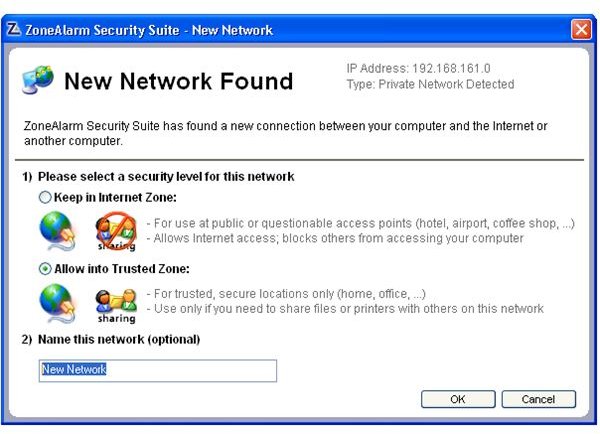
After that, you will be greeted with a window to set your security level for your network. The options are self explanatory and you just select the option suitable for your network.
After the initial securing process, you will be greeted with the main window and –if you are connected to the Internet- goes to update the antimalware database. The window says it is updating the antivirus database but it actually is updating the database for viruses, spyware and other malware; so do not think that it is only updating the antivirus.
Post-install configuration does not require much attention, but I would like to draw attention to the following points, which are located on the (sub)menus on the left:
- Spysite Blocking: The selection is set to “On”, however it would be better if the database included some well-known malicious websites.
- Cookie Control: The selection is set to “Off”. This option allows all cookies, including the ones from the tracking sites. This may need some tweaking since some websites do not work properly without tracking cookies. You can define the individual websites under the menu.
- Ad blocking: The selection is set to “Off”. This can be a good idea for a smoother Internet experience but this option does not block the pop-up and pop-under windows. You can define the sites which you allow to open pop-up windows (such as your bank) and set this option to “Medium”, which blocks all the pop-up and pop-under windows.
However, I must state that the program lacks detailed configuration options overall which the advanced users will miss.
Feature Set (5 out of 5)
With the first run, I suggest you to make a deep scan of your system (or when the program prompts you to do so), which will take longer than the subsequent scans. However, this will enable the program to build a secure base for your computer and the program will continue its next scans based on the information of this initial scan.
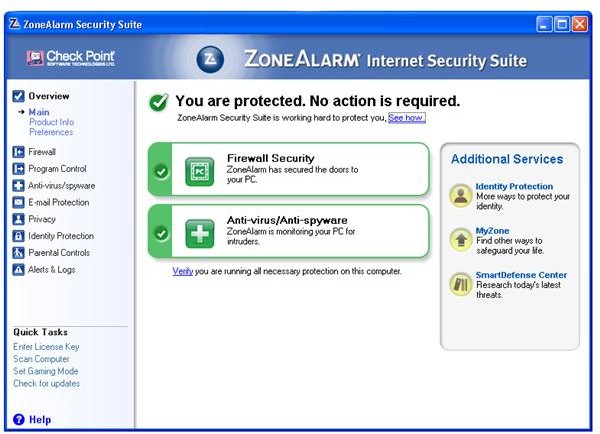
I can safely say that the ZoneAlarm Internet Security is a feature-rich application. In addition to the core protection with the malware, the suite also has e-mail protection, privacy and identity protection and parental controls.
The e-mail protection scans all of your e-mail when you are retrieving them from the server. The program checks the HTML codes, which may direct your computer to malicious websites in the background and checks the scripts/programs attached, such as .vbs (Visual Basic Scripts), .exe (Executable files) and the like. The list of file extensions checked can be found under the E-mail Protection options.
I would like to say that I especially liked the privacy and identity protection features that come with the program. The privacy feature empties your web browsing history and clears the cache thus erasing all of your Internet activity. The identity protection module on the other hand safely stores your digital identity and secures them against leaking on the Internet. You can compare it to password protection programs , but this module has broader and categorized approach, such as e-mail/passwords, social security numbers, credit card numbers etc..
Parental control module involves categorized access control for your family. For example you can stop your kids from seeing violent websites but can allow them to view file sharing websites. The protection is activated with just putting a tick at the appropriate category.
Overall (5 out of 5)
In addition to the antivirus and antimalware protection, the additional features make the software come closer to an overall protection. In this way, ZoneAlarm Internet Security competes directly with Symantec’s Norton Internet Security , not with 360 because Norton 360 includes “Norton Utilities” in addition to security protection.
In terms of price, ZoneAlarm Internet Security has a USD 49.95 price tag, compared to USD 59.99 of Norton Internet Security. Although the price is USD 10 lower, ZoneAlarm offers additional security features such as 0-hour rootkit protection, full kernel-level virus and spyware protection. These two full features make it stand one step forward of Norton Internet Security 2009. It can be installed in 3 household computers.
Comparing more, ZoneAlarm has another program called Extreme Security , which is placed in direct competition with Norton 360. This is an outstanding product especially with identity protection and has the computer tuning features. I can recommend Zone Alarm Extreme Security for all the users; especially for US customers, who will receive Daily Credit Card Monitoring, Fraud Alerts, Monthly Reports and Victim Recovery Services with the purchase of Extreme Protection suite, priced at USD 69.95 and can be used with 3 household computers. If your budget permits, go with this one. If not, Internet Security is good enough.
More Reviews!
Would you like to read more reviews? Look around Bright Hub and you’ll find reviews of numerous other anti-virus solutions including Norton Internet Security , Kaspersky Internet Security , ESET Smart Security , McAfee Total Protection and Blink Professional .


