Antivirus for iMac: Personal Antivirus Removal Tool Guide

Removing Computer Viruses on a Macintosh
In order for Mac users to secure their PCs from viruses and malware, they need to install some kind of personal antivirus removal tool. A firewall alone is not enough to stop malicious codes from entering one’s PC, so obtaining an antivirus program and keeping PCs updated with the latest versions and patches will help Mac users avoid many threats. Before downloading or purchasing an antivirus for iMac, the PC user must ensure the software is legitimate (i.e., it is a program coming from a reputable company or source).
Again, Mac users can do something about preventing computer viruses from invading their computer. They can act now by choosing one of the antivirus removal tools (mentioned in the next section) that is reliable. Users may go with a trusted brand, or want to try a low-cost one found available online to download.
Note: Mac users will know if they have a good virus protection program if it will alert them of a suspected or potential virus.
Top Antivirus Removal Tools for Macintosh
The top 3 anti-virus removal tools for a Mac computer are…
Norton AntiVirus 11 for Mac is reviewed as the top antivirus product on the market and is the most trusted antivirus solution for Mac systems. The program provides real-time and on-demand antivirus protection. It can automatically scans Mac PCs (searching files and email attachments, etc.) detecting and removing viruses and other similar threats. Key features include detection and removal of viruses, worms, Trojan horses, and rootkits. Its newest feature: the Norton AntiVirus dashboard widget (that is available with this version). The cost: it is available for less than $50.00. It works with the Mac OS X v10.5 (Leopard).

<strong>Intego VirusBarrier X5</strong> provides great protection from potential viruses. It will scan system files as well as e-mails to verify they do not contain viruses. If this personal antivirus removal tool detects a virus, it will remove it. This program is great at blocking viruses from entering Mac PCs. In addition to providing superb system performance, this antivirus for iMac offers users a good Graphical User Interface (GUI). It is available for less than $60.00.
McAfee VirusScan for Mac is an antivirus for iMac program that protects Mac users against all types of viruses and malicious code. It offers on-demand scanning by using its file drag and drop option. Scanning is easy, reliable, and accurate, and software updates are done from a single keystroke. This program is capable of providing broad protection. It is downloadable for a trial period, or can be purchased for less than $40.00.
More options? Of course there are. Here are another 4 popular antivirus removal tools (for free and for a price) for the Mac…
MacScan 2.6.1is a SecureMac antivirus (Trojan detection tool) and anti-spyware program for Mac OS X. It is available for a 30-day trial, and costs less than $30.00 for the program.
ClamXav is a free antivirus program (virus checker) for Mac OS X.
iAntiVirus is a personal antivirus removal tool capable of spyware protection for Mac OS X. With this program, Mac users have two options: (1) they can receive the free edition (that is downloadable) if wanting to use it at home, or (2) purchase it if wanting to use it for either business or commercial use.
Another good Apple antivirus product is the one found available for downloading at their Web site: ProtectMac AntiVirus 1.1.2. File size: 36.3MB. This program can scan both Macintosh and Non-Macintosh systems for malware. Users are able to schedule scans and monitor them, if they so choose. In addition, updates are checked daily and downloaded automatically.
Choosing the Right Mac Tool
Whether it is using a free antivirus program or a paid one, the smart choice is to have at least one installed. The right antivirus removal tool to install is the one that meets individual users’ requirements.
Advise: Do not wait too long to decide on what software to install because virus attacks happen daily.
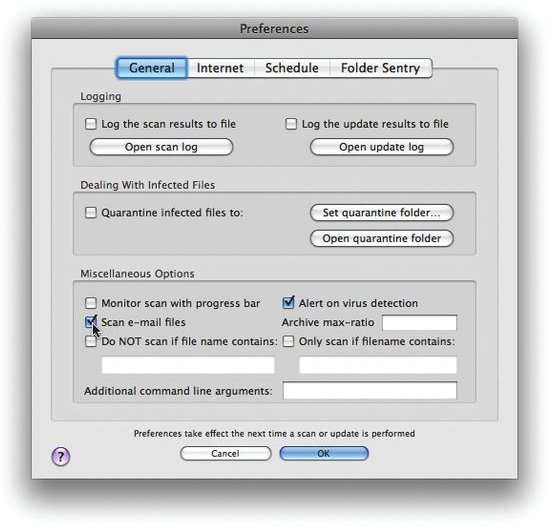
Tip: Keep the antivirus software updated in order to provide automatic protection against the latest threats. Be sure to check your antivirus settings on your Mac to make sure that automatic updates are scheduled to occur daily. Moreover, make sure to set up automatic scans–to scan all email attachments before a user is allowed to open them. This should be done for downloading music, movies, and other items too.
Screenshot by Macworld.com
References Section
Mac Antivirus Reviews: https://www.antivirusmac.com/
Security Software for Mac: https://download.cnet.com/mac/security-software/
Screenshot Credit: Antivirus Setup Preferences
Image Credit: Antivirus Software For Mac OS
