GeSWall Versus DefenceWall: Which is Best?

GeSWall vs. DefenceWall
GeSWall
This product ensures safe use of Internet applications, and it can protect the network from intruders. It’s capable of locating suspicious behavior, which it can isolate before the program causes harm to the user’s PC. It doesn’t stand up to DefenceWall, but it does have the advantage of being absolutely free to download (6.04MB). It’s a good alternative to DefenceWall! It’s downloadable at gentlesecurity.com. To learn more about it, check out this article, "GeSWall Review: A Free and Innovative New Security Tool."
**
DefenceWall
This product gets the thumbs up! It offers more excellent protection than GeSWall and most other anti-virus and anti-spyware scanners on the market. Like GeSWall, it protects a user’s computer from malware, but it offers more protection against identity theft. Unlike GeSWall, it does have a price ($39.95), but users are able to download DefenceWall for a 30-days free trial. It’s downloadable at softsphere.com. To learn more about it, check out this article, <em>“DefenseWall HIPS - Best Type of Internet Security!”</em>
Comparing Products

GeSWall - As a security control mechanism, it can isolate applications when needed, as in the case of untrusted files. This allows users to be able to configure the restrictions of untrusted applications. Furthermore, it can block or deny network access and traffic. One downfall for GeSWall, however, is that it doesn’t use a real-time scanner.
Pros/Cons: It provides good security, and it can ensure a safe use of the Internet; but it has no total untrusted file control, nor is it capable of defending from higher level of intrusions.
Available products (free and paid versions):
- GeSWall 2.9 Freeware - It works with Windows 2000/XP/2003/Vista/Windows7. File Size: 6.2 MB
- GeSWall 2.9 Professional Edition - It also works with Windows 2000/XP/2003/Vista/Windows7.
- GeSWall Server Edition 2.3.5 - It works with Windows 2000/2003.
* Note: Users here have a choice: they can either go with the “free” security tool, or the “professional” shareware version (which contains extra features). The other product is strictly for the server.
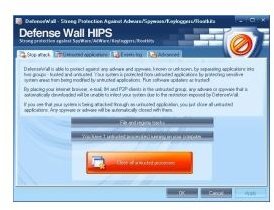
DefenceWall - As a security control mechanism, it divides all applications into Trusted and Untrusted groups. It provides more malware protection than GeSWall. In addition, it has built-in total untrusted file control. Furthermore, DefenceWall has all the configuring options of GeSWall but has already resource protection configured so that untrusted programs are separated from each other. Version: 3.11 is availble (since April 2011) to download (4.2MB) at CNET. com. It works with Windows 2000/XP/2003/Vista/7 32-bit. It is free to try (30-day trial); or $39.95 to buy.
Pros/Cons: It’s effective and sufficient when it comes to integrity protection, but it does not control outbound connections; for this reason, the protection against backdoors is not sufficient.
What’s the better product? It’s worth saying that both products work well as an effective intrusion prevention system.
Image Credits: DefenseWall and GeSWall
References
GeSWall Review: https://www.youtube.com/watch?v=PBKNHBl-yos
DefenseWall V3: https://www.youtube.com/watch?v=H6RpYdmjpqc
