If you think you may have been infected with malware via AOL Instant Messenger (AIM), you should check out the free AIM malware cleaner called AIMFix. This article will describe some of the symptoms of AIM malware as well as how to use AIMFix to clean up the infection.
Overview
AOL Instant Messenger (AIM) is a popular instant messaging client used by millions of people around the world. In the world of computers, anything that is popular is likely to be a target for malicious activities including viruses and other types of malware.
In 2003 and 2004, AIM viruses and malware became quite prevalent – so much so that Jay Loden decided to do something about it. He modeled AIMFix after another virus removal tool popular in late 2003 called phxfix. AIMFix was built to remove AIM viruses and malware and was structured so Jay would be able to update it frequently as new types of malware were released.
Today, AIMFix is still updated on a regular basis. This article will walk you through some of the symptoms of AIM malware as well as how to run AIMFix to remove any infections.
Symptoms
When infected with a piece of AIM malware, you may notice some oddities when using the instant messaging client or when performing routine tasks in Windows.
- Certain Windows applications may close automatically shortly after opening such as the Task Manager or Registry Editor.
- Security settings may be reset so you are unable to download applications – in hopes of blocking your access to a site or tool that will help you out of your predicament.
- You may also notice oddities within the instant messaging client itself – with web sites or odd messages appearing in a profile or in messages themselves.
Using AIMFix
Luckily, using AIMFix is about as simple as it gets.
-
Download the latest version of AIMFix from the Jay Louden site - https://jayloden.com/aimfix.htm
Advertisement -
Save the aimfix.exe to a location on your PC
-
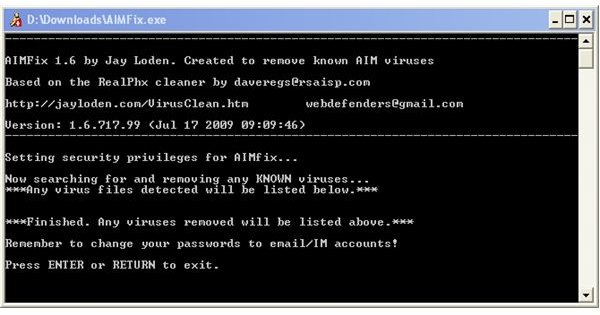
Run the aimfix.exe by double clicking on it and a shell window will pop up informing you of the status of the tool. Any malware detected and recognized will automatically be removed.
Advertisement
If you find after running AIMFix that you still experience some of the symptoms above, you may want to run AIMFix in Windows Safe Mode or run a full-fledged virus\spyware scanner as you may have something other than AIM specific malware.
Hopefully with these hints you’ll be back up and running in no time!


