Proxies not only serve the purpose of circumventing firewalls and similar devices for accessing blocked sites in school and at the workplace, they are also useful for browsing the web without leaving traces, and for faster load times of Intranet sites.
Purpose
A proxy server is a specialized computer or service for fetching URLs on behalf of users. Reasons to use them usually fall into one or more of the following categories:
-
Faster load times
Advertisement -
Freedom of Web browsing
-
Private Browsing
Advertisement
Proxies may, or may not, cache the visited web sites for bandwidth considerations.
Load Time and Bandwidth
Using a proxy server can be helpful in faster load times of web sites, and at the same time reduce network bandwidth consumption. Supposed a company headquartered in Europe places an Intranet proxy in their branch office in São Paulo. The employees in Brazil can then access the cached Web pages of the company website in Europe much faster than if each Web page was loaded trough the Internet backbone, which likely passes a web request first to the United States, where the traffic is relayed over the Atlantic. There is nothing to be done in general for using this type of proxy; an administrator will take care of all.
Freedom of Web Browsing
Many employers have implemented technical restrictions at the office so that staff cannot access social network sites such as, for instance, Facebook or YouTube, during office hours. The same goes for free Web email services such as Gmail for example. Along the same lines do schools, universities and certain countries block access to “inappropriate” web sites.
There a more sophisticated technologies such as filters for restricting or blocking user’s web requests; however a corporate internal proxy server may as well be used for controlling web browsing: If the URL (Web site address) is on the blacklist the proxy won’t let users connect.
That’s why the savvy users make use of a free Web proxy such as www.NoTrack.org . There, the user enters the URL he or she wants to visit and the proxy server fetches the website. In many cases that works because the network traffic doesn’t easily reveal that, for instance, Facebook, was visited. Thus, such a Web proxy server is sometimes called unblocker.
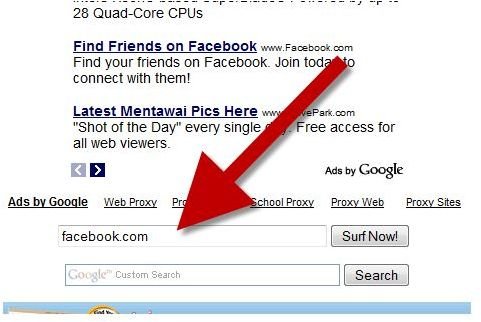
In the image below you can see where the web address of the to be unblocked site has to be entered into a form bar (the form is similar for most of these sites). Hitting the Surf Now button will take you straight to the URL you want to visit.
Depiction of How to Visit Facebook with a Web Proxy
Lists
However, sooner or later it will likely be discovered that a certain website provides unblocking services, and the administrator or software will block the proxy. That’s why so many proxy lists (web sites listing free proxies) exist. Some of these proxy lists even offer mailing lists so that subscribers have the latest working proxies sent to their mailbox. When you google the term “proxy list” you will get an abundance of relevant results.
Anonymity
Apart from bypassing firewalls or web filters some users want to make use of proxies for the sake of anonymity. The unblockers discussed above do little in terms of concealing the original IP address to the visited web site. If someone wants to browse websites anonymously then they are better off with a SOCKS proxy as they conceal the IP address of the originating computer, usually for nominal fee as subscription service. More about socks proxies can be found in our article How to Browse the Web Anonymously for Free .
The Bottom Line
These days, most proxies are designed to overcome restrictions of Web browsing, and are free. These unblocker proxy services offer little, if any, anonymity. Anonymous proxies on the other hand make use of the SOCKS protocol, and are paid services. The importance of caching proxies is declining because of increased Internet speed and faster connections to Internet service providers.
In any case be aware that proxy servers of all kind usually log their traffic, and that their operators may be forced to hand out the log files by a court order. It’s definitively not a good idea to conduct illegal activities or sending out Spam using proxy servers!
Further Reading and Resources
How to Browse the Web Anonymously for Free - https://www.brighthub.com/computing/smb-security/articles/31878.aspx
Example of a proxy list: www.proxynet.org
Example of a proxy mailing list: groups.google.com/group/freeprox
References
- Image source: notrack.org
- Author’s own experience


