If you’ve set up Exchange 2003 or 2007 and allow your users to utilize the extremely useful Outlook Web Access (OWA), you need to make sure you’re securing the connection with SSL. Are you? If not, read on to lean how.
Overview
Outlook Web Access (OWA) allows users to connect to their Exchange 2003 or 2007 mailboxes from outside of your network, or on your network without a fully fledged Outlook client. Either way, it’s an extremely useful tool and is one of the must have features when using Exchange. Using the basic Exchange setup leaves your OWA utilizing an unsecured connection. This means user passwords are passed from the client to the Exchange server using plain text. Simple network sniffing tools can easily intercept the password and suddenly your Exchange server is compromised.
This article will show you how to secure OWA using SSL for both Exchange 2003 and Exchange 2007 – both processes are the same.
Obtain and Install a Web Certificate
Most of the work of securing OWA with SSL is obtaining and installing a web certificate. In this article, I will cover the high level steps to do this. For detailed instructions, please follow this article from Microsoft on How to implement SSL in IIS . Once the Certificate is installed on your server, you can continue by enabling SSL on OWA.
First, you need to create a certificate request in IIS Manager. The Certificate is used to identify your server and to encrypt the data passing from between clients and your server. Once a request is created, you send it off to a Certificate Authority (CA) for processing. You can create your own Certificate Authority to use on your domain, but browsers won’t see your CA as a “trusted” authority, so you’ll need to do some extra work. Another option is to use a trusted CA like Verisign or Thawte. These certificates will automatically be recognized by browsers and won’t give your users a security warning.
After the request is sent to the CA, the CA verifies your company information and host name and sends you back a certificate file. Once you have the file, you install it onto your web server using IIS Manager.
Enabling SSL for OWA
After the certificate is installed, you can configure OWA to use the certificate. I’m making the assumption Exchange 2003 or 2007 has already been installed and Outlook Web Access is already working – without SSL being enabled.
- Start the IIS Management console by going to Start, Control Panel, Administrative Tools, Internet Information Services Manager
- Browse to the site where your Exchange virtual directory is –in a typical Exchange install, this is located under the Default Web site. Right click on the web site and select Properties
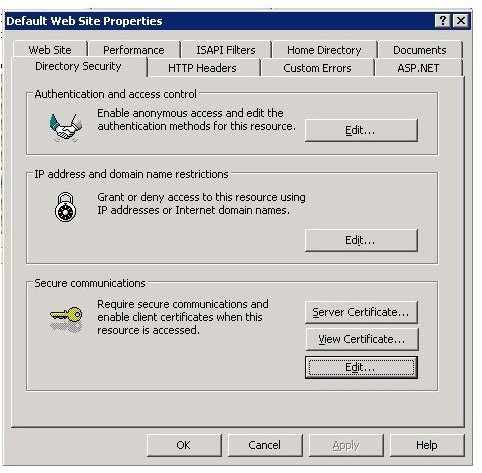
- Click on Directory Security (Figure 1)
- Under Secure Communications, click the Edit button. If the Edit button is greyed out, the server certificate was not installed properly
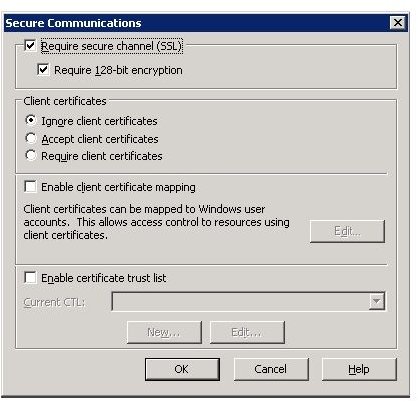
- Check the box for “Require secure channel” and click OK
- You should now be able to access the site using the secured URL via https://
/exchange (for Exchange 2003) or https:// /owa (for Exchange 2007)
Images