How to Stop Sending Spam on Exchange Server: The Role of SMTP Relays in Spamming
Spam and Spamming - Brief Introduction
Before we proceed and understand how to stop sending spam, let us understand spam. Spam is generally an unwanted email message that you do not expect. These email messages are broadcasted to multiple users and contain contents that advertise a product or service. They may also be used for other purposes. Each server hosting an email service is capable of recognizing spam by reading the headers of the email. This is why you see a separate Spam folder in your email accounts. Though there are filters that divert the spam to the relevant directory, some of these messages manage to get past the filters to end up in your inbox.
Even as technology is progressing to save you time and effort managing spam, malicious users of the Internet are also putting in their efforts to bypass spam filters. The most common method they use these days, is to use a reputed email client such as Windows Mail, Microsoft Outlook, Eudora or Thunderbird. When an email server sees that the email has originated from a reliable email client, it can get confused, and the spam is often delivered to your inbox.
While there are certain restrictions imposed on users of email services so that they cannot spam others, the measures are, unfortunately, not strong enough to prevent users from bugging others with unwanted emails. However, if your network is using Microsoft Exchange Server to send mail, you can find the solution in this article useful to stop the sending of spam.
How to Stop Spamming through Exchange Server
A high priority of network designers is to stop sending spam through their networks. Most of the email clients are configured to send mails using the SMTP protocol. Microsoft Exchange Server, though considered different from SMTP, also contains the latter as one of its many components. The MS Exchange Server is comparatively more effective than SMTP. Still, users who want to play around use the dependency of Exchange Server on SMTP to spam. How do they do this?
One of the main features of the Exchange Server is the Active Directory Service. This service stores the email address and other related information for users in a group or an organization. Based on the Directory Service, the mails sent by any user of the group or organization are placed into two categories.
If a mail is sent to a user whose name is listed in the Exchange Server, the mail is a normal one, also called an “internal” or “submit” email. On the other hand, if the mail is sent to users outside the group or organization, the mail is said to be “relayed”, meaning the mail is relayed through different servers in order to deliver it to the intended recipient. SMTP relays are the most common method used for spamming.
As this mail carries the reference of MS Exchange Server in its header, it is hard for email service providers to tell if this email is regular mail or spam. This is where the spammers take advantage. One of the steps to avoid spam through SMTP relays is to turn it off. While turning off SMTP prevents users from sending spam using accounts dependant on SMTP alone, changes may be made to the Virtual SMTP Servers on Exchange Server to reduce the amount of outgoing spam.
Important Note: More and more network administrators are turning off the SMTP option on their LANs. This may cause problems in sending email in the future when most of the SMTP protocols across the world are turned off. Hence, it is better to configure your network’ email clients without POP (Post Office Protocol) or IMAP (Internet Message Access Protocol) options that use SMTP. Administrators can use other options such as HTTP (Hyper Text Transfer Protocol) so that they do not need to turn off SMTP on the LAN. Alternatively, set the LAN’s email client to use Exchange Server by configuring it to avoid users from misusing your network to spam.
Configuring the Exchange Server to Stop Spam
You can use SMTP Virtual Servers and configure the different settings so that you can control the entire system and avoid users from sending out spam. To access the SMTP Virtual Server, you need to:
- Ggo to the Server object to select Exchange System Manager.
- From Exchange System Manager, go to the Protocols container and then to the SMTP node.
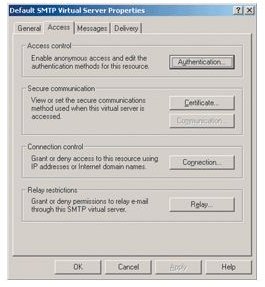
- Right click the default SMTP Virtual Server to select Properties.
In the dialog box that appears:
-
Select the tab named Access (see Figure 1 in Screenshots section below).
-
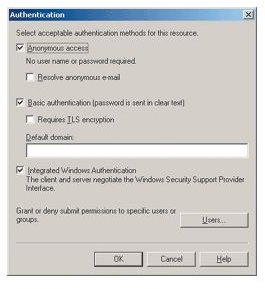
Click on the Authentication button to access the Authentication dialog box (See Figure 2).
-
You can specify the different authentication methods for accessing the SMTP Virtual Server.
-
The first option is Anonymous Access, which if checked, will allow any type of client to use SMTP relays and talk to your server.
-
The second, Basic Authentication, allows users to send text credentials to authenticate. This is more secure.
-
The third option in the dialog box is the Integrated Windows Authentication checkbox. Keep it checked. Many network administrators remove it assuming that Exchange Servers do not need SMTP at all. This may lead to possible loss of emails.
-
Coming back to the Access Settings (Figure 1), click on the Relay button to secure the relays through the Exchange Server.
-
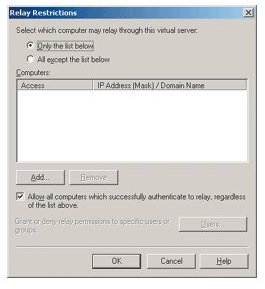
In the dialog box that appears (Figure 3 below), you can specify which computers can use relays.
-
Uncheck the option at the bottom of the dialog that allows all authenticated computers to use relays. This offers more protection from spam. Even after unchecking the box, the Exchange Servers are able to deliver mail to the recipient or forward it. Hence, there is no use taking unnecessary risk by keeping the option open.
-
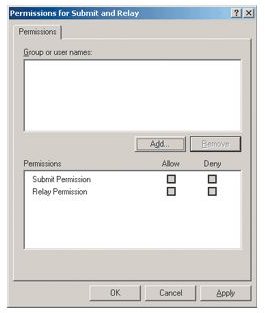
Once you remove the check on the “Allow all computers…” in the dialog box, you are able to access the Users button on the same dialog box. This option is not accessible unless you remove the checkbox that allows all computers to relay after authentication. Once you click the button, you get a Relay restrictions dialog box (See Figure 4 below).
-
Here, you can choose the user groups and levels that are able to relay or use the SMTP Virtual Server that we are configuring. You may want to define user groups and levels to reduce the risk of spamming.
However, the trick is to remove all the user groups and levels that are present, and to not add any level or group if you want greater security for your network.
Before you remove all the pre-existing user groups and levels from the upper box, select the “Deny” check boxes for both the “submit” and “relay” options under permissions. This keeps the relays active on the network without allowing any user to actually use it.
Furthermore, only the Exchange Servers that are related and set up on your LAN can communicate among themselves. This will prevent the Exchange Server from relaying spam without having to turn off SMTP relays that may create obstacles in delivering mail properly.
ScreenShots
References
Technet Library, https://technet.microsoft.com/en-us/library/dd277329.aspx
