Many programs exist on the Internet that claim to completely clean your computer of any such files that allows others to track your computer usage. ParetoLogic Privacy Controls is one of them. The article takes a cut on the software, noting down its pros and cons.
ParetoLogic Privacy Controls – What the Company Says
The company says that simply deleting the files and cookies does not remove the information from the computer. For complete security, these temporary files and cookies should be shredded beyond recognition. True to the words, ParetoLogic Privacy Controls offers several shredding options that go up to the US Military Standards.
The official webpage of the ParetoLogic Privacy Controls lists a number of items that it claims to remove from your computer once you run the scan. These include activities related to Internet Explorer. The software also claims to clean all traces related to P2P applications such as Limeware, Bit Torrent Clients, uTorrent, Azuerus, and Kazaa. Besides, ParetoLogic Privacy Controls can also clean leftover traces from Instant Messaging programs such as Skype, AOL, Windows Messenger, Yahoo, Gmail and many others.
The Co founder of ParetoLogic, Don Wharter, says in a press release that it is necessary to use the Privacy Cleaner even if you are intending to sell off your computer because there are ways by which the person who buys your computer can recover the leftover data to misuse it.
Currently the ParetoLogic Privacy Controls software tool is available in eight languages serving more than 70 countries around the world. The tool, as per the co-founder, is a marriage of sophisticated technology with user-friendly interface.
ParetoLogic Privacy Controls – Preparing to Test the Software
Several programs on the Internet claim that they can completely protect your privacy and prevent others from tracing your computer usage. ParetoLogic Privacy Controls also claims the same but with the additional offer of US Defense style cleaning. I downloaded the software to test the program and the degree to which it can keep your computer experience, a secret.
System Requirements as per the Download site: The company recommends Pentium III or above processor with a minimum of 216 MB RAM, 20 MB HDD space, and an internet connection on Windows 2000 or later. The speed of the connection is not mentioned on the Product webpage so I assume it can also be downloaded using a Dial-Up connection. I am saying this because I was able to get the software in 8 minutes on a 256 Kbps connection. On Dial-ups, it should be around 20 minutes on low traffic lines.
Computer Used to Test ParetoLogic Privacy Controls: The Windows XP Pro laptop I used to test the software had only 512 MB of RAM. It had the Intel Celeron processor of 1.6 GHz. The Hard Disk size was 80 GB. In addition, the broadband connected to the laptop offered the speed of 256 Kbps.
Downloading ParetoLogic Privacy Controls - The ParetoLogic Privacy Controls did not take much time to download though I did not use any of the download accelerators. It took approximately 8 minutes to download ParetoLogic Privacy Controls using the simple Microsoft Internet Explorer’s download system. The size of the download is 5601 KB or 5.4 MB. If you use any of the Internet Download Accelerators, you should be able to download it within 5 minutes on broadband and within 15 minutes on Dial-up connections.
Installation of ParetoLogic Privacy Controls: The installation started as soon as the download completed. The entire installation process took approximately 4 minutes on the laptop. It was smooth without many keystrokes. As with other programs, it asked for acceptance of the EULA and the installation folder. You need not do anything after that. It installs automatically. When I tried to check the uninstallation time, it was even less: around 3 minutes.
Upon successful installation of the ParetoLogic Privacy Controls, it creates two scheduled tasks. One is for a periodic check of updates while the other is for regular unattended scanning. You can change the time of scheduled scan by clicking on the icon in Scheduled Tasks Folder. To access this folder, click on the Start Menu, All Programs, Accessories, and then System Tools. So far, there were no problems with the program. Let us check out the effectiveness of the program in the next section.
ParetoLogic Privacy Controls: The User Interface
**
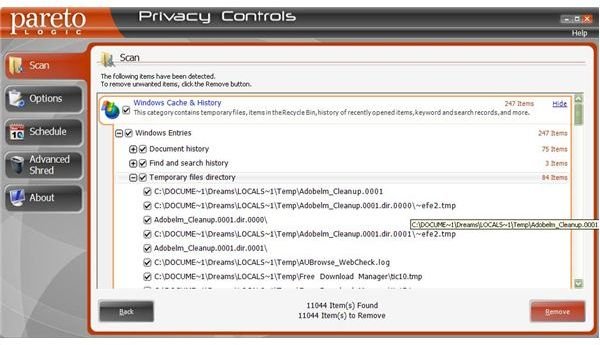
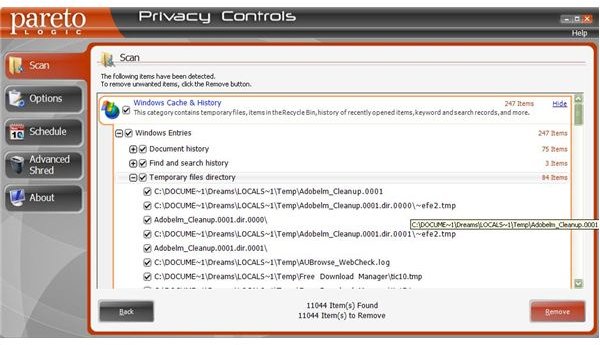
The user interface of ParetoLogic Privacy Controls is clean (uncluttered) and pretty easy to understand. It has only 5 links to the left, namely Scan, Options, Schedule, Advanced Shred, and About. The main window of the program has a single link that says Scan.
The Scan link can be used to scan the computer. Clicking on the Scan button will give you a list of unwanted and leftover files categorised into the following sections:
Windows Cache and History: Contains temporary files, recycle bin files, recent document links and links to recent searches.
Internet Browsing History: Contains cookies, temporary Internet files, and links to recently visited sites.
MS Office History: Contains recently opened documents.
Multimedia History: Contains playlists, links to recently visited music sites and similar data.
Email Trash: Contains the trash folder of your email client and email activity logs.
Third Part Application History: This part contains data from IMs and any Peer to Peer Applications you used.
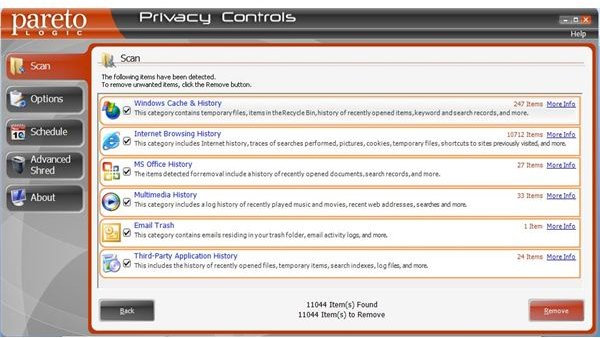
To sum up, the ParetoLogic Privacy Controls offers to cleanup almost all the private data on your computer. It lets you unmark the files you do not want to delete by unchecking the check box against the file. To see the details, click on the More Info link located to the top-right of each section. This will expand each section and the sub-sections (if applicable).
The best thing I noticed in ParetoLogic Privacy Controls is that it neatly classifies the unnecessary data files under different sections unlike its many competitors that just display the files that will be deleted. In the latter case, most of us do not get any idea as to what part of the computer is the file related.
The Advanced Shred Option
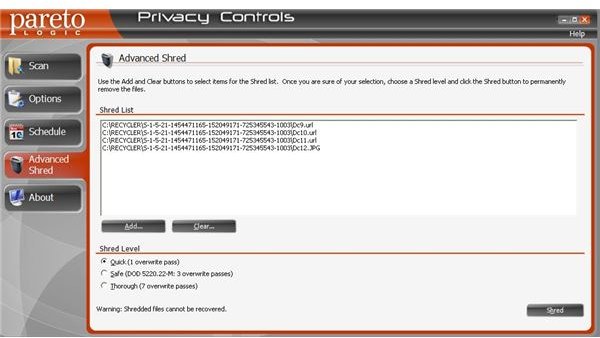
The Advanced Shred Option allows you to add unwanted files and folders to a listbox that appears when you click on the option. You can then delete all these files and folders permanently, beyond recovery. The option allows you three types of shred. The first one is the Quick one, wherein the program employs a single pass. The second option under the Advanced Shred option employs three passes. The third option is the most powerful eraser as it allows you to completely destroy any number of files and folders with seven passes!
You can use the Options Link to select the sections or subsections that you do not want to be scanned. The Schedule option lets you re-schedule the automatic scanning. You can use the About option to get a valid license for your ParetoLogic Privacy Controls so that you can use all the features that are not available in the demo mode.
The Bottom Line
While ParetoLogic Privacy Controls is undoubtedly well designed and easy to use, it’s nonetheless difficult to justify its $29.95 price tag as there are free applications, such as CCleaner , which will do everything that ParetoLogic Privacy Controls (in fact, CCleaner actually does more than Privacy Controls). My recommedation: save some bucks and go with a no-cost alternative.
ScreenShots
This post is part of the series: Top Computer Safety Software and Software for Enhancing Computer Performance
This series aims to review top computer safety and software for enhancing computer performance. It covers top 10 firewall, offers you a list of top computer backup programs while discussing top remote backup services. It also reviews software for enhancing computer performance.


