Free Antivirus Shootout: Avast vs AVG vs AntiVir – Part 3

Written by:  • Edited by: Bill Bunter
Updated Feb 4, 2011
• Related Guides: Malware

This is the final part of this series of articles which we will compare the on-access, on-demand protection and web protections by Avast, AVG and AntiVir against malware and exploits.

On-demand Detection: AntiVir

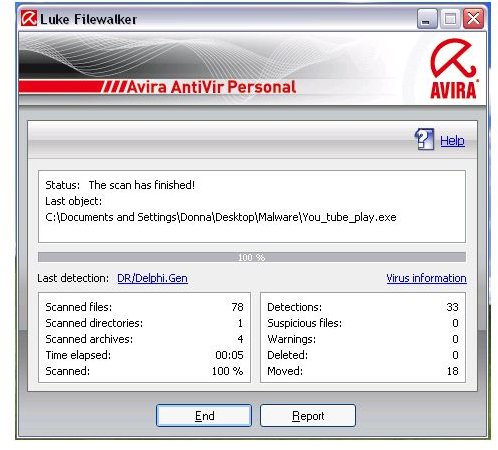
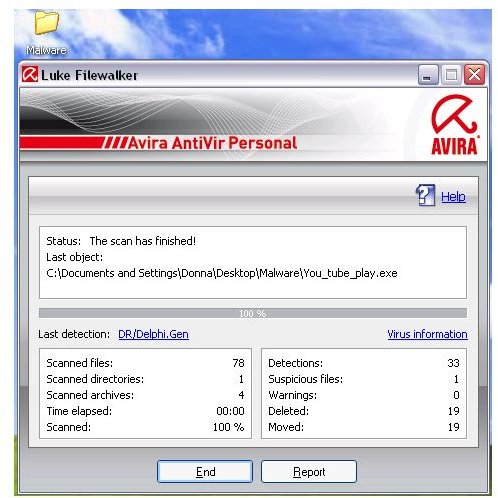
AntiVir’s default setting for its scanner is able to detect 18 out of 20 samples . Using the non-default setting in AntiVir improved the on-demand detection by detecting 19 samples .
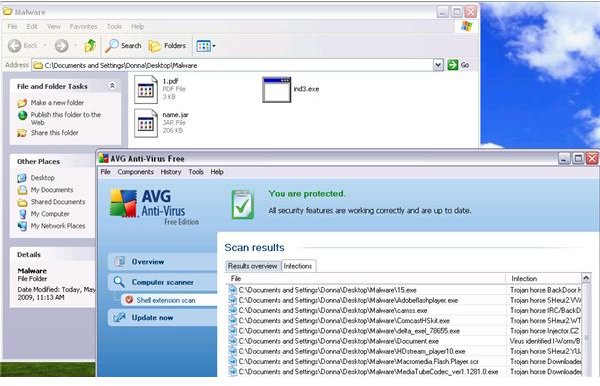
AVG is able to detect 17 samples using the default and non-default settings while Avast performed the same but it detected 18 .
Real-time Protection

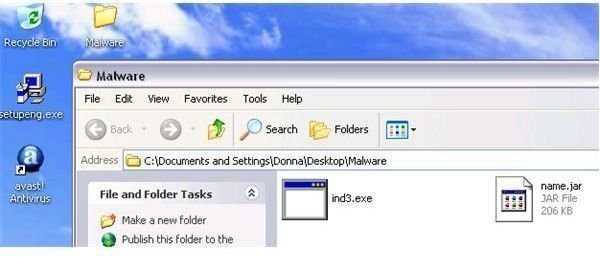
On-demand detection is not the only feature of AVG, AntiVir and Avast but the program also features real-time protections against malware. To test their on-access protection, I started transferring the 20 samples from external drive to the system drive.

Default settings of On-access Protection: AntiVir and Avast

Avast on-access protection and AntiVir Guard both detected 17 malware while transferring the 20 samples from external drive to the system drive. AVG Resident Shield performed differently though for it did not detect a single malware while transferring the samples. The resident-shield of AVG only started protecting the computer when the directory containing the samples is opened and it able to detect 14 out of 20 only .
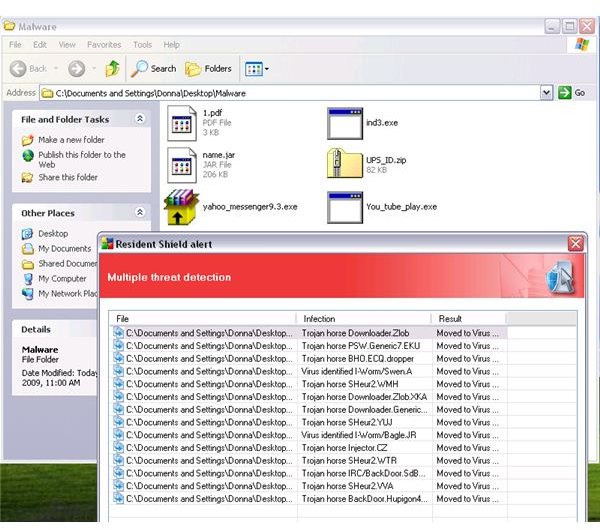
Non-default settings of On-access Protection: AntiVir

AVG’s resident shield when using the non-default settings of its real-time protection quickly detected 15 out of 20 samples right after the transfer (no need to open the folder containing the sample). AntiVir Guard performed better when using the non-default settings by detecting 18 samples during the transfer of malware on the system drive. Using the highest on-access protection settings in Avast did not improved the detection capability for it again detected 17 samples.

Web Protection on Malware in the Wild: No Winner

Most antivirus program will prevent malware infection by monitoring any files that we will create or store in the hard-drive. It can also protect you by blocking malicious files, fake applications and other type of malicious contents while you browse such known exploits and malicious scripts.

I visited 9 rogue links that will allow me to download fake AV or the link will redirect to a fake AV website. AVG, AntiVir and Avast blocked the access or download on 4 rogue links only. When I visited 6 links that have known exploits, AntiVir and AVG failed to identify 5 of the 6 exploits while Avast detected 3.

I tried to download 3 Trojans, 2 spyware and 2 worms: AVG detected 3 Trojans while AntiVir and Avast prevented the download of 2 Trojans. AVG and Avast failed in preventing downloads for 2 spyware and 2 malware that is known worm Koobface. AntiVir allow the download of the 2 worms but blocked 1 spyware download.

The Bottom Line

While all 3 programs have strengths and weaknesses, AntiVir's detection capabilities, speedy scan times and overall ease of use make it a clear winner.

For more information, check out our detailed reviews of AVG, AntiVir and Avast!


Comments

Showing all 25 comments
 
Don Slentz Jun 8, 2011 12:49 PM
AVG hides a lot of it's memory footprint
AVG hides a whole lot of it's memory footprint in the system process - If you will look at it through process hacker or process explorer you can see this if you want to test it. look at the system process on a machine without AVG on it it will almost always be under 300k - with AVG it will always be above 100,000k
I have hounded AVG about this ever since AVG 8.5 with no response - I guess since you can't see it it doesn't present a problem (FOR THEM)
Solarlynx May 8, 2011 8:56 AM
Comodo is the best!
Comodo would easily beat those 3 avs by protection and detection.
rahul Jan 11, 2011 4:30 AM
avast the best
i have use avira for about 6-8 months and then switched to avast.it is far better than avast.auto update is a good feature of it.
Dexter62 Dec 29, 2010 7:16 PM
RE: Free Antivirus Shootout
Thank you for the clarification, Donna. Also, thanks for a great article on an important topic. Happy New Year!
Donna Buenaventura Dec 29, 2010 1:13 AM
RE: Free Antivirus Shootout: Avast vs AVG vs AntiVir – Part 3
Hi Dexter62,

Tested products are the free editions of AVG, Avast and AntiVir.
Dexter62 Dec 28, 2010 10:45 PM
antivir vs avast
I dropped Norton and McAfee long ago for being reosuce hogs. I also dropped AVG as I didn't like the way it worked - also seemed like a resource hog and didn't always catch things. Been using Avast for some years now and it's great. Hardly know it's even there and does the job well. I use the home-free version. Never tried AntiVir and curious if it's superior to Avast and whether this article tested the Home-Free or paid version of AntiVir because they're very different. Would be nice to know if the test was between home-free version of Avast and AntiVir or something different (like paid versions only). Need to make sure we're understanding appled to apples here.
Pratik Chaudhari Dec 27, 2010 10:10 AM
Free Antivirus Shootout: AVG vs AntiVir vs Avast!L
I am using Avast anti-virus for about 2yrs. Most of the anti virus like AVG and AntiVir give me problems with virus detection.I visit a lot of websites, most of them probably infected. avast does it work without a glitch. so for me avast is better and has kept my sys. virus free for about 2 yrs!!!!!!
a bottle of wine Oct 2, 2010 7:48 AM
avg
avg is better!
sk Sep 26, 2010 1:46 PM
i am not agreed
my recent experience with my virated pc says that: best is nortonn................
Molds May 27, 2010 12:07 PM
Antivir for Life
I've tested all three of them since the day our family had a computer shop. I don't like AVG.. I used Avast for quite a while, maybe 8 months or so but it gave lots of problem with regards to virus. Then I switched to Antivir which was reffered to me by my then officemate.. I'm still using Antivir up to this day.. I started using it since 2004 and it's 2010 already.
gromakakolo May 24, 2010 8:37 PM
I agree with Final Verdic
Your right, Avira Antivir free edition is really cool and detects the most infections out of the PC. Works great on my old intel pentium II, 400mhz, 256MB RAM, winxp sp2 computer as well - meaning it does affect overall performance of very old and slow PCs.
Don Apr 16, 2010 2:16 AM
http filtering performance
What I'd like to know is how much they each slow down web browsing. How much cpu do they take, relatively, to load 100 web pages with firefox?

Which one does it with the least processor time overhead, or the least time delay?

Thanks!
Burnselk Feb 6, 2010 11:59 AM
mainak
How long have you used AVG? I just loaded it on my nephew's computer yesterday........after removing some bothersome program that kept him from reaching his desktop upon startup. "It" had no names associated with it so I can't tell you what it was. I finally restored the computer to an earlier point and was able to get around it and run the free online bitdefender. For some odd reason I was unable to run eSet's free online scanner. Go figure. Anyway, I wanted to add that info for what it's worth.
Jay Jan 24, 2010 1:32 PM
Avast registration and...
I just installed Avast this morning. The current version of Avast Free v5 no longer requires a registration code. They ask for a name and Email address (and other skippable fields) on the registration screen. When you submit that, the program "registers" itself for a year. No Email/key malarky to go thorough.

I recently ran some tests of AVG, Avast and AntiVir on a test system. Long story short, AntiVir found infected file "A" that Avast and AVG did not find, while Avast and AVG found infected file "B" that AntiVir did not find. Infected files were confirmed at VirusTotal, and I noted that the dates on VirusTotal indicated these had been seen over six months ago.

Of the three AntiVir's updates were dog-slow, the interface was klunky, and there were a couple language translation errors.

That leaves me torn between AVG and Avast. They both are neck-and-neck, however a few niggling things annoy me. AVG's "sales pitch" occurs a couple times a year, where you'll suddenly get a popup browser page suggesting you upgrade to the paid version. This happens for a couple days then goes away. The new version of AVG creates $AVG folders on every drive including removable drives. AV programs should NOT write to user drives in that way.

Avast's "simple" interface is fugly, looking like a graphical trainwreck. Turning that off gives you a more clunky but at least usable interface. The scanning is annoying, in that it stops the process on anything it finds. I would much rather have it scan then give me a summary. I also had slowdown problems with Avast Free v4.x while playing some games. Turning off the resident scanners temporarily fixes that.

Now Avast Free v5 has a better interface, no clunky graphics. I have not done a full scan yet to see if it still pauses for user input on everything it finds. And I haven't tested it with games.

Anyway, those are my experiences.

Donna Buenaventura Jan 13, 2010 3:34 AM
RE: Free Antivirus Shootout: Avast vs AVG vs AntiVir – Part 3
Hi Jeff,
Thanks for your comments. My test system is using 3GB of RAM which should be more than enough for any antivirus program to use without dragging the system down. However, there are still antivirus program that will slow the system down. Depends on the issue or component by antivirus program that is using too much resources (usually fixed by vendors when many is impacted).
Kaspersky Internet Security is an example. It drag the system down but after a reboot, the system is back to normal. AVG's Security Toolbar has caused problem until now but if the end-user do not install it, it will not affect the performance of the system.

What I'm trying to say is if we meet the system requirements and whether it's 2GB to 4GB or more of memory, if antivirus program caused slow issue in the computer, the user need to find what is causing it (the component or the program itself) and check for program upates (if there's fixes). If nothing helps, it's time to look for alternative.

Hope this helps :)

Regards,
Donna
Jeff P. Jan 12, 2010 1:33 PM
System drag beyond memory usage?
I appreciate this article very much, as I've always wanted to see a detailed comparison of the three most popular and respected free anti-virus programs. I've tried them all and like them all, more or less, except that they all seem to impose a noticeable drag on my PC's performance.


I am thankful that you provide information about the memory usage of each program (n.b. your reply to Dennis M). This is something not even touched upon by the "expert reviewers" at, say, Consumer Reports and CNET.


However, I'm wondering: is memory usage always a good indicator of system drag? I can definitely see how a program with a large memory footprint would slow down a system with a relatively small amount of RAM, but what about PC's that have gobs of RAM to spare?
Donna Buenaventura Dec 1, 2009 1:53 PM
RE: Free Antivirus Shootout: Avast vs AVG vs AntiVir – Part 3
Samia, are you referring to the nag window by Avira antivir whenever it is updating the definitions? If so, there are ways to disable it but not official from Avira: http://www.elitekiller.com/files/disable_antivir_nag.htm
samia shaukat Nov 30, 2009 8:27 AM
help
i keep getting antivir resident shield coming up on my pc
can u please help me sort this out as i do not want to purchase anything from them but its getting annoying
my pc is protected
Aaron Nov 18, 2009 11:37 PM
RE: Free Antivirus Shootout: Avast vs AVG vs AntiVir – Part 3
Well assembled article. Having only used AVG before I was looking to possibly try something new. The information here was relevant but to the point and not overly burdensome to sift through. After reading this I have decided to give AntiVir a try. Thanks again, I really appreciated it.
Lloyd Nov 18, 2009 2:33 AM
Thanks
Thank you for a very thorough analysis. We really appreciate it.
Donna Buenaventura Nov 10, 2009 9:31 PM
RE: Free Antivirus Shootout: Avast vs AVG vs AntiVir – Part 3
Dennis M, AVG is using more memory than AntiVir and Avast if you will install AVG Security Toolbar. AntiVir is using less resources of them all.

Jeff, AntiVir is free. No membership is required to download it:
http://free-av.com/en/download/download_servers.php
http://www.filehippo.com/download_antivir/
http://download.cnet.com/Avira-AntiVir-Personal-Free-Antivirus/3000-2239_4-10322935.html
Jeff Nov 10, 2009 9:12 PM
Free Antivirus
AntiVir is not FREE. You have to buy a membership to download it......
Dennis M Sep 29, 2009 11:33 AM
What about system performance?
At the end of each article you wrote, "People often wonder which free antivirus program is the best to use not only in preventing infection but security software that do not have side effect on the system’s performance."
.
But none of the articles compare the three programs' respective effect on system performance. So I'll ask, which of the three make the most efficient use of system resources?

mainak Sep 17, 2009 12:37 PM
antivirus software
according to me I think that avg ranks first, second is avast and antivir is the last.
Tiffany Sep 7, 2009 6:06 PM
Thanks
Great article. I appreciate you taking the time to post this. Very helpful.
 
blog comments powered by Disqus
Email to a friend