Lockout policies prevent unauthorized use of computers and locks out users when users enter the wrong password after a set number of times. Thresholds can be set so that users can try after a period of time. If a user is locked out, the administrator can login and unlock the users.
Controlling Logons
Controlling individual users is important on any operating system. With Windows XP, Windows Vista or Windows 7, the administrator of either operating system can create individual users in order to control what is installed on Windows and how and what hardware is installed. The option of controlling who is logging on is important to home users as well as businesses.
Every user should have a complex password . Passwords should be created with a minimum of eight characters with numbers, letters (both upper and lower case) and symbols. The use of passwords is a great tool in keeping out anyone who is not authorized on the system.
Creating a User
In order to create a user, two methods can be used. The administrator of the computer can right click on My Computer (depending on version) and select manage or adding a new user can be accessed by going to the control panel. Regardless of the method used, anyone who uses the computer should be entered as a user which restricts what can be done to the pc. Only trusted users should be created with administrative rights or power user rights.
With passwords, further control can be added by locking out the user if the password is tried after x amount of times. As a general rule, three (3) is the magical number that allows enough retries for the user (everyone enters their password wrong eventually). Three is also enough that the administrator (owner of the computer) will not have to constantly unlock a user who forgets their password often. This number is low enough that an unauthorized user will be locked out rather quickly preventing or discouraging malicious use.
How to Setup a Policy to Lockout Users
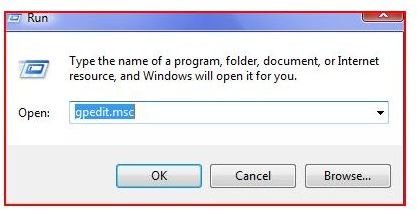
Administrators of a computer can create a lockout policy by going to the run line and typing gpedit.msc or secpol.msc. These two commands are actually snapins that control the group policy or security policy of Microsoft Windows. While Group Policy will control more areas, the security policy editor allows for security on the computer.
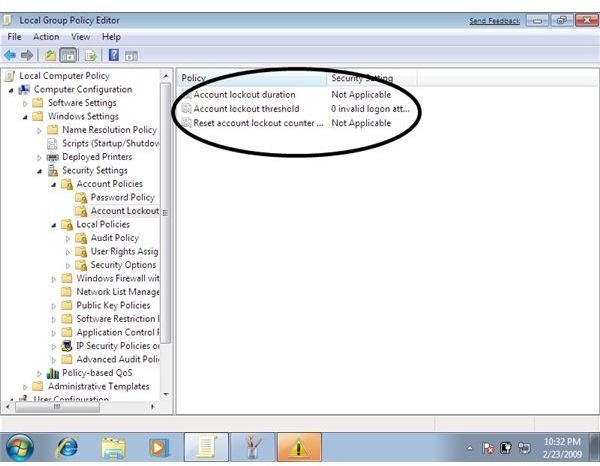
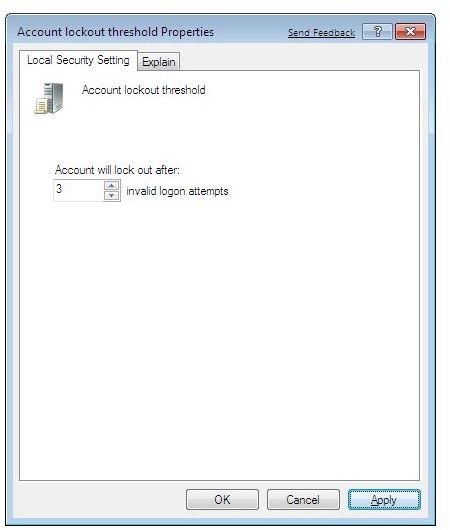
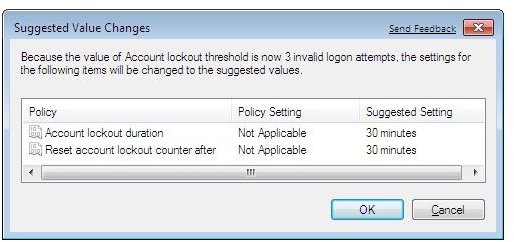
Once inside of either snapin, look under Computer Configuration, Windows Settings, Security Settings, Account Policies and select Account Lockout. Once you find Account Lockout, select this option and look in the right pane. In the right pane, select the center option, Account Lockout Threshold. Double click on this option and move the retries to 3 (three). This will set both the Account Lockout Duration and the Reset Account Lockout Counter to 30 minutes by default. Once set, the user will be disabled and cannot login if the user tries three times. The Resets will occur after 30 minutes (the user can try again after without the administrator). It is important to enable auditing in the same policies in order to see ‘who’ has used the wrong passwords and if they tried after they were locked out.
Note: The three operating systems, Windows XP, Windows Vista and Windows 7 are primarily the same.
Policies
Conclusion
In order to control users, the owner or administrators of computers should set up policies to lock out computers. This prevents unauthorized use of computers and locks out users when users enter the wrong password after a set number of times. Thresholds can be set so that users can try after a period of time. If a user is locked out, the administrator should login under their account and unlock the user by going to the users and unchecking locked out (disabled). In order to protect a computer from misuse in a home or business environment, this is one of the basic ways to put security measures in place.


