Introduction to Local and Wide-area Networks - Part 6
Wide-area Networks and the Internet
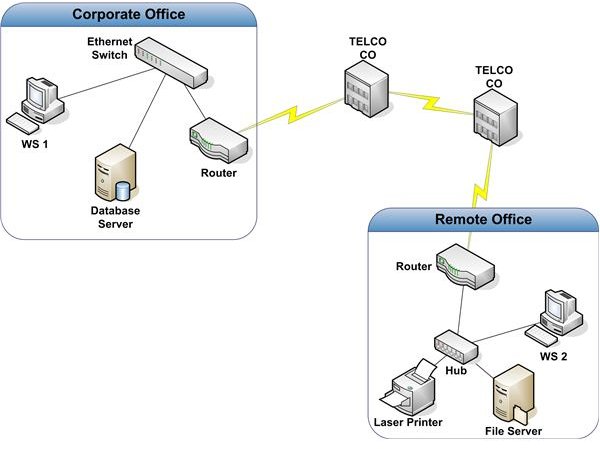
Many organizations have two or more locations that are too far apart for a practical connection via high-speed LAN technology. In these situations, a Wide Area Network (WAN) is used. Figure 1 shows a common configuration used to connect two locations.
In this example, two Ethernet LANs are connected with a T1. A T1, also known as DS-1, is a common data circuit. It supports guaranteed bandwidth of up to 1.544 Mbps. Compare this to the common 100 Mbps bandwidth for LANs. The T1 depicted in Figure 1 is a point-to-point circuit. One end of the T1 is connected to a Telco CO. The other end is connected to a Smart Jack in the remote office. A smart jack is the point at which the Telco terminates the T1 in your building. It’s also the point at which the Telco’s responsibility for support ends. This is known as the Demarc, short for Demarcation Point. Routers are used to connect the two LANs. Although some additional configuration and provisioning may be necessary, the manner in which these routers move packets between the two locations is essentially the same as that used by routers on a LAN.
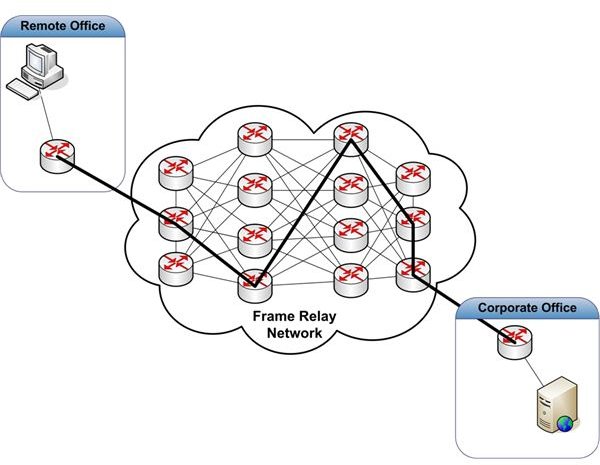
If an organization has a large number of remote locations, point-to-point connections may be far too costly. Other technologies are available to reduce costs in these situations. We’ll discuss two of them - frame relay and IP VPN. Figure 2 depicts a frame relay solution.
A frame relay network allows multiple businesses to share a network of routers and switches to move data between locations. This can result in lower WAN costs when compared to point-to-point T1 connections. To connect two offices, like the one in our example, four components are necessary - a T1 connected to the Corporate Office, a T1 connected to the remote office, a Telco frame relay network, and a Permanent Virtual Circuit (PVC). We’ve already discussed how T1’s are connected to a business office location.
Frame relay networks are common today, although other WAN connectivity methods are often more practical. Any Telco you call will have a solution similar to its competitor. The primary differences will be cost, support, and the effort required to roll the solution out to your facilities.
A PVC is a Private Virtual Circuit that connects two of your locations. To your network, it looks like a point-to-point connection. Other businesses sharing the frame relay network can’t see your data. Your Telco provisions a PVC through router and switch configurations within their frame relay network. The bold path between routers in Figure 2 represents a PVC. The path provisioned may not be the most direct path. One of the objectives of provisioning is to minimize congestion in the network.
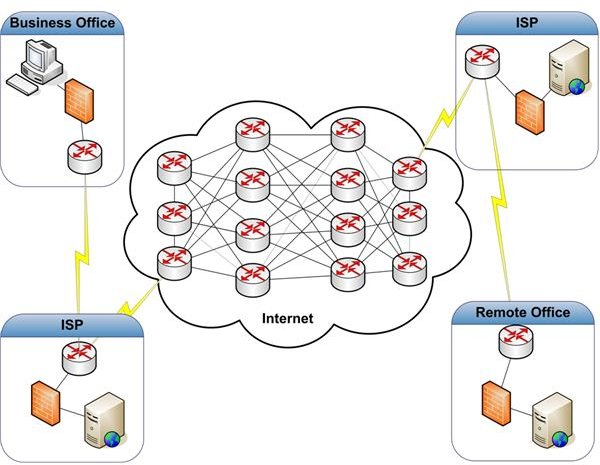
Although frame relay networks were the economical solution for many years, IP VPN is a popular replacement. IP VPN uses the Internet instead of a frame relay network to move data between locations. This results in lower costs. Before we look at IP VPN, we should understand how the Internet works and how a single location connects to the Internet. Figure 3 is a logical representation of the Internet.
The Internet is nothing more than a large web of interconnected routers and switches that move TCP/IP packets from one of the millions of connected devices to another. Unlike a frame relay network, however, no PVC is provisioned. Each packet released to the Internet may travel a different path than the packet sent before or the packet sent after. With basic Internet service, there is little you can do to mitigate the effects of congestion. But the improvements in Internet infrastructure have mitigated performance issues related to traffic patterns to the point where using the Internet is often more cost effective than other forms of WAN connectivity. Newer quality of service technologies, like MPLS, allow subscribers to push critical packets through the Internet at times of high use. This is necessary for services like voice over IP.
Getting connected to the Internet isn’t much different from how you connect your home; it’s just on a larger scale with better service level expectations. Each business location is connected to an Internet Service Provider (ISP). This may be the Telco you use to provide IP VPN services. The ISP is the portal to the Internet. (Although no CO is shown in our example, the circuits from the ISP’s and the business locations still run through one or more CO’s.) This is a pretty straight forward setup. It’s typically much cheaper than point-to-point or frame relay solutions. However, it does have one flaw. The Internet is not inherently secure.
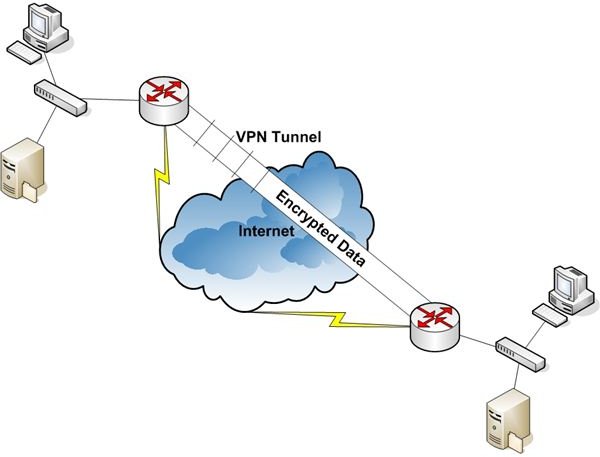
Traffic sent over the Internet can be picked up and read by anyone with access. In general, data is accessible at any hop between the source and destination locations. This isn’t usually a problem if you’re just browsing the Internet, but it can become a big problem if you are moving sensitive business information across the same infrastructure. This is where IP VPN comes in. Figure 4 represents an IP VPN implementation.
A router, firewall, workstation, server, etc. is configured at each location as a VPN endpoint device. Once configured, all packets transferred between these two devices are encrypted. The encrypted data flow creates a virtual tunnel, shown in Figure 4 as the encrypted data pipe. You can use this connection as a private, secure WAN connection.
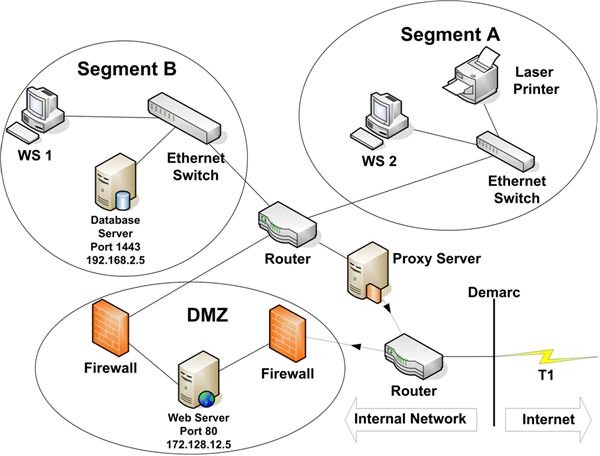
Now, we’ll take a look at two common methods of isolating your critical network resources from the Internet. Figure 5 depicts a business location connected to the Internet via both a proxy server and a DMZ.
A proxy server can serve many purposes. In this article, we’ll take a look at four: packet filtering, network address translation (NAT), performance improvement, and site access control. We’re using the proxy server in this example to block all traffic initiated by systems from outside our network. Only packets sent to devices within our network, that have initiated Internet connections, are allowed to pass.
NAT is a common service that allows an organization to present a small number of IP addresses to the Internet. These public facing addresses usually have nothing in common with the addresses of devices connected to the organization’s LAN or WAN. When a device on the internal network initiates a connection to the Internet, the proxy server maps the device’s private IP address to one of the publicly facing IP addresses. As far as a service on the Internet is concerned, it is communicating with the publicly facing IP address. It can’t see the private IP address of the device with which it’s communicating. This helps protect the organization’s information assets since the outside world doesn’t know the IP addresses of the devices on the internal network.
Proxy servers are not required for NAT. Almost all routers, including those for home or home office, support NAT.
Performance improvement is achieved through caching. When a user on your network accesses a web site, the proxy server can store a copy of the pages she views on its disk. If she or another user attempts to access that site again, the proxy server will check its cache to see if the requested page is stored there. If it is, the proxy server retrieves it and sends it to the requesting user. This is not only faster than pulling it across the Internet, it also helps conserve circuit bandwidth.
Not all web pages can be cached. Pages that are dynamically built upon access, for example, can’t be cached. Pages that can be cached should be refreshed periodically to ensure the content is up to date. Proxy servers can be configured to perform these updates automatically.
Finally, proxy servers can be used to restrict the sites to which an organization’s users are allowed to connect. The capability of most proxy servers to perform this function is rather primitive. You can set up a proxy server to allow access to all web sites except those you enter into a list. The reverse is also true. You can set up the restrictions so your users can access nothing unless it’s in the list. The management of these lists can become overwhelming. It’s a better idea to implement one of the third party products that allow you to restrict Internet access by site category. Each category contains hundreds of sites the vendor has identified. The vendor provides daily updates to the category lists. Management is minimal.
The second way to connect to the Internet shown in Figure 5 is via a DMZ. The abbreviation DMZ is borrowed from the military term Demilitarized Zone. Like a military DMZ, a network DMZ serves as a guarded, fortified zone between the dangers lurking on the Internet and your internal network. These dangers include crackers and malware.
In the example in Figure 5, the DMZ is used strictly to allow external access to certain databases. Many organizations require this kind of access for vendors or customers. Instead of providing direct access from the Internet to production databases, it’s a better idea to provide access only to application/web servers in the DMZ. The servers in the DMZ are then granted restricted access to retrieve or write data to specified databases only. This functionality is provided by firewalls.
A firewall’s primary role is to restrict traffic to only packets that meet certain criteria by using access control lists.
Access control lists are used by firewalls and routers to block all packets except those the business chooses to allow. The most common type of packet filtering uses source and destination IP Addresses and ports specified in the IP datagrams to determine whether to block a packet.
In Figure 5, the external firewall is configured to allow only datagrams with a destination port of 80 and a Destination IP Address of 172.128.12.5 to pass into the DMZ. All other packets are blocked. Port 80 is used by the web application running on the web server in the DMZ. If a user coming in from the Internet opens the application and requests data, the web server will send a packet to the internal firewall with a Destination IP Address of 192.168.2.5 and port 1434. This is the address of the database server that hosts the application’s data. 1434 is the port assigned to Microsoft SQL Server, a database management system on which the database is hosted. The internal firewall checks each packet it receives. In our example, it’s configured with an access list that allows only traffic destined to 192.168.2.5, port 1434, and only if the source IP address matches that of the web server in the DMZ, 172.128.12.5. All other packets are blocked (dropped).
A DMZ is a very powerful tool to harden your network perimeter. In later chapters we’ll see that it’s just one layer in a defense in depth strategy necessary to protect your information assets.
In Part 7, the last in this series, we’ll see how a wireless network might be configured.
See other articles in this series…
Tables and Figures (Hover for caption, click to enlarge)
Key Terms
CO - Central Office. A CO, sometimes called a switching station, serves two functions. First, it is the place where local circuits, both data and voice, are terminated into the Telco’s network. Second, voice and data are transmitted from one CO to another until arriving at their destination. A CO may also serve as the point where voice and data traffic are transferred, or handed off, to another Telco’s network.
Cracker - A cracker is someone who compromises the confidentiality, integrity, or availability of your network for personal profit.
Encryption - Encryption is the use of a key and a special algorithm to convert readable information into a form that is not readable unless you have the key to reverse the encryption process, or decrypt the information. The readable information is called clear text, and encrypted information is called cipher text.
Malware - Malicious Software. Malware includes trojans, viruses, and worms.
Port - A port is an identifier that specifies the application or service that is supposed to receive a transmitted datagram. Some ports are assigned to specific applications. For example, When a web browser communicates with a web server it uses port 80. Email uses port 25. Many ports are unassigned. They can be used by software developers or assigned dynamically by network devices when necessary to establish a session with another device.
Telco - Telephone Company. Telco typically refers to local carriers rather than long distance carriers, although the separation between these two types of voice service providers is rapidly disappearing..
This post is part of the series: Introduction to Local and Wide Area Networks
Understanding how networks work is an important first step in understanding information security. This series provides everything you need to know to get started.
- Introduction to Local and Wide-area Networks - Part 1
- Introduction to Local and Wide-area Networks - Part 2
- Introduction to Local and Wide-area Networks - Part 3
- Introduction to Local and Wide-area Networks - Part 4
- Introduction to Local and Wide-area Networks - Part 5
- Introduction to Local and Wide-area Networks - Part 6
- The Importance of Wireless Connectivity
