Mac OS X PDF Converter: AnyBizSoft PDF Converter. Your PDF Conversion Needs.
System Requirements (5 out of 5)
The system requirements for AnyBizSoft 6-in-1 PDF Converter for Mac are very forgiving so it will run on any modern Mac that has 100MB or more hard disk space free. The official system requirements are:
- Operating System: Mac OS X 10.5 or later
- CPU: Intel (32bit) 512MHz
- Hard Disk: 100MB or more
Installation and Setup (4 out of 5)
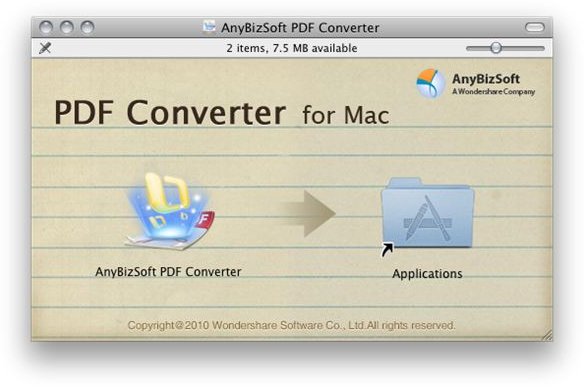
Installing AnyBizSoft 6-in-1 PDF Converter for Mac is as simple as visiting their website to download the image file (8MB), mounting the image file and dragging AnyBizSoft PDF Converter to your applications folder. That’s it, the program is fully installed. After installing the program you will want to adjust the preferences to your liking. To do this launch AnyBizSoft PDF Converter for Mac, access the PDF Converter menu and click Preferences.
The preferences for AnyBizSoft 6-in-1 PDF Converter for Mac are pretty simplistic. You can set your destination folder and a couple settings for each type of conversion and that’s it. As a new user simply setting your destination folder and leaving the other options at their default should work fine so feel free to start using the program and adjust these settings as needed.
User Interface (5 out of 5)
As stated in other articles, I prefer applications designed exclusively for Mac OS X because they tend to integrate themselves much better into Mac OS X. While AnyBizSoft does offer a PDF converter for Microsoft Windows their Mac OS X PDF converter was coded with the Mac platform in mind so fits into your Mac OS X desktop very well.
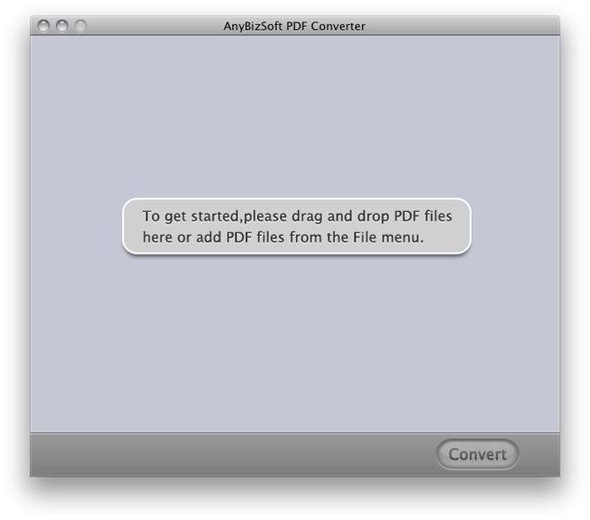
The main AnyBizSoft 6-in-1 PDF Converter for Mac window is simple and efficient. I can drag single or multiple files to this window, in essence queuing them, set the output format and then finally hit Convert to batch convert the files I’ve added. The program does the rest. It doesn’t get much easier than that.
Features and Performance (3 out of 5)
According to the AnyBizSoft 6-in-1 PDF Converter website the official features are:
- Print restricted PDF files
- Resize images of PDF files
- Edit PDF files in Microsoft Office
- Share PDF files on internet easily
- Change contents in any existing PDF files
- Modify typos and misspellings in PDF files
- Calculate and edit data in Microsoft Excel
- Read PDF eBooks on mobile devices, such as iPad, iPhone, iPod touch, Sony reader and more
- Extract the text, images, graphics, tables and hyperlinks for reusing in other applications
In my testing all these features worked well, however there are a few features I would of liked to see included in the program. These missing features are:
- The ability to convert PDF files to an Apple iWork compatible format (for example, if you convert a PDF file to word with this program and then open it with Pages it looks horrible).
- An OCR text layer option to enable the user to scan old documents directly to PDF and make them searchable.
- Selective conversion. I don’t always need to convert the entire PDF file and would like the ability to select, from the PDF file, what I would like converted.
Ease of Use (5 out of 5)
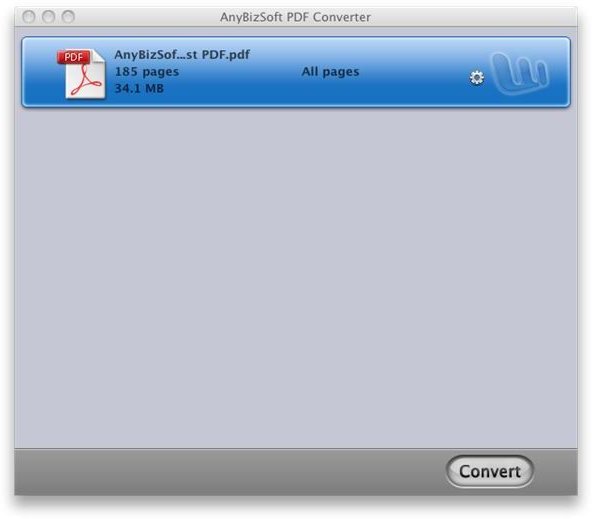
Using the AnyBizSoft Mac OS X PDF Converter is as easy as you get. The team at AnyBizSoft has done a fantastic job of making the user interface as simple and efficient as possible. The program interface supports drag and drop so you can simply drag your files to the AnyBizSoft Mac OS X PDF Converter window to add them to your conversion queue, choose the output format and hit convert. The program does the rest.
Value (3 out of 5)
As I have said in other reviews, if you have frequent occasion to use a software program it tends to pay for itself in no time, and with a price-tag of $69.95 this PDF converter from AnyBizSoft is no different. In my humble opinion though, this program should have a price-tag of no more than $49.99. Here’s why …
- Users need to have more control over the output file
- OCR and scanning directly to PDF are essential for users looking to archive old printed word / PDF files. These are the users who will use the program the most and would pay the $69.95 without issue if it had this option.
- A user that needs to convert PDF files only rarely may shy away from the price-tag.
AnyBizSoft is in the process of doing some heavy promotion for this product offering a 20% discount to Bright Hub readers as well as many cool giveaways on their Facebook page. Act quickly and you could receive this product free or for a fraction of the price.
Overall Rating (3 out of 5)
This program is an excellent occasional use Mac OS X PDF Converter. It is more basic than a program like Solid PDF to Word and therefore better suited, perhaps, for occasional use. I tested each and every feature of this program and it performs flawlessly as advertised. The PDF files I converted to Word and then opened in Word for Mac were perfect. The batch conversion was fast with excellent results.
Take this program as-is, lower the price to $49.99 and it definitely has a place in the PDF conversion market. As a person who occasionally needs to convert a PDF file to Word I would opt to purchase this program over Solid PDF for Word which has a price-tag of $79.95 simply because I do not need the advanced features of Solid PDF to Word. A business user who needs advanced functions like OCR text layers for searching or scan directly to PDF for the archiving of older printed documents will want to pass and go with a product like Solid PDF to Word.
