Need thumbnails of your photos on your Mac? Look no further!
Cocothumbx is freeware for the Mac that creates thumbnails for picture, text and movie files. This is really handy since a lot of picture files on my Mac don’t have thumbnails. If you want to see what picture it is (because you can’t remember the name you gave it) you have to open the file. This not only is time consuming, it is also annoying. But Cocothumbx fixes all that and it does an awesome job.
Download and Installation (4 out of 5)
You can download Cocothumbx from the developer’s website . It is freeware, although you can leave a donation if you want. The application requires your Mac to be running on OS 10.4 or later and have Quicktime v 7.0 installed. If you met those requirements all you have to do is download the file and open it once it mounts on your desktop. For ease of use, you can put it in your Applications folder or your Dock, but neither is required.
Features (5 out of 5)
Cocothumbx can create and remove thumbnails for many kinds of picture and text files. The files it supports are, according to the website :
BMP
TIFF
TARGA
GIF (animated)
PNG
JPG
PICT
EPS
ICNS
JP2
SGI
DOC
RTF
RTFD
HTML
CSS
TXT
QuickTime supported Movies.
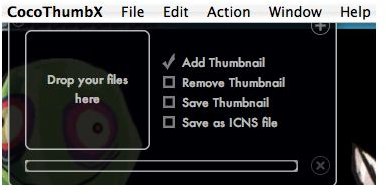
To create or remove a thumbnail all you have to do is drag and drop the files into the window and it will deposit the file back in the place from whence it came. It works quickly and without any problems for me so far. It takes less than a minute (maybe only about 30 seconds or so) to create thumbnails for 200 pictures and that’s not too shabby. There is even a little beep when it is finished.
Cocothumbx also has a large preferences menu that can be manipulated to your heart’s content, although I didn’t find the need to tweak anything.
Usefulness (5 out of 5)
If you have any number of pictures on your Mac you will find this useful. Being able to scan through thumbnails is so much easier than opening each file. Cocothumbx saves time and is fun to use. It is a must have for any Mac user!
Overall (5 out of 5)
I love Cocothumbx. It’s free and it works perfectly. With the large variety of files it handles it is the perfect application for creating or removing thumbnails. I’ve used it on all applicable files on my Mac and it has made my life much easier. Try it for yourself today.


