Protecting Mac Computers from Virus Threats with iAntiVirus Software Review
New Rumors Swirl About Mac Virus Threats
There’s been a lot of trash talk and speculation circulating in recent weeks about Mac OS X’s vulnerability to viral threats. It started with Washington Post Blogger Brian Krebs noting that, due to alleged virus potential, even Apple is telling Mac users to start running antivirus software. It turns out that the Apple Knowledge Base article from which Krebs gathered this information was somewhat out of date, yet even Apple went into spin control mode and the “old” Knowledge Base article disappeared from the Apple Support site. All of this Apple virus talk has spawned more buzz than the recent sighting of Obama with a Microsoft Zune. Blasphemy!
Is Your Mac Safe from Viral Threats?
So the question remains, is your Mac really vulnerable to virus infection? Well, yes and no. Look, as safe and stable as your Mac is, it’s a computer. Computers will always have vulnerabilities. The latest counts reveal somewhere in the neighborhood of 90 known Mac threats. There are thousands of threats to Windows PCs. Still, it seems every couple of weeks a new virus or trojan pops up out of the woodwork with the ability to potentially damage your Mac. However the chances of your machine becoming infected is relatively small – for now.
A New Mac Antivirus Option: iAntiVirus
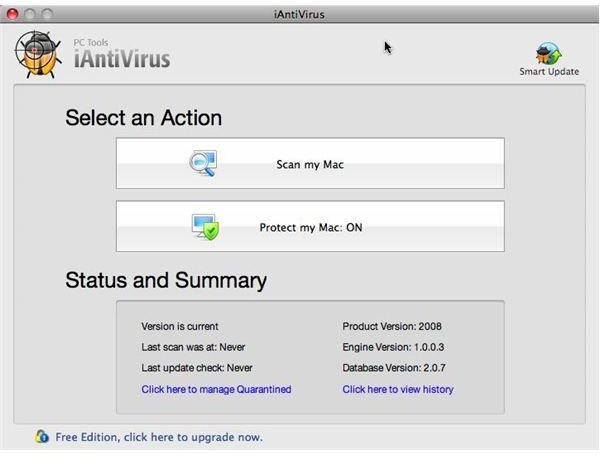
Most Mac antivirus software is primarily concerned with detecting PC and Windows infections and disinfecting your Mac, which has a potential to spread PC infections indirectly to Windows users via email and file transfer. The new iAntiVirus from PCTools takes a different approach. IAntiVirus scans your Mac for viruses, trojans and spy ware that is Macintosh-specific. The software offers real-time protection, places infected files in quarantine, provides smart updates and, when running in the background, has a fairly low resource footprint.
iAntiVirus Offers a Mac-like Antivirus Experience
The iAntiVirus software is a free download for home users available at iantivirus.com. A pro version for business and commercial uses is offered at $29.95 with dedicated support for the software. As I downloaded the installer, I wasn’t sure exactly what to expect from iAntiVirus, considering the fact that the company, PCTools, has a long history of Windows software development under its belt. As it turns out, iAntiVirus for Mac is, well, very Mac-like. The software even comes as a standard Apple package installer. One little caveat: Instead of handing the program with the Apple Installer application, I tried to expand the package. Stuffit Expander wasn’t sure what to make of the .pkg installer. Wrapping the installer in a DMG Disk Image, the standard package for distributing Mac software, circumvents this issue. Once Apple Installer is launched, iAntiVirus is a standard Mac install, simply requiring the user to select the drive and administrator username and password.
iAntiVirus is Easy to Configure and Use
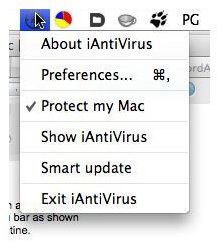
Once installed, iAntiVirus places a menu-bar icon with a simple drop-down menu for configuring the application preferences, turning the application on and off and updating the virus definitions. A quick peek at my MacBook’s Activity Monitor shows that iAntiVirus plays well with system resources. Running the application only requires about 15 megs of physical RAM and uses no discernible system resources.
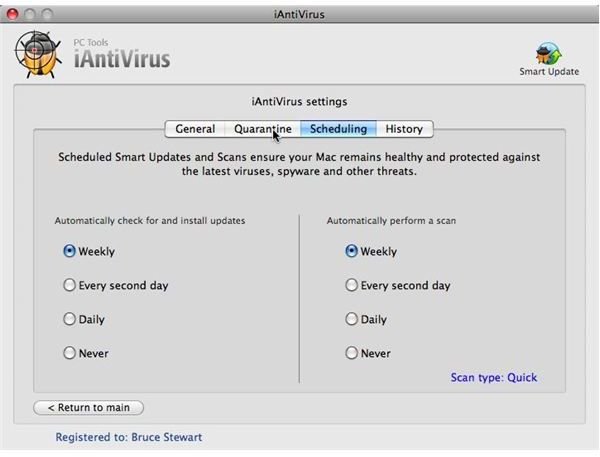
The preferences are pretty straight forward, with scanning mode, options to scan compressed archives, directories to exclude from antivirus scanning and the ability to keep the iAntivVirus icon in the Dock. According to the documentation, files can be dragged and dropped onto the iAntiVirus Dock icon to scan them for potential threats. Unfortunately, I could never get this feature to work. Every attempt to do so brought up a nag-screen telling me iAntiVirus was unable to process the scan until the current scan was completed. Starting or stopping the Protection application didn’t help and no matter what option I tired, scanning or not, I still got this nag screen. Confusing. The iAntiVirus preferences also include a list of quarantined items, a very easily configurable way to schedule scanning and a useful history window. All in all, iAntiVirus is like other Mac software in that it’s very easy to configure.
Scanning and Protecting Your Mac with iAntiVirus
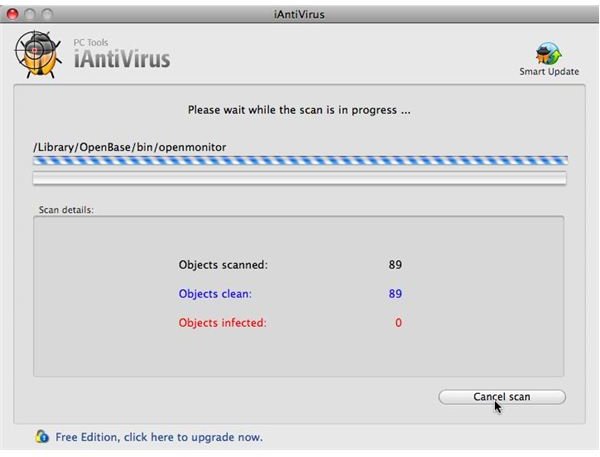
OK, about scanning: I first ran the program’s “Quick Scan” and it was indeed pretty zippy. The Quick Scan appears to scan the local users directory. With the Unix underpinnings of Mac OS X, Quick Scan is probably all the average Mac user will ever need. It’s highly unlikely that any threats could affect the Mac at system level without Admin access. The scan took about half an hour to complete on a 120-gig Mac Book drive. The “Normal Scan” mode scans the Mac’s entire drive, including the system and system library, and took about three hours to complete. With the scheduling available in the iAntiVirus preferences, scheduling your Mac to perform a complete “Normal Scan,” in the middle of the night or on a Sunday morning for example, should be a snap even for novice users. Scanning did chew up quite a bit of the system’s resources. I noted between 25 and 65 percent of the system’s resources were being used by iAntiVirus, making my MacBook seem sluggish at times, but hardly unusable. This is certainly welcome news, as one of the banes of PC antivirus software is that programs will often tax the machine to near un-usability. Of course, the iAntiVirus threat-list database of Mac threats only numbers 88 potential culprits, compared to the thousands of potential vulnerabilities on a Windows-based PC.
iAntiVirus is a Very Polished Antivirus Contender with a Few Rough Spots
All in all, iAntiVirus is a very smooth running and Mac-like application from a company with experience and expertise in the PC antivirus world. It’s fast, doesn’t bog down system resources and is very unobtrusive in the Mac computing experience. So what needs to be fixed? Wrap the .pkg installer in a DMG Disk Image file to make downloading and installation easer. Make drag and drop file scanning easier to configure and work out of the box (I never could get the feature to work). Add an option to scan particular folders for changes. With OS X Leopard, the Mac automatically defaults to downloading all files from the Internet to the Downloads folder. I was surprised that the preferences didn’t include the option to automatically scan that — or any folder – as a download “watch” zone. Still, iAntiVirus is a solid product with very few “gotchas.” In my 20 years as a Mac user, I’ve never had one single virus infection on any of the dozens of machines I’ve owned. I’m going to continue to use iAntiVirus on my MacBook to keep it that way.
iAntiVirus Screen Shots