
Mail is one of the simplest desktop email clients in Mac OS X. And it functions great to handle our day to day email needs. But it has several tricks up its sleeve that may not be obvious to the regular Mail user. This article discusses how to easily quote specific for your email replies.
Highlight And Send
When replying to received emails, Mail’s behavior can be set up to include the previous conversations on your reply mail. There are times when you don’t necessarily need to include them all in your reply. Sometimes just highlighting an important bit of text you want will be sufficient for further discussion.
So for example, let’s say a friend of yours sends you the page contents of a location you both are eyeing for a vacation spot. You get this long email about the geographic location, history, and many other things, and you find something interesting to reply about.
In this case, you don’t need to append the whole entirety of the initial email that was sent to you. On the reading pane, highlight the text you want to discuss further. Once done, click the reply button in mail to compose your reply, and the long email previously sent will not be included, instead, only the highlighted text will be included on your reply.
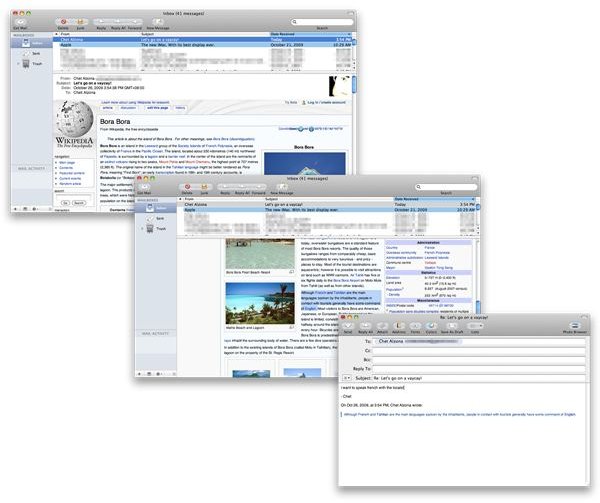
This method helps you weed out all the other information you will no longer be needing as you go ahead and discuss further plans, or points of a meeting, or reiteration of important information that you need to go over.
Works With Graphics Too!
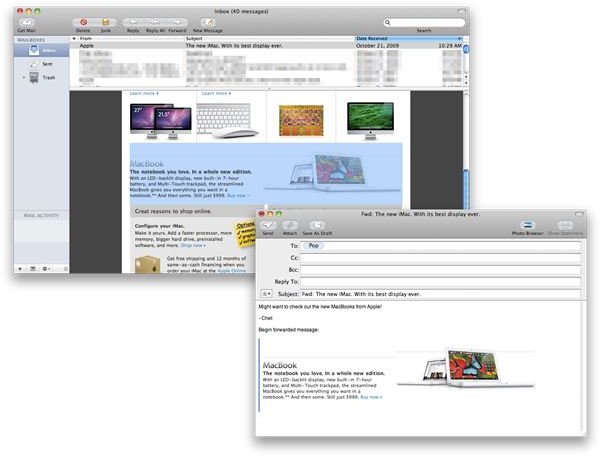
What’s great about the highlight and send feature of Mail is that it can also be used for virtually any element of an email when you are replying or forwarding within Mail. Sometimes, you might receive email newsletters from your favorite stores announcing new stuff, and might want to recommend some of the items in the newsletter to your loved ones.
You can highlight any element from an email and it will be included on your reply or email to forward. All the images, hyperlinks, text formatting, and so on will be included on your reply.
Go Ahead, Mail My Day
This Mail trick is one of the many existing tricks buried in Mail just waiting for you to discover. Make sure to keep your eyes open for new tricks just waiting to be used in Mail. Please feel free to add a trick from your bag in the comments section!
Enjoy!


