I’d like to share just two simple shortcuts that make my day-to-day Mac experience much more enjoyable. The first tip allows you to quickly and easily email the contents of a webpage in Safari. The second tip gives you the ability to quickly view all of your open Applications and then close them.
Easy Shortcut To Email The Content Of A Safari Webpage From Apple Mail
This tip requires that you have an email address setup and working in Apple’s Mail application and can only be used in the Safari web browser.
In the good ol’ days of sending interesting links to a coworker, friend, or family member you would simply cut and paste the URL for the webpage into an email, attach a funny message and you’re done.
One of my favorite shortcuts in Safari is the ability to quickly take any webpage I’m viewing and email the contents of that webpage, links, images and all.
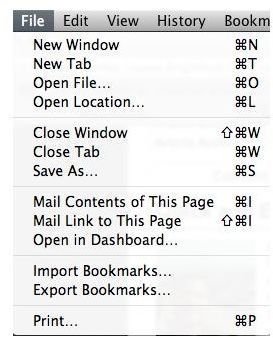
You can do this through the menu by visiting File in Safari’s menu and choosing Mail Contents of This Page. If you are familiar with the Mac OS then you’ll also notice the shortcut keys next to this menu item.
Now It’s Time To See This Keyboard Shortcut In Action
Right now I have www.brighthub.com loaded in my Safari web browser. If you click, in conjunction, command+i you will see Apple Mail launch and the contents of www.brighthub.com in the body of your email message. Now all you have to do is enter an email address and a subject and send off your email.
Quickly View All Of Your Open Applications And Quit Them With A Keyboard Shortcut
If you are like me then you often leave multiple Applications open at the same time. In Mac OS 10.5 an open Application is identified by the blue gem located beneath the Application icon in your Dock. Now of course you could navigate between your Applications by using the mouse to click on each Application, but this article is about becoming a power user.
Another way to quickly navigate between your open Applications is to press, at the same time, command+Tab in the middle of your display you should see a preview of the Applications that are currently running on your system. Not only is this a quick and easy way to navigate between Apps but you can also quit the Application by navigating to the open Application and then pressing command+Q


