Check Your Warranty Online In Apple's Website
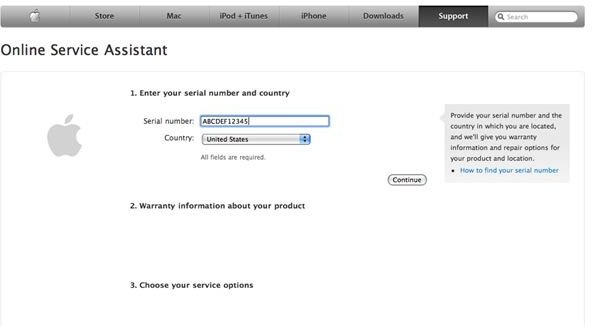
The Online Service Assistance
Simply go to this URL https://selfsolve.apple.com/GetWarranty.do and type in your serial number and select your country. This is Apple’s Online Service Assistant where you can find details about your Mac’s warranty, and if your machine is with Apple for servicing, you can track it here as well.
If you do not know how to find your serial number - it’s easy.
Simply click on the Apple logo on the upper left hand corner of your screen, and select “About This Mac”. A small window will appear and click on “More Info…”. After doing so, a new window with more details will display and at the bottom area of the list you will find your serial number there. This window is the System Profiler, where you can see the technical specifications of various items that are built into your Mac.
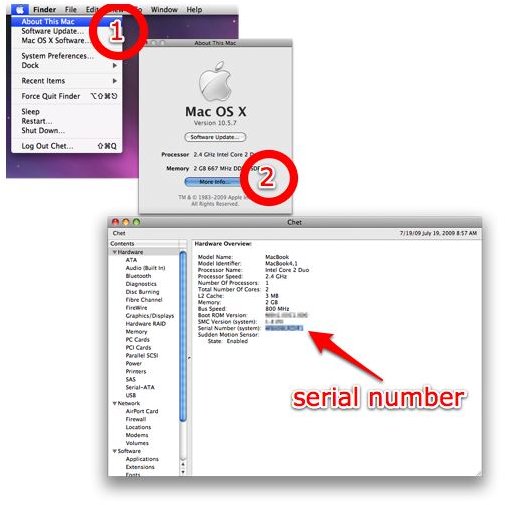
You can copy your serial number to your clipboard from here, and paste it into the form in the Online Service Assistant form. After entering these two fields, you can click continue and find your warranty details.
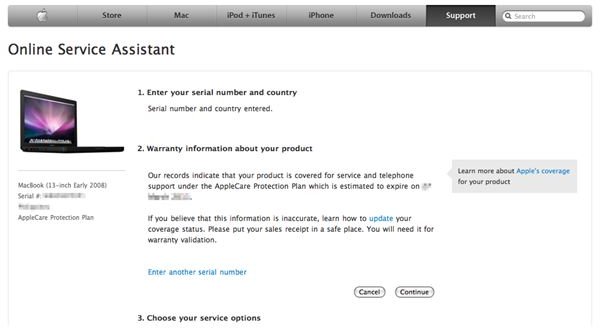
It will be indicated in the resulting page when your warranty expires for the type of machine you have. It will be indicated here if your machine is out of warranty or not.
AppleCare Protection Plan

Most new switchers are not aware that you can purchase an extended AppleCare Protection Plan for your Mac within the standard one year limited warranty. So for example, you bought your Mac on July 19, 2009, your limited one year warranty (that comes free) will last one full year - July 19, 2010. And you can purchase your AppleCare extended warranty just before your limited one year warranty expires.
Therefore, you can put off the purchase of AppleCare the next year so you can further the warranty two more additional years, covering three years of piece of mind in total. Just don’t forget to make the purchase before time runs out. This is a great financial strategy to stretch your expenses so that you won’t have to shelve everything in one store visit when on the day you buy a new Mac.
AppleCare also comes with an exclusive TechTool Deluxe app - a tool that helps you diagnose your machine should anything unusual occur with your hardware.
Stay safe!
