
Name Mangler is an easy to use, click and drag, batch file renaming utility. This utility is very useful for organizing file and folder names in your computer. It is a product of Many Tricks and is distributed as a freeware app for Mac.
Name Mangler for both Files and Folders
There are many batch file renamer utilities available as a free download for the Mac. But most of them are either too complex to use, or are made with poor design. Name Mangler is free, lightweight and comes with the best UI approach – as a batch file renamer that you can understand how it works the very first time you run it.
This app allows you to rename any file or folder you drag into its window by setting a rename method and the filling in the appropriate files on it’s right pane. The check mark on the upper left hand corner allows you to complete the changes and proceed with the batch rename action.
Drag It. Set It. Done.
Name Mangler’s straight forward user interface is simple and easy to use. Just drag the files you want to rename as a batch, set either the Prefix or Suffix of the file name, set the mode of renaming in the upper right hand corner, and hit the check button to process.
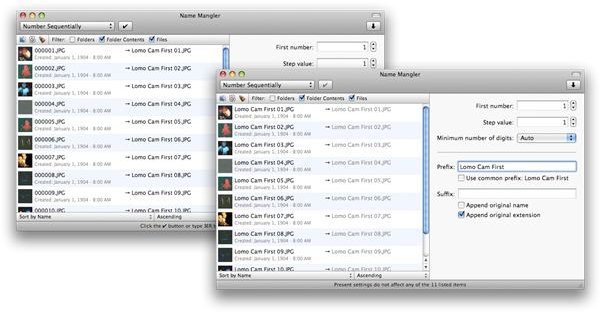
You can set Name Mangler to find and replace certain text among the loaded files, pad a sequential number into the file name, change case, set extension and more advanced renaming features. The batch action will depend on what you select from the drop down located in the upper right hand side of the app’s window. Each option chosen in the drop down will change the parameters on the right pane of the app.
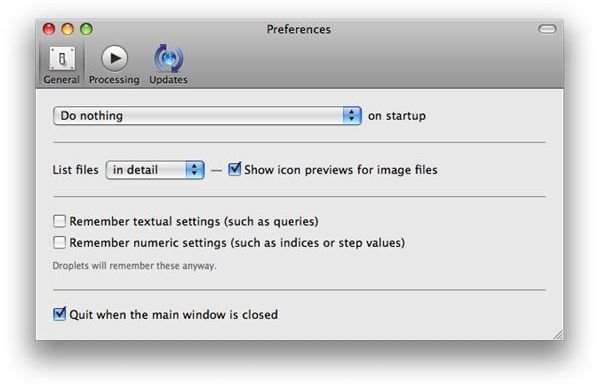
Of course, for any app, there are some pre-set software behavior that you may want to deviate from, and these user preferences may vary from one person to the next. Name Mangler provides a concise and easily configurable app, and you can set its behaviour from its preference pane to make the app behave and work according to your liking.
Fast and Reliable
Name Mangler’s batch renaming capabilities does it’s job smoothly and does exactly what it’s meant to do without a hitch.
This app shines in the file organization department, and makes renaming even hundreds of files on you Mac a breeze with just several clicks. Whenever you need to rename either files or a group of folders, this is the app for you.
The app can be downloaded here free for your enjoyment.


