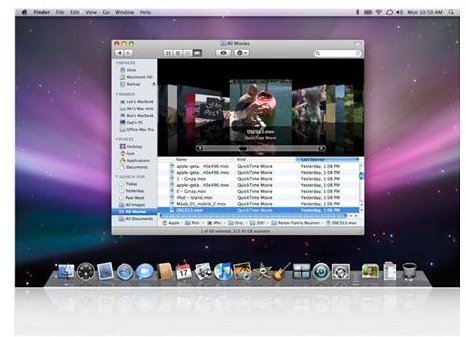
In the third and final part of our series about switching from a PC to a Mac, we look at some of the main differences you’ll notice in using the machines and some important rules to follow to make sure your Mac works without problems.
User Accounts
Windows users are supposed to create separate user accounts for everyday computing rather than use a master Administrator account – but many, if not most, ignore this advice.
With a Mac, it is even more important that you create and run a ‘standard’ level user account. This will prevent you making any serious and even irreversible changes to the system by mistake, particularly when you are still getting used to using a Mac.
As with Windows (or at least Windows used properly), you’ll be able to make most necessary changes from a standard account as you’ll be asked for your administrator password wherever it’s needed.
File Management
The Mac uses a tool named Finder to organize files and you will find it largely similar to Windows Explorer. (The Finder will be particularly familiar if you’ve ever used iTunes.) The main difference is that the close, minimize and expand (similar to maximize) buttons are on the top left rather than right and are red, yellow and green respectively.
There are a couple of important notes to remember about the way the Mac handles folders and files compared with Windows:
- Never move a Mac application to another folder. The Mac system cannot cope as well with Windows when applications are in the wrong place and you may prevent the program from working.
- Be careful not to move one folder on to another with the same name. Doing this will simply wipe over the second folder completely rather than add the first folder’s files. To avoid this, it’s safest to move the files themselves rather than the entire folder.
Navigation
The main search function on a Mac is known as Spotlight and can be launched through an icon on the top right of the screen.
The Mac uses a single menu bar at the top of the screen which changes depending on which program you are using. This can take some time to get used to as you will be expecting each program to have its own menu bar.
When using the standard Apple mouse, holding down Control as you click on an object will usually perform the equivalent action to right-clicking in Windows.
The Mac equivalent of the Windows taskbar is known as the Dock . It appears at the bottom of the screen and has links to major applications plus a display of all the applications you have open. Clicking on the relevant icon will make that the active application and activate the relevant menu at the top of the screen. The Dock also houses the Trash function, which works similarly to the Recycle Bin.
Internet Use
If you aren’t using a third-party browser such as Firefox, you will be using the default Apple browser, Safari . You may need to go into Safari’s Preferences menu to enable the tabbed browsing which you are used to in other browsers.
Internet Explorer is no longer officially available for the Mac and there’s no real need to use it. If you find a site which only works in Internet Explorer, there is a possible way to trick the site which I explain in my article about using Internet Explorer on a Mac .


