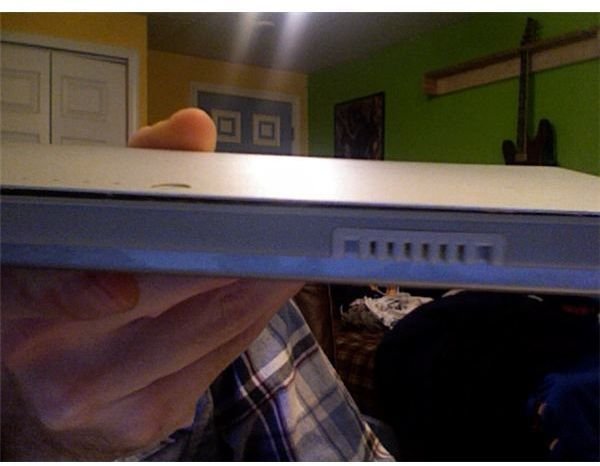
There is a major defect with the Macbook Pro rechargeable batteries that doesn’t come to be noticeable until down the road. Here are some tips to give your battery a longer physical life and prevent it from overheating and breaking the casing.
Just recently, I opened my 17" Macbook Pro laptop to find that the clicker on the track pad was not working. There was no clicking sound and it seemed like it was not going down all the way. I tried cleaning around it to see if maybe something very small had fallen in to the sides, but nothing helped. I then flipped my Macbook over and removed the rechargeable battery that is located in the bottom. What I found was that the slab of metal that covers the top of the battery had come unsealed from the battery itself.
Sadly my Macbook Pro warranty has expired so I have no choice but to purchase a new battery. What I found is that the heat the Macbook puts off causes the glue that seals the casing to melt thus resulting in the top of the casing to rise. This was a result of me rarely closing my Macbook Pro, I normally kept it open and just let the screen saver run. It occurred after about 14 months or so. You may be saying, well that’s a long time, but the fact of the matter is that this is actually the second time it has happened, meaning that there is a defect. Search around the Internet and you will find other owners with the same problem.
I have no choice but to purchase a new battery, however I would like to give you some tips to help prevent your battery from having this happen to it. Below is a list of actions you can take to help prevent the battery from swelling and overheating like mine did:
- Close your Macbook when not in use, this will help minimize the heat and hopefully let your laptop cool down.
- Remove the battery entirely and keep your power cord plugged in, that way the battery is not exposed to heat at all
- Purchase a fan to place underneath your laptop so the fans can cool the laptop while it runs.
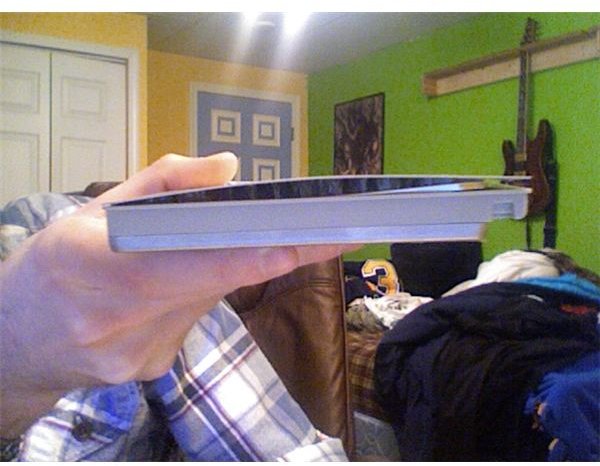
Something I noticed as a side note, once the seal has broken on the battery, colder temperatures can cause it to warp completely, lifting most of the sealing up around the rest of the battery.
So let’s say you are like me, and did not have any time remaining on your warranty, what do you do? Well you really have no choice but to purchase a new one. Most stores that sell Apple computers and laptops will have these rechargeable batteries in stock for about $130. I went to the Apple Store’s online site to read reviews of this battery. I found that a large number of people who purchased it, are having the same problem. The best advice to is to use your power cord as much as possible and keep the battery out of the laptop. The only drawback of doing this is the fact that if your cord gets yanked out, then you lose your current work.
There really is no good solution to this defective battery problem. Apple has not addressed it, even though there are a large number of reviews stating that the battery comes apart.
Since there is no way around this problem with the batteries, you are basically using the battery at your own risk. Some wise things to do, is to check it every once in a while. If you do start to see any sign of the battery rising, then give Apple a call and see what they can do. Hopefully Apple has addressed this issue with the Macbook Air, and will have the problem completely solved when the new Macbook Pro laptops are released. Until then, cross your fingers and be smart when using your battery. If you are using just the power cord, then save very often and make sure it is in a safe spot where it won’t be pulled out. Maybe taping it to the desk will help prevent those accidental yanks. I hope this will help prevent others from having the same issue I did, and maybe pocket them $130.


