T-Pain Vocal Effect in Garage Band: How to Sound Like T-Pain's Voice in GarageBand by Adjusting Tuning, Vocal Refelection, and Compressor Options
How to Adjust Vocal Settings in GarageBand to Sound like the T-Pain
Okay, so maybe you’re not the best singer in the world. However, if you own a Mac and have ever wanted to experiment with using the Garage Band application; then you can adjust the settings so that even you will sound good singing just like T-Pain. The way this is done is by adjusting the tune of your voice.
Make Your Voice Sound Better!
To get started, you are going to want to first launch the Garage Band application. After it appears on your screen, you will want to select ‘Create a New Project’. Type in a file name for your song and click ‘Create’. From here, you will want to click the track button located on the top tool bar, and then click “New Basic Track.”
Now a box with a speaker should appear right below the piano in the main window. Click the plus sign in the bottom left hand corner of the screen. Then, place a checkmark in the box ‘Real Music Instrument Track’ and click ‘Create’. The next step is to click the scissors icon also located on the bottom left portion of the Garage Band window. This will bring up some tuning options.
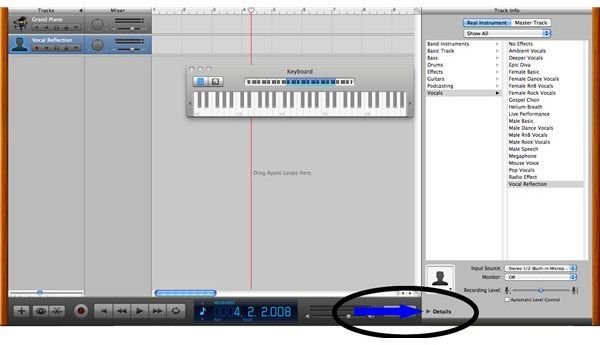
Under the advance tab in the window you just brought up, you will want to find the control for enhanced tuning and slide it all the way to the right. Also, put a checkmark in the limit to key box located directly below the slider. Now you are going to want to go up to the large pane located on the right of the Garage Band window and select Vocals > Vocal Reflection.
Now, in the bottom right corner of the screen you will see a small arrow that looks like a play button with the words ‘Details’; Click it. You should now see a portion of the pop up box that says ‘Compressor’. Uncheck this box to turn the compressor off. Finally, click the pencil next to the track echo field and slide the slider under echo time closer to the short end of the scale.
Click ‘Save Instrument’ in the lower right hand corner of the screen. To test this out click the record button and sing a couple of lines. When you are done singing, click the stop button and drag the slider back to the beginning of the scale. Now press play.
You’re Done!
There you have it. Now you can sound just like T-Pain. Well, maybe with Garage Band and a couple of singing lessons.
Learn how to create ringtones using Garage Band!
